RESOLVE FX · PROCEDURAL CAMERA MOTION · STUDIO
Camera Shake.
Design motion in layers.
Do not hide cadence problems with amplitude.
Camera Shake generates procedural horizontal/vertical position, rotation, and zoom. The useful mental model is not “shake amount” but a stack: global amplitude/speed, independent PTR axes, a separate Zoom branch, temporal waveform/randomness/pauses, then blanking protection and final Blend. Resolve 21.1 lists the effect as Studio Version Only.
Pan · Tilt · Rotation · Zoom
Method · Randomness · Pauses
Border · Crop · Blend
Use the lab to separate amplitude from cadence. Switch from SINE to Square Wave, push Randomness Speed, change Zoom Type, then leave Border Type on Black and watch the conceptual crop requirement. The point is diagnosis, not emulating Resolve internals.
Independent teaching model only. It visualizes relationships between amplitude, cadence, axis balance, zoom direction, randomness, pauses, edge pressure, crop, and Blend. It does not reproduce Resolve Camera Shake timing, random generator, transform order, shutter integration, border sampling, or OFX pixel math.
4 actual Resolve captures + independent procedural-motion teaching model
21 CONTROLS · STUDIO · SPATIAL / TEMPORAL01AMPLITUDE → AXES → CADENCE → EDGES
A convincing shake is a controlled system, not a pile of random sliders.
Build one responsibility at a time. If the result fails, you should be able to say whether the problem is amplitude, axis balance, cadence, zoom behavior, motion blur, or exposed edges.
Camera Shake is four layers of motion, not one “shake amount.”
Motion Scale and Speed Scale define the global envelope, Pan/Tilt/Rotation form a separate PTR branch, Zoom has its own Amplitude/Speed/Direction, and Shake Quality changes temporal shape and irregularity. If every layer is changed at once, it becomes impossible to know which layer made the motion mechanical, too fast, or too obvious.
Cadence usually breaks realism before amplitude does.
SINE produces predictable periodicity, the rectified variants reshape it, and Square Wave introduces intentional steps. Randomness Scale/Speed, pauses, and Random Seed then break perfect repetition. For handheld work, small independent axes plus controlled irregularity are usually more useful than simply raising Motion Scale until the shake becomes obvious.
Blanking is the geometric cost of the effect; do not fix it blindly.
Pan, Tilt, Rotation, and outward zoom can expose areas outside the source image. Border Type chooses the fill strategy, while Zoom to Crop provides overscan at the cost of field of view. The correct workflow is to inspect the full shot and maximum excursions instead of immediately applying a large crop; otherwise the edge problem disappears while composition is sacrificed more than necessary.
Resolve 21.1 manual boundary: Camera Shake is Studio-only and generates random camera motion in horizontal/vertical position, rotation, and zoom, with controls ranging from slow drift to abrupt jerks and pops.
02REAL RESOLVE 21.1 CONTROL MAP
Twenty-one controls across five responsibilities — and only four real captures in the current archive.
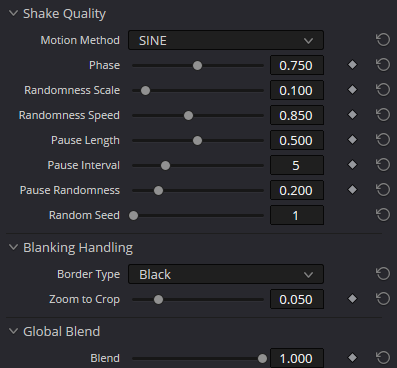
The screenshot viewer never fabricates the missing upper Inspector. Main Controls and Shake Levels are documented from the current manual; the available captures verify Motion Method, Zoom Type, Shake Quality, Blanking Handling, and Global Blend.
AA · Main Controls
Set the global energy and tempo first.
- Motion Scale
Master multiplier for the overall Camera Shake amplitude. It scales the generated procedural motion as one envelope and is useful for keyframed entrances/exits without rebuilding every axis.
VERIFYFor shake fade-ins/fade-outs, animate Motion Scale first. Speed Scale changes cadence; it is not equivalent to an amplitude fade.
- Speed Scale
Master multiplier for procedural motion speed. It changes the temporal cadence of the whole system rather than only PTR Speed or Zoom Speed individually.
VERIFYIf the effect feels nervous, separate a speed problem from a waveform/randomness problem: an overly fast SINE and high Randomness Speed produce different kinds of jerkiness.
- Motion Blur
Adds simulated motion blur to the synthetically moved image. The manual notes that it is more visible on faster motion and simulates part of a motion-picture shutter response.
VERIFYTune it after cadence and amplitudes. Motion Blur can soften abrupt motion, but it does not turn an inappropriate Square Wave or excessive Rotation into natural handheld.
BB · Shake Levels
PTR and Zoom are two independent motion branches.
- Pan Amplitude
Amplitude of horizontal displacement. Together with Tilt and Rotation it defines the spatial character of the PTR branch.
VERIFYDo not automatically match Pan and Tilt. Real handheld motion is often axis-asymmetric depending on focal length, camera mass, and operator action.
- Tilt Amplitude
Amplitude of vertical displacement; Blackmagic describes it as fully independent from Pan.
VERIFYVertical shake often reads more strongly on horizons and architecture. Judge the shot, not the numeric symmetry with Pan.
- Rotation Amplitude
Adds angular motion to the frame around the effect geometry. Small values become visible quickly on straight lines and titles.
VERIFYRotation is one of the fastest ways to reveal procedural shake. For natural handheld, start low and increase only when the reference shot justifies it.
- PTR Speed
Speed of the Pan/Tilt/Rotation branch. It sits under the global Speed Scale and does not control the separate zoom branch.
VERIFYIf PTR and Zoom seem to breathe in lockstep, separate PTR Speed and Zoom Speed before adding more Randomness.
- Zoom Amplitude
Amplitude of procedural scale change. Unlike Zoom to Crop, this is visible motion rather than blanking protection.
VERIFYDo not confuse it with protective crop. Zoom Amplitude creates motion; Zoom to Crop spends field of view to hide edges created by that motion and PTR.
- Zoom Speed
Speed of the separate zoom branch. It lets scale breathe slower or faster independently of PTR Speed.
VERIFYFast zoom often reads as digital pumping even when the PTR shake is convincing. For handheld work, keep zoom small or zero unless the reference needs it.
- Zoom Type
Constrains direction to Outward Only, Inward Only, or Outward and Inward. The manual specifically notes that Inward Only avoids blanking caused by the zoom branch itself.
VERIFYThis does not remove edge risk from Pan/Tilt/Rotation. Even Inward Only requires full-shot review when PTR amplitudes are significant.
CC · Shake Quality
Waveform, phase, randomness, pauses, and seed define cadence.
- Motion Method
Selects SINE, Rectified SINE, Rectified SINE (invert), or Square Wave. This is the base temporal shape before controlled randomness is added.
VERIFYSquare Wave is useful for popping/flickering-style motion but easily looks artificial when used to imitate handheld.
- Phase
Offsets the starting point of the procedural waveform relative to the selected Motion Method and amplitudes. It is not another intensity control.
VERIFYPhase is useful for aligning a specific motion beat, but changing it shifts temporal alignment and requires rechecking the whole section.
- Randomness Scale
Adds irregularity to horizontal, vertical, and rotational motion. Higher values push the procedural base farther away from a perfectly repeating pattern.
VERIFYRandomness does not replace deliberate Pan/Tilt/Rotation balance. Build the axis character first, then break periodicity.
- Randomness Speed
Controls the temporal character of irregularity: lower values are smoothly erratic, higher values become more jagged.
VERIFYVery high Randomness Speed combined with strong Randomness Scale quickly turns handheld motion into vibration/jitter.
- Pause Length
One of the pause controls that breaks motion with intermittent stops. The manual describes the pair as controlling the frequency/duration structure of those pauses.
VERIFYJudge it in motion: a still frame cannot tell whether a pause feels organic or like a technical freeze.
- Pause Interval
Works with Pause Length to define the cadence of interruptions in procedural motion.
VERIFYAn overly regular interval becomes a visible pattern. For natural motion, add Pause Randomness only after the base cadence is sensible.
- Pause Randomness
Adds randomness to pause intervals, reducing a metronomic feel.
VERIFYDo not add pauses by default: continuous handheld and impact shake can require very different temporal behavior.
- Random Seed
Changes the specific random-value sequence. The same seed with the same settings produces a reproducible random realization.
VERIFYSeed is useful for auditioning variants, but it does not fix a wrong amplitude/speed range. Build the character first, then choose the realization.
DD · Blanking Handling
Fill the edges or create the minimum overscan deliberately.
- Border Type
Defines how empty areas are filled when the transform leaves the source frame: Black, Replicate, Reflect, or Wrap-Around.
VERIFYReplicate/Reflect can hide a black wedge but may create their own obvious artefact on faces, text, geometry, or frame edges. Inspect actual maximum excursions.
- Zoom to Crop
Protective scale-up intended to crop away blanking introduced by Camera Shake. It is not part of the zoom motion and does not mean “more shake.”
VERIFYUse the minimum value that actually protects the shot. Excessive Zoom to Crop wastes field of view and can reduce perceived image quality for no benefit.
EE · Global Blend
Blend is final integration, not a way to hide bad cadence.
- Global Blend → Blend
Mixes the final Camera Shake result with the original. It is useful for final integration and extremity checks after the motion itself is already designed correctly.
VERIFYIf partial Blend is required because the motion feels synthetic, fix Motion Method, amplitudes, speeds, and randomness first. Mixing does not repair a wrong motion model.
03SPATIAL OWNERSHIP + TEMPORAL INTENT
Place Camera Shake where frame geometry is allowed to change — then design cadence and blanking around that decision.
Switch the graph between continuous handheld and a keyframed impact. The first is about controlled ongoing cadence; the second is about a Motion Scale envelope that returns cleanly to zero.
Build asymmetric Pan/Tilt/Rotation
Use Motion Scale as the envelope, separate Pan/Tilt, keep Rotation restrained, and tune PTR Speed before adding extra randomness.
The graph shows decision order, not mandatory node count. Camera Shake is a spatial/temporal operation: define where geometry changes, design cadence, solve blanking, then verify downstream alignment and playback.
04BUILD IT IN RESOLVE
Four exercises cover subtle handheld, impact, vibration, and the blanking stress-test.
These are method exercises, not universal presets. Lens, framing, stabilization, subject motion, and delivery crop all change what “natural” means.
Subtle handheld: asymmetric axes, low Rotation, restrained randomness
Add barely perceptible life to a static or overly perfect shot without a digital preset feel.
PrepareA dedicated Camera Shake stage late in the spatial pipeline; a real handheld reference with a similar focal length.
- 01
Start with low Motion Scale and moderate Speed Scale; keep Motion Blur low initially.
- 02
Make Pan/Tilt asymmetric, keep Rotation much lower, and keep Zoom Amplitude minimal or zero.
- 03
Choose SINE, then add a small Randomness Scale at a relatively low Randomness Speed.
- 04
Review edges across the full shot, set the minimum required Zoom to Crop, and only then finalize Motion Blur/Blend.
The motion reads in playback without looking like a repeating template or sacrificing composition to unnecessary crop.
Impact shake: a short hit without endless shaking
Create a localized hit/landing/collision and return the frame to a calm state.
PrepareKeyframes are available on Motion Scale; the timeline sound/event is the temporal reference.
- 01
Design the hit in a short range around the event using PTR amplitudes, restrained Rotation, and optional Zoom.
- 02
Animate Motion Scale from 0 to the required level and back to 0; do not try to fade the effect using Speed Scale alone.
- 03
For a popping-style hit, audition Square Wave but compare it with SINE/Rectified so you do not create a digital step without intent.
- 04
Review several frames before and after the stop and inspect motion blur/edges at maximum excursion.
The shake exists only where needed, the amplitude envelope fades rather than the waveform speed, and there is no obvious reset.
Mechanical vibration: fast PTR without unnecessary zoom
Suggest motor/vehicle/rig vibration without turning the shot into a large handheld swing.
PrepareA shot with rigid geometry and some edge safety; playback at the real frame rate.
- 01
Reduce Pan/Tilt amplitudes, raise PTR Speed, and optionally raise Randomness Speed.
- 02
Keep Rotation very small and usually keep Zoom Amplitude near zero.
- 03
Compare SINE with Square Wave; use the latter only when deliberately hard mechanical/popping motion is desired.
- 04
Tune Motion Blur to the actual speed; too much smear makes small vibration look like defocus.
The result is high-frequency micro-motion without large spatial excursions or unnecessary digital zoom.
Blanking stress-test: find the minimum Zoom to Crop
Eliminate edge risk with minimal field-of-view loss and no hidden Border Type artefacts.
PrepareThe most aggressive part of the shot, Border Type initially set to Black, Viewer focused on frame edges.
- 01
Keep Black so blanking is visible honestly in every direction and at rotation peaks.
- 02
Increase Zoom to Crop only until black wedges disappear across the entire shot.
- 03
Compare Replicate and Reflect if you want less crop, but look for repeated edges, mirrored geometry, and faces.
- 04
Use Wrap-Around only when cyclic edge wrapping is genuinely acceptable for the image.
The composition loses only the field of view that is actually necessary, and edge fill does not create a more obvious artefact than the original blanking.
05PROCEDURAL MOTION IS NOT TRACKING
Choose Camera Shake when you need generated motion; choose tracking or keyframes when the movement must be measured or exact.
| Tool | What it owns | Use it when |
|---|---|---|
| Camera Shake | Procedural Pan/Tilt/Rotation/Zoom with waveform, randomness, pauses, blanking handling, and Blend. | When you need to generate shake/handheld/impact without analyzing existing motion. |
| Match Move / Tracker | Measures real object/frame motion and transfers transform/composite based on track data. | When motion must follow a specific object or actual camera rather than be procedural. |
| Film Look Creator · Gate Weave | Gate Weave is simplified film-mechanical micro-motion inside a broader film-look effect. | When the task is film gate/weave inside a broader film-emulation look rather than general camera shake. |
| Transform / keyframes | Deterministic manually authored position/rotation/scale keyframes. | When motion must hit exact beats and does not need procedural randomness. |
06SYMPTOM → CAUSE → FIX
Most failures are cadence, edge pressure, or spatial ownership problems — not a lack of more shake.
01Handheld looks like a perfectly repeating sine wave.+
First make Pan/Tilt/Rotation asymmetric, then add modest Randomness Scale at low/moderate Randomness Speed. Use pauses only when the reference actually contains stops.
02Black wedges appear at the edges.+
Set Border Type to Black for diagnosis, find the maximum excursion, then use the minimum Zoom to Crop. If using Replicate/Reflect, inspect their own artefacts; Inward Only removes blanking only from the zoom branch, not PTR.
03The motion is too nervous and digital.+
Separate the cause: lower Speed Scale/PTR Speed if the whole motion is too fast; lower Randomness Speed if only the irregularity is too jagged; leave Square Wave if the step behavior is not artistically required.
04The shake fades strangely or seems to accelerate before stopping.+
For an amplitude fade, animate Motion Scale toward 0. Speed Scale changes temporal rate and is therefore not the right primary control for fading the shake out.
05Zoom looks like digital pumping.+
Lower Zoom Amplitude/Zoom Speed or disable the zoom branch. Handheld motion does not require obvious scale change; PTR and Zoom are independent.
06A tracked Window, title, or graphic slips after Camera Shake.+
Check spatial ownership. Camera Shake changes frame geometry; a downstream operation calculated in another geometry can stop matching. Procedural shake often belongs after tracking/compositing, followed by a separate edge review.
07Motion Blur makes the image soft but the shake still feels unnatural.+
Motion Blur integrates motion; it does not generate good cadence. Fix Motion Method, axis amplitudes, speeds, and randomness first, then tune blur for the actual speed.
Playback at the real frame rate
Camera Shake is temporal. Still frames cannot reveal cadence, pauses, jagged randomness, or the quality of a keyframed impact stop.
Edges at maximum excursion
Inspect frame corners at peak Pan/Tilt/Rotation/Outward Zoom. Approve border fill and crop against the worst frame, not a random playhead position.
Downstream spatial alignment
After the procedural transform, recheck tracked windows, overlays, titles, composites, and any stage that assumes specific frame geometry.
07BEFORE YOU DELIVER
Approve motion in playback, blanking at peak excursion, and every downstream spatial dependency.
A clean still image is not enough. Camera Shake has to survive time, edges, tracking/compositing, and the final crop.
08FAQ
The distinctions that keep procedural shake controllable instead of arbitrary.
Is Camera Shake available in the free version of Resolve?
The current Resolve 21.1 manual marks Camera Shake as Studio Version Only. Production guidance should therefore assume DaVinci Resolve Studio.
What is the difference between Motion Scale and Speed Scale?
Motion Scale controls overall motion amplitude; Speed Scale controls overall speed/cadence. To fade shake in or out, keyframe Motion Scale rather than slowing the waveform with Speed Scale.
Does PTR Speed control Zoom?
No. PTR Speed belongs to Pan/Tilt/Rotation. Zoom has its own Zoom Amplitude and Zoom Speed, so its temporal behavior can be tuned independently.
Which Motion Method is the most “realistic”?
There is no universal answer, but SINE provides a smoother base that is easier to organicize with controlled randomness. The manual explicitly associates Square Wave with popping/flickering motion, so it is intentionally stepped. Realism depends on the whole combination of axes, cadence, randomness, and reference.
Why is Inward Only safer at the edges?
Because the zoom branch only moves toward a larger scale and does not expose space outside the frame. Pan/Tilt/Rotation can still create blanking, so edge checking remains mandatory.
What is better: Zoom to Crop or Reflect/Replicate?
They are different compromises. Zoom to Crop loses field of view but keeps natural pixels inside the enlarged frame; Reflect/Replicate preserve field of view but synthesize/repeat the edge and can reveal themselves on recognizable geometry. Choose based on the shot’s worst-case frames.
Does Random Seed change the character or just the realization?
Seed changes the specific random-value sequence, giving another reproducible realization with the same primary settings. Character comes from amplitudes, speeds, Motion Method, randomness amount/speed, and pauses; choose Seed after those are designed.
Can Camera Shake be used before tracking?
Technically yes, but that changes the geometry the tracker sees. If tracking/compositing already exists in the original geometry, procedural shake is usually safer later. The key is to define spatial ownership once and avoid downstream elements living in a different coordinate state.
Sources and verification boundaries
Visible dropdown/state names were checked against the four actual Resolve captures in the project archive. Main Controls, Shake Levels, and behavior descriptions were cross-checked against the current Resolve 21.1 manual. The interactive path is deliberately a teaching model and does not reproduce proprietary OFX timing, randomness, transform order, shutter simulation, border sampling, or rendered pixels.
This web pass does not claim live Resolve-render certification. Final acceptance belongs to the installed Resolve build, the real shot, real-time playback, and the rendered delivery file.