RESOLVE FX · LIGHT · OPTICAL CAUSALITY
Lens Flare.
Do not decorate the frame.
Build one believable virtual lens.
Lens Flare is easiest to control as a causal optical pipeline: identify the emitter, place it in screen space, define macro lens geometry, refine aperture and elements, then integrate the finished system with the shot. Presets accelerate the start; they do not replace source and geometry decisions.
Preset + emitter
Center + aperture
Composite + Blend
First toggle Flare Alone. If the optical structure looks wrong there, Final Result and Global Blend cannot fix the cause.
Teaching approximation, not Blackmagic OFX. Emitter detection, ghosts, streaks, aperture response, anamorphic geometry and compositing are deliberately simplified; slider values do not claim Resolve parameter ranges. Use the lab to learn causal order, then judge the real Lens Flare in Resolve on moving footage.
Five native Inspector captures + an independent optical teaching approximation.
Emitter · Lens · Elements · Mix01CAUSE BEFORE ARTIFACT
A believable flare is one emitter passing through one coherent virtual lens.
This mental model prevents the common preset-stack failure. Source and placement establish causality; Global Corrections and Aperture establish the lens; Elements create local optical detail; Composite Type and Global Blend only decide presentation.
1. Emitter first
Lens Flare becomes convincing not because it contains many artifacts, but because the viewer understands where they physically originate. Start with Position or Light Source Masking, verify Preview Source Spot, and only then increase scale, brightness or optical detail.
2. One virtual lens
Global Scaling, Anamorphism, Lens Center Position, Defocus and Aperture should describe one coherent optical system. If every control is treated as an unrelated special effect, ghosts, glare and streaks stop reading as consequences of the same lens.
3. Integrate last
Composite Type and Global Blend determine how an already-designed flare enters the image. They should not conceal a bad source mask, incorrect center or excessive Full-Screen Glare. Repair the structure first, then choose blend behavior and final amount.
Current product reference: Blackmagic · DaVinci Resolve 21 New Features Guide ↗
02THE ACTUAL RESOLVE 21 PANEL
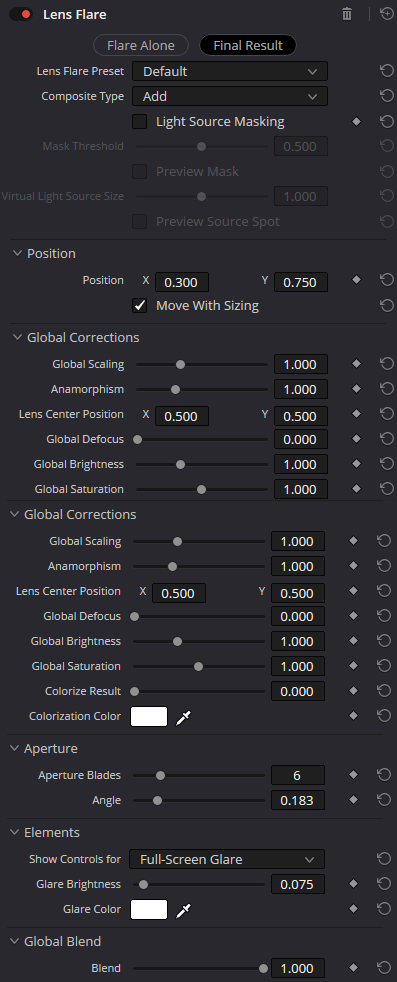
Five native captures anchor every control group and menu used in this guide.
Visible values document one Inspector state—not recommendations or declared parameter limits. The panel itself is the evidence for current labels and menu options.
01 · SOURCE + PRESET
Choose the optical family and believable emitter first
- Flare Alone / Final Result
Two diagnostic views: Flare Alone isolates the generated flare, while Final Result restores the source image and composite context. Shape is easier to tune in isolation; plausibility must be judged in the final shot.
CheckDo not confuse the view with processing: it helps diagnosis but does not repair source or optics.
- Lens Flare Preset
Preset establishes the starting optical family. The native menu confirms Default, Blank, MIR-I 2.8/37, Late Afternoon, Headlight, 1970s Sci-Fi, Modern Sci-Fi, Anamorphic Handycam and Custom. Pick the nearest character, then move to source and geometry.
CheckOnce Position, Anamorphism and Elements are heavily customized, changing presets can destroy the balance you built.
- Light Source Masking · Mask Threshold · Preview Mask · Virtual Light Source Size · Preview Source Spot
Light Source Masking ties the flare to a luminance source in the shot; Mask Threshold separates the emitter from merely bright detail; Preview Mask and Preview Source Spot are diagnostic checks; Virtual Light Source Size changes the perceived emitter size. This is source selection, not brightness polish.
CheckIf the mask catches clouds, skin or a white wall, fix threshold/source spot before reducing Global Blend.
02 · POSITION
Place the source before shaping the lens
- Position X / Y
Position sets the screen-space point of the virtual source from which the flare pattern is constructed. Even a good preset looks pasted on when its center does not match the visible or implied light source.
CheckOn a moving shot, validate position across several frames rather than only on the hero frame.
- Move With Sizing
Move With Sizing determines whether position follows downstream sizing/reframing. In a normal pipeline it helps the flare remain attached after scale or framing changes.
CheckIf the flare drifts after a resize, check this option before rebuilding Position keyframes manually.
03 · GLOBAL CORRECTIONS
Define macro lens geometry before individual elements
- Global Scaling · Anamorphism
Global Scaling changes the overall spatial scale of the flare; Anamorphism stretches its character toward anamorphic geometry. These are macro controls used to establish size and aspect before fine-tuning individual ghosts or glare.
CheckDo not compensate for excessive Scaling only by lowering Brightness—the footprint will still be wrong.
- Lens Center Position X / Y · Global Defocus
Lens Center Position defines the virtual lens center around which internal flare elements are arranged. Global Defocus softens or tightens them. These are separate decisions: center changes geometric relationships; defocus changes edge and clarity character.
CheckIf ghosts sit on the wrong axis, correct Lens Center before touching Defocus.
- Global Brightness · Global Saturation · Colorize Result · Colorization Color
Global Brightness and Global Saturation control the energy and chroma of the assembled flare system. Colorize Result with Colorization Color can tint the system as a whole. It is efficient for global palette matching but can flatten natural spectral differences between elements.
CheckFor a naturalistic look, preserve color variation between elements and use global Colorize sparingly.
04 · APERTURE + ELEMENTS
Aperture sets the iris signature; Elements set local flare balance
- Aperture Blades · Angle
Aperture Blades controls the polygonality of the virtual iris and Angle rotates it. More blades approach a rounder shape; fewer blades create a stronger polygonal signature. Rotation is especially visible in structured star or ghost elements.
CheckDo not change blade count only because it looks prettier; the shape should support the implied lens and preset.
- Show Controls for · Full-Screen Glare · Glare Brightness · Glare Color
Show Controls for selects a specific flare component. The native capture is set to Full-Screen Glare, exposing Glare Brightness and Glare Color. Elements are for local correction of optical layers without rebuilding the overall geometry and position.
CheckIf one glare dominates, reduce that element before lowering Global Brightness.
05 · COMPOSITE + FINAL MIX
Composite Type defines interaction; Global Blend defines final amount
- Composite Type
The native menu shows Normal, Add, Subtract, Difference, Multiply, Screen, Overlay, Hard Light, Softlight and Darken. Add and Screen are common light-compositing choices, while the others enable more graphic styling. The mode changes contrast/exposure interaction, not just opacity.
CheckCompare Add and Screen in bright regions; the wrong mode quickly makes a flare feel digitally pasted on.
- Global Blend · Blend
Global Blend is the final control for the entire Resolve FX instance. Use it after source, position, optical geometry and element balance are correct. It reduces or restores the finished effect as a whole and should not replace upstream diagnosis.
CheckIf Blend must stay extremely low, inspect Global Brightness, the glare element and source mask—the real problem may be upstream.
03PRESET IS A START, SOURCE IS THE CAUSE
Choose the family quickly; validate the emitter slowly.
The nine visible presets change the starting character, but source masking and placement determine whether the flare belongs to the shot.
Preset
Default · Blank · MIR-I · Sci-FiStart from the nearest optical family instead of rebuilding every element from zero.
Treat preset values as a starting state, not a target.
Source mask
Threshold · Preview MaskUse masking when the flare should be causally tied to bright content in the shot.
Remove false emitters before styling optics.
Manual source
Position · Source SpotUse manual placement for off-screen lights, graphic work or shots where a luminance mask is unstable.
Track/animate the cause, not the whole pattern by eye.
Composite
Add · Screen · othersChoose interaction only after source and optics are plausible.
Judge it in Final Result, not Flare Alone.
04ONE COHERENT VIRTUAL LENS
Macro geometry first, local flare elements second.
Scaling, anamorphism, lens center and defocus establish the optical system. Aperture and Elements refine its signature. Mixing these stages randomly is how a flare turns into unrelated overlays.
Macro scale
Scaling · AnamorphismSet footprint and aspect before deciding how bright individual ghosts should be.
Geometry is not brightness.
Lens axis
Lens Center X/YThe lens center governs how internal elements align around the source.
Repair the axis before softening ghosts.
Iris
Blades · AngleAperture geometry creates a recognizable optical signature and orientation.
Match the implied lens, not a decorative shape.
Elements
Show Controls forCorrect a dominant glare locally rather than flattening the whole flare system.
Global Blend stays last.
The hero lab approximates this causal structure with deterministic synthetic ghosts, streaks, aperture rays and compositing. It does not claim Blackmagic parameter scales, kernels or internal lens simulation.
05FROM EMITTER TO FINAL MIX
Build upstream decisions first; repair the stage that actually failed.
The graph separates source, placement, lens design, local detail and integration. That prevents the common habit of reaching for Global Blend whenever anything looks wrong.
Choose the emitter
Pick the closest preset, then decide whether Position or Light Source Masking defines the cause of the flare.
Teaching signal flow, not a literal Blackmagic OFX graph. The durable order is emitter/preset → screen placement → macro lens geometry → aperture/elements → final composite.
06BUILD REPEATABLE FLARES
Four exercises with visible acceptance conditions—not magic values.
Lens Flare depends on exposure, source size, movement, crop, delivery transform and the chosen preset. The transferable skill is decision order and a clear acceptance check.
Headlight / point source
Attach the flare to a small bright emitter without false triggers.
PrepareUse a shot with a headlight, lamp or bright specular point and compare Flare Alone with Final Result.
- 01
Enable Light Source Masking and raise Mask Threshold until Preview Mask isolates the intended emitter.
- 02
Check Preview Source Spot and match Virtual Light Source Size to the visible emitter size.
- 03
Only then tune Global Scaling, Brightness and the selected Glare element.
The flare remains attached to the emitter while unrelated bright details do not independently trigger the effect.
Anamorphic character
Create a broad horizontal signature without making it look like a randomly stretched glow.
PrepareStart from Anamorphic Handycam or a nearby preset and lock Position/Lens Center first.
- 01
Increase Anamorphism to the required width without compensating with brightness.
- 02
Check Aperture Blades and Angle so streak/ghost geometry remains coherent.
- 03
Compare Add and Screen, then trim Global Blend.
The width reads as a property of virtual optics rather than a post-stretch of the image.
Controlled retro sci-fi
Use a stylized preset while preserving a readable element hierarchy.
PrepareChoose 1970s Sci-Fi or Modern Sci-Fi and work temporarily in Flare Alone.
- 01
Reduce dominant Elements before lowering Global Blend.
- 02
Align Lens Center Position with the chosen screen composition.
- 03
Return to Final Result and check whether faces or important highlights lose clarity.
The look remains clearly stylized without collapsing into an undifferentiated wash of light.
Nearly invisible integration
Add a sense of real optics without an obvious VFX signature.
PrepareUse Default/Blank, a correct Position and a restrained emitter.
- 01
Build a small optical footprint with Global Scaling and Defocus.
- 02
Lower Glare Brightness until it is mainly noticeable when toggling bypass.
- 03
Use Global Blend for final amount without changing geometry.
The shot feels more alive when enabled, but the viewer does not consciously notice a separate effect.
07CHOOSE THE LIGHT MODEL
Lens Flare is for virtual-lens artifacts—not every bright highlight.
Pick the simplest model that explains the shot. Specialized Light FX overlap visually, but their causal models differ.
| Tool | Visual model | Use when |
|---|---|---|
| Lens Flare | Emitter → virtual lens → ghosts / glare | You need reflections, iris character, anamorphic geometry or a recognizable lens signature. |
| Glow ↗ | Emitter → soft bloom | You need general halo/spill without a complex virtual-lens pattern. |
| Aperture Diffraction ↗ | Aperture → structured starburst | Aperture diffraction and star structure are the primary visible artifact. |
| AI Cinematic Haze ↗ | Depth → atmospheric scattering | The light must interact with depth and atmosphere rather than a flat virtual lens. |
08DIAGNOSE THE STAGE, NOT THE AMOUNT
A bad Lens Flare usually points to one specific stage.
Use Flare Alone, Preview Mask and Preview Source Spot to remove context and identify whether source, placement, geometry, element balance or compositing is actually wrong.
01The flare looks pasted on and unrelated to the source
Likely cause: Position/Preview Source Spot does not match the emitter, or Light Source Masking includes unrelated regions.
Repair: Switch to Preview Mask/Source Spot, repair threshold and source placement, then return to optics.
02The flare is too large, yet lowering brightness still looks wrong
Likely cause: The problem is Global Scaling or Anamorphism rather than energy controls.
Repair: Reduce the spatial footprint first, then restore Global Brightness to a plausible level.
03One glare element overwhelms the frame
Likely cause: Full-Screen Glare or the selected Element is too strong relative to the other optical layers.
Repair: Repair Glare Brightness at the Elements stage before using Global Blend.
04Add burns highlights while Screen feels too soft
Likely cause: Composite Type and upstream brightness/element balance are not matched to the shot’s dynamic range.
Repair: Compare Add/Screen in Final Result, balance Global Brightness/Elements, and only then set final Blend.
09FAQ
Practical Resolve FX Lens Flare questions.
Which preset should I start from?
Start from the nearest optical character. Blank is useful for neutral construction and Anamorphic Handycam for an obviously anamorphic base, but every preset still needs source, position and composite validation.
Is Light Source Masking mandatory?
No. If you place the flare manually with Position or the emitter is off-screen, masking may be unnecessary. It is most useful when the effect should respond to a real bright source.
How is Lens Flare different from Glow?
Glow mainly builds soft bloom around emitters. Lens Flare models a more complex virtual optical system with lens center, aperture, ghost/glare elements, anamorphic geometry and their composite.
When should I use Global Blend?
After source, position, geometry and element balance are correct. If an excessively strong flare is only manageable with a very low Blend, locate the upstream control that caused the problem first.
10SOURCES & BOUNDARIES
Current UI labels come from native Resolve 21 captures; product placement is cross-checked against Blackmagic documentation.
The interactive lab is intentionally separate from those sources: it is a deterministic educational approximation for cause/effect, not a reverse-engineered implementation of Resolve FX Lens Flare.