RESOLVE FX · LIGHT · OPTICAL GHOSTS
Lens Reflections.
Do not stack pretty ghosts.
Build a believable optical path.
Lens Reflections is easiest to control as a five-stage system: isolate believable emitters, establish one lens axis, place up to four virtual reflecting surfaces, differentiate each surface with defocus/stretch/coating, then integrate the already-correct result. The four elements are not four decorative copies—they are four positions in one virtual lens.
Regions + alpha
Optical path
Global Blend
First inspect Source Regions. If the wrong highlight enters the system there, no Lens Coating or Global Blend can make the downstream ghosts physically correct.
Teaching approximation, not Blackmagic OFX. Source extraction, morphology, optical-path mapping, defocus, coatings and alpha routing are deliberately simplified; slider values do not claim Resolve parameter ranges. Use the lab to understand stage order, then judge the real Lens Reflections on moving footage.
Thirteen native Inspector captures + an independent optical-path teaching approximation.
Source · Axis · Surfaces · Mix01ONE LENS, FOUR SURFACES
Believable reflections share one source and one optical axis.
Think upstream to downstream: source regions create the cause; Lens Center creates the axis; Position in Optical Path creates depth; local defocus/stretch/coating creates surface character; Global Blend only presents the finished result.
1. Source map before optics
Lens Reflections responds to intense highlights. Build a clean Source Regions map first: alpha routing, Color Mode, Brightness/Gamma/Smooth and morphology should leave only emitters that can plausibly generate the ghost chain.
2. One optical axis
Lens Center and Position in Optical Path should describe one coherent virtual lens. When every ghost is moved and stretched independently without a common axis, the result stops reading as internal lens reflection.
3. Local before master
The four Reflecting Elements are local surfaces. Repair a specific ghost with Include Reflection, Brightness, Defocus, Stretch and Coating; reserve Global Brightness/Blur and Blend for system-level and final adjustments.
Product family reference: Blackmagic Design · Resolve FX Light ↗
02THE ACTUAL RESOLVE 21 PANEL
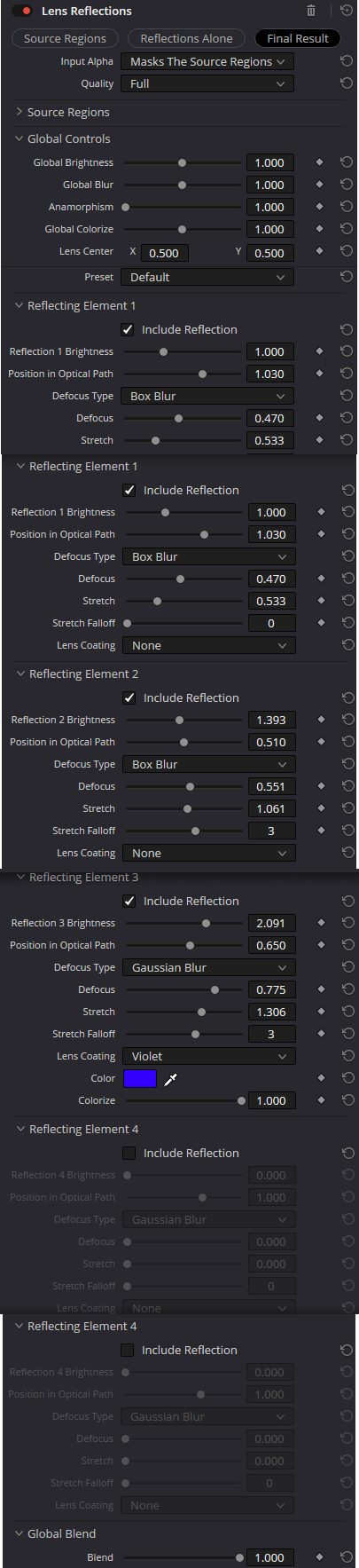
Thirteen native captures anchor every menu and conditional control used here.
Visible values document one Inspector state—not recommendations or declared parameter limits. Use the screenshots as UI evidence and the text as a causal model for working with those controls.
01 · ROUTING + QUALITY
Choose diagnostic view, alpha routing and working quality first
- Source Regions / Reflections Alone / Final Result
Three views separate the source map, isolated reflection pass and final composite. They are diagnostic windows into one process, not three different effects.
CheckJudge source-map shape in Source Regions, optical ghosts in Reflections Alone, and integration only in Final Result.
- Input Alpha
Masks The Source Regions constrains source analysis with incoming alpha; Is Used For Compositing applies alpha during recompositing; Is The Source Of The Glow uses alpha as the Light FX source map.
CheckDo not confuse source definition with compositing: the same matte can be useful at different stages for different reasons.
- Quality · Full / Half (Faster) / Quarter (Fast)
Quality trades optical-pass fidelity for speed. Half/Quarter are useful while shaping structure; Full is the mode for final judgement of blur, edges and coating color.
CheckDo not approve subtle ghosts or colored coatings from Quarter preview alone.
02 · SOURCE REGIONS
Build a clean highlight map before generating ghosts
- Color Mode · Fast (Grayscale) / Slow (Color)
Fast simplifies the source to grayscale for speed. Slow preserves color information when reflections should inherit neon, headlight or colored-specular hues.
CheckSlow matters when source-region color is actually part of the look.
- Brightness · Gamma · Smooth · Color Filter
Brightness and Gamma redistribute source contribution, Smooth reduces jagged structure, and Color Filter narrows analysis by color. These are upstream source-map controls, not master result controls.
CheckIf ghosts are triggered by a white wall instead of the lamp, fix Source Regions before Global Brightness.
- Morph Operation · Morph Amount
Shrink, Grow, Opening and Closing perform source-mask morphology. Opening is useful against isolated specks, Closing against small holes, and Shrink/Grow for overall contraction or expansion.
CheckMorphology should not replace correct source selection; strong values quickly alter emitter geometry.
03 · GLOBAL OPTICS
Define one virtual lens before tuning four surfaces
- Global Brightness · Global Blur
Global Brightness scales energy of the generated reflections and Global Blur softens them globally. They are master optical controls downstream of source selection.
CheckIf only one ghost is wrong, use its local Brightness/Defocus rather than changing the whole effect.
- Anamorphism · Lens Center X / Y
Anamorphism changes the aspect of the optical signature; Lens Center defines the geometric center around which reflections are distributed.
CheckA wrong Lens Center makes the whole ghost chain geometrically implausible even when individual colors look attractive.
- Global Colorize · Preset
Global Colorize tints the system as a whole, while Preset chooses the starting optical family: Default, Streaks, Prism, Plain, Night, Bokeh, Glints, Summer or Custom.
CheckAfter substantial manual element tuning, changing preset can invalidate the balance you built.
04 · REFLECTING ELEMENTS 1–4
Give every surface a distinct role in the optical path
- Include Reflection · Reflection Brightness
Include Reflection enables a specific virtual surface and Brightness sets its local energy. All four elements do not need to be active.
CheckDisable an unnecessary element before trying to hide it with master Blend.
- Position in Optical Path
Position in Optical Path changes reflection placement and scale relative to source and Lens Center. It is an optical coordinate, not a simple screen-space X/Y offset.
CheckDifferences in optical-path position are what create depth across the ghost chain.
- Defocus Type · Defocus
Each element can use Box Blur, Triangular Blur, Lens Blur or Gaussian Blur with its own Defocus amount, separating surfaces by blur character as well as position.
CheckLens Blur can be more expensive; compare edge character at Full Quality before final approval.
- Stretch · Stretch Falloff
Stretch deforms the ghost while Stretch Falloff controls how that deformation falls away.
CheckStrong Stretch on every element quickly turns a coherent lens into unrelated graphics.
- Lens Coating · Color · Colorize
Lens Coating defines the spectral character of the surface: None, Violet, Magenta, Blue, Orange, Green, Custom Tint or Custom Color. Colored modes expose Color and Colorize controls.
CheckUse coating to distinguish surfaces, not to paint every ghost with an unrelated rainbow color.
05 · FINAL MIX
Global Blend is the final trim, not an upstream repair tool
- Global Blend · Blend
Blend mixes the already-built Lens Reflections result with the source frame. It belongs after source, global optics and per-element tuning.
CheckIf Blend has to stay near zero, locate the excessive energy upstream in the pipeline.
03SOURCE REGIONS BEFORE GHOSTS
Treat source extraction as its own grade, not a hidden prelude.
The most expensive mistake is tuning four surfaces against a dirty emitter map. The durable sequence is diagnostic view → alpha routing → Color Mode → tone/filter controls → morphology → only then global optics.
Source Regions
Brightness · Gamma · SmoothUse the diagnostic view until only plausible emitters remain. Do not compensate for false sources with low Blend later.
Acceptance: every white region has a physical reason to generate a ghost.
Input Alpha
Mask · Composite · SourceDecide whether alpha constrains analysis, limits recompositing, or becomes the source map itself. Resolve 20.2 added the source-of-glow routing for this Light FX family.
Acceptance: alpha is used at the stage you actually intend.
Morphology
Shrink · Grow · Opening · ClosingUse morphology to repair small source-map defects, not to rescue a fundamentally wrong selection.
Acceptance: emitter geometry remains recognizably tied to the source.
04THE OPTICAL PATH IS THE EFFECT
Depth comes from position, local softness and coating—not from four equal overlays.
Blackmagic describes Position in Optical Path as the control that moves a reflection according to a virtual element’s position in the lens. That is the key mental model: the coordinate belongs to the lens model, not to the screen.
Lens Center
X · YEstablish one geometric center before distributing elements. A bad center makes every ghost wrong in a consistent but unnatural way.
Position in Optical Path
Element 1 → 4Separate surfaces by depth and sign along the optical model. Do not treat this like four unrelated screen offsets.
Defocus + Stretch
Blur model · local shapeMake one surface broad and soft, another tighter and cleaner; avoid giving all elements the same signature.
Lens Coating
None · Violet · CustomUse spectral color as subtle separation between surfaces. Coating is most convincing when it supports source color rather than competing with it.
05A RELIABLE SIGNAL ORDER
Move left to right; when something fails, move back to the stage that caused it.
This graph is intentionally simpler than the Inspector. It is the decision order that keeps presets, four local surfaces and master controls from fighting each other.
Define emitters
Use Source Regions, Input Alpha, Color Mode and morphology to decide what may generate reflections.
Teaching signal flow, not a literal Blackmagic OFX graph. Durable order: source regions → global optical axis → reflecting surfaces → local character → final mix.
06BUILD REPEATABLE REFLECTIONS
Four exercises with visible acceptance conditions—not magic values.
The useful skill is not memorizing slider numbers. It is learning which stage owns source selection, geometry, local ghost character and final integration.
Night headlights
Build a coherent ghost chain from a small bright source.
PrepareUse a shot with headlights or a lamp and begin in Source Regions.
- 01
Clean the source map with Brightness/Gamma and, if needed, Opening.
- 02
Choose Night or Default and validate Lens Center.
- 03
Keep 2–3 elements with different Position in Optical Path and Defocus.
Ghosts align to one optical axis and move as one system rather than unrelated overlays.
Colored neon
Preserve emitter color in reflections without turning the shot into a rainbow.
PrepareSwitch Color Mode to Slow (Color) and compare Reflections Alone with Final Result.
- 01
Keep source color readable before Global Colorize.
- 02
Use coating on only one or two surfaces.
- 03
Trim Global Brightness and Blend after checking saturation through the delivery transform.
Reflections inherit the source character without recoloring the whole frame.
Bokeh / soft ghosts
Create large soft reflections without losing coherent optical logic.
PrepareStart from Bokeh and use Full/Half Quality to judge heavier blur models.
- 01
Set Global Blur only after per-element Defocus Type is established.
- 02
Differentiate optical-path positions more than brightness.
- 03
Judge edges in Reflections Alone and integration in Final Result.
Soft ghosts differ in depth and shape rather than brightness alone.
VFX matte as the source
Use a prepared alpha as a precise source-region map.
PrepareFeed a prepared alpha from Fusion/compositing and choose Is The Source Of The Glow.
- 01
Validate alpha first: it should describe emitters only.
- 02
Do not compensate for a poor alpha with excessive Morph Amount.
- 03
After source routing, tune optical elements in the normal order.
Reflections are generated only from the prepared VFX regions and ignore unrelated highlights.
07CHOOSE THE RIGHT LIGHT FX
Lens Reflections is for internal optical ghosts—not every bright-light artifact.
Choosing the right Light FX before tuning saves more time than any preset. The four tools below solve different visual causes.
Internal ghost chain
Best when you want multiple reflections from virtual lens surfaces tied to bright source regions.
Broader flare system
Use when you need explicit flare presets, placement, aperture and dedicated flare elements.
Bloom around emitters
Use when the look is primarily soft luminous spread rather than structured internal ghosts.
Directional beams
Use when bright regions should generate directional rays, shafts or shimmer rather than lens-surface reflections.
08DIAGNOSE THE STAGE, NOT THE AMOUNT
A bad Lens Reflections setup usually points to one specific stage.
Use Source Regions and Reflections Alone to remove context. If a problem already exists there, Final Result and Blend can only hide it—not solve it.
01Ghosts are triggered by unrelated bright details
Likely cause: Source Regions are too broad or alpha routing is assigned to the wrong stage.
Repair: Return to Source Regions, repair Brightness/Gamma/Color Filter or Input Alpha, then re-evaluate optics.
02All ghosts look like one flat copy
Likely cause: Elements use nearly identical Position in Optical Path and Defocus/Stretch.
Repair: Separate optical-path positions and defocus character; tune brightness after geometry.
03Colored ghosts look like a random rainbow
Likely cause: Too many surfaces use unrelated Lens Coating colors.
Repair: Return some coatings to None, keep Slow (Color) for source hue inheritance, and use only 1–2 accent surfaces.
04The effect still feels wrong after lowering Blend
Likely cause: The error is in source selection, Lens Center or a specific element rather than master amount.
Repair: Check Source Regions → Reflections Alone → local element controls; leave Blend for last.
09FAQ
Practical Resolve FX Lens Reflections questions.
How is Lens Reflections different from Lens Flare?
Lens Reflections focuses on internal ghost/reflection surfaces and four independent Reflecting Elements. Lens Flare builds a broader flare system with dedicated flare elements, aperture and source placement.
Do I need all four Reflecting Elements?
No. Two coherent ghosts often look more believable than four equally strong ones. Include Reflection is as much a creative control as Brightness.
What does Position in Optical Path do?
It represents a virtual reflective surface within the optical model, changing ghost placement/scale relative to the source and Lens Center rather than acting as a simple screen-space offset.
When should I use Slow (Color)?
Use it when emitter color should propagate into reflections. Fast (Grayscale) is usually sufficient for neutral or fast previews.
10SOURCES & BOUNDARIES
Current UI labels come from native Resolve 21 captures; behavior is cross-checked against Blackmagic documentation.
The interactive lab is deliberately independent: it is a deterministic educational approximation of source extraction and optical ghosts, not a reverse-engineered implementation of Blackmagic Resolve FX Lens Reflections.