RESOLVE FX · LIGHT · DIRECTIONAL SHAFTS
Light Rays.
Do not paint beams on the frame.
Build them from a believable cause.
Light Rays becomes predictable when treated as five stages: define the emitter map, choose a directional field, shape the ray body, add motion/air only if needed, and integrate the finished pass. Source Regions and Rays Alone are not presentation modes—they are the diagnostic tools that keep each stage honest.
Regions + alpha
Angle / location
Recovery + Blend
First approve Source Regions. If the wrong highlight becomes an emitter, every later shaft is causally wrong even when it looks attractive.
Teaching approximation, not Blackmagic OFX. Source extraction, edge detection, ray propagation, shimmer, atmosphere and compositing are deliberately simplified; slider values do not claim Resolve parameter ranges. Use the lab to understand stage order, then judge the real Light Rays on moving footage.
Nine native Inspector captures + an independent causal-ray teaching approximation.
Source · Direction · Body · Air · Mix01CAUSE → FIELD → SHAFT
A convincing ray is the consequence of a source and a direction—not a bright overlay.
Use the diagnostic views in causal order: Source Regions tells you what emits, Rays Alone tells you what was generated, Final Result tells you whether the already-correct pass belongs in the shot.
Cause before beauty
Light Rays begins with an emitter map. If the source is wrong, Length, Shimmer and Atmosphere only spread the mistake over a larger area.
Rays need a geometric cause
At An Angle and From A Location are not two styles of one slider but two directional models. The choice should match scene geometry and source position.
Ray body, motion and medium are separate layers
Appearance shapes the ray; Shimmer animates its internal structure; Atmosphere adds a medium; Composite Type and Global Blend integrate the result.
Product family reference: Blackmagic Design · Resolve FX Light ↗
02THE ACTUAL RESOLVE 21 PANEL
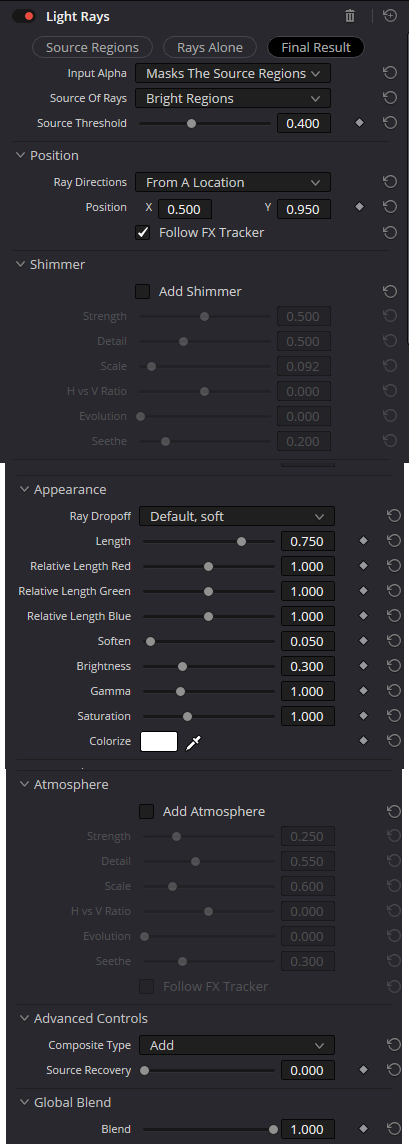
Nine native captures anchor the current menu names and conditional states.
Visible values document one Inspector state—not recommendations or declared limits. The screenshots are UI evidence; the explanations focus on stage ownership and failure modes.
01 · SOURCE MAP
First decide what is allowed to emit a ray
- Source Regions / Rays Alone / Final Result
Three diagnostic views separate the emitter map, isolated ray pass and final composite. This prevents a selection problem from being misdiagnosed as a compositing problem.
CheckIf unwanted detail is already visible in Source Regions, repair the source map; Global Blend can only hide it.
- Input Alpha · Masks The Source Regions / Is Used For Compositing / Is The Source Of The Glow
Alpha can constrain source-region extraction, participate only in the final composite, or become the Light FX source map itself. The last routing was officially added in Resolve 20.2 for Light Rays and related Resolve FX Light tools.
CheckDo not confuse an emitter matte with a final-composite matte; the same alpha can serve different stages for different reasons.
- Source Of Rays · Bright Regions / Edges
Bright Regions responds to luminous areas; Edges builds the emitter map from contrast boundaries. This changes the cause of the shafts, not merely their style.
CheckStart with Bright Regions for the sun, lamps and headlights; test Edges when shafts should arise from contours or light boundaries.
- Source Threshold
Threshold rejects weaker candidates before ray generation. It is an upstream control that decides which pixels enter the emitter map.
CheckRaise Threshold in Source Regions until incidental highlights disappear while the intended emitter still retains its shape.
02 · DIRECTION + ORIGIN
After the source map, define propagation geometry
- Ray Directions · At An Angle / From A Location
At An Angle creates a shared directional field; From A Location makes rays radial around a specific origin.
CheckChoose the mode from scene physics: parallel sunlight and a local lamp imply different geometry.
- Position X / Y
In From A Location mode the coordinates define the origin of the ray field. Position should align with a believable emitter or its off-frame continuation.
CheckA wrong origin exposes the effect immediately: shafts may look geometrically neat but causally implausible.
- Follow FX Tracker
This option ties position or procedural behavior to the FX Tracker so the source and related structures do not drift away from shot motion.
CheckA static shot may not need tracking; with camera movement, stabilize the track before judging the rays.
03 · APPEARANCE
Shape the ray body only after cause and direction are correct
- Ray Dropoff · Default, soft / Keep Shape Of Source / CCD Bloom Harsh / CCD Bloom Soft
Dropoff defines the energy profile along the ray and how strongly source shape is preserved. Keep Shape Of Source retains the emitter geometry more strongly; CCD variants create a more characteristic bloom-like response.
CheckCompare Dropoff in Rays Alone; source-image contrast can hide profile differences in Final Result.
- Length · Relative Length Red / Green / Blue
Length sets overall spatial reach while the three Relative Length controls let channels diverge in distance. This can create subtle spectral variation without a separate chromatic effect.
CheckStrong RGB separation quickly turns an optical shaft into a graphic rainbow; inspect white emitters and frame edges.
- Soften · Brightness · Gamma · Saturation · Colorize · Color
Soften changes ray-body sharpness; Brightness controls energy; Gamma redistributes mid-level response; Saturation and Colorize control color character. Gamma and Saturation were officially added in Resolve 19.1.
CheckEstablish form with Length/Dropoff/Soften first, then tone with Brightness/Gamma, and only then color.
04 · SHIMMER + ATMOSPHERE
Animate the shafts and the medium as separate layers
- Add Shimmer · Strength · Detail · Scale · H vs V Ratio · Evolution · Seethe
Shimmer modulates internal ray structure. Strength sets amplitude, Detail/Scale shape spatial frequency, H vs V Ratio controls anisotropy, and Evolution/Seethe drive temporal variation.
CheckShimmer should add life, not flicker. Judge it in motion rather than from a still frame.
- Add Atmosphere · Strength · Detail · Scale · H vs V Ratio · Evolution · Seethe · Follow FX Tracker
Atmosphere creates an additional medium modulation around the shafts—suggesting dust, haze or suspended light. It is distinct from Shimmer: it shapes the medium rather than only the ray itself.
CheckIf the rays already read clearly, add Atmosphere only until volume becomes perceptible, not until it turns into a second independent effect.
05 · COMPOSITE
Final mixing should not repair upstream mistakes
- Composite Type · Normal / Add / Subtract / Difference / Multiply / Screen / Overlay / Hard Light / Softlight / Darken
Composite Type determines how the ray pass is mathematically recombined with the source image. Add and Screen are natural for many light tasks; the other modes are deliberate creative choices, not ways to repair a bad source map.
CheckCompare Add and Screen on highlights: Add raises energy more aggressively, while Screen usually preserves highlight headroom more gently.
- Source Recovery
Source Recovery restores some original emitter detail when the rays or composite have overwhelmed the source structure.
CheckUse it after the ray pass is already correct; do not substitute it for fixing Brightness, Gamma or Dropoff.
- Global Blend · Blend
The final master fader scales the already-built effect. At Blend = 0 the source should remain untouched; this is final integration, not ray generation.
CheckTune Rays Alone first, then Final Result, and reduce Global Blend only at the very end.
03SOURCE REGIONS BEFORE RAYS
Emitter extraction is its own grade. Treat it that way.
Source Of Rays and Source Threshold decide the cause; Input Alpha decides where alpha enters that cause/composite. Build a clean emitter map before touching ray beauty controls.
Bright Regions
luminous areasBest starting point for windows, sun, lamps and headlights where the emitter itself is a bright area. Threshold should leave the motivated source while rejecting unrelated highlights.
Acceptance: every bright pixel in Source Regions has a reason to emit.
Edges
contrast boundariesUse when the visual cause is a bright boundary or contour rather than a filled luminous region. Edge-derived shafts can preserve silhouette structure more cleanly.
Acceptance: contours, not broad flat areas, drive the ray pass.
Input Alpha
mask · composite · sourceResolve 20.2 added the ability for Light Rays to use input alpha as the source of glow. That is distinct from masking Source Regions or using alpha only during compositing.
Acceptance: alpha participates at the stage you actually intended.
04DIRECTION IS A LIGHTING DECISION
At An Angle and From A Location describe different physical stories.
Do not choose the prettier mode first. Choose the geometry that explains the source, then use Position and tracking to keep that explanation stable across the shot.
At An Angle
shared directionUseful for broadly parallel light such as stylized sunlight or a directional beam crossing the frame. Every source region inherits the same general travel vector.
From A Location
Position X / YUse when the light originates from a local emitter. The origin can sit inside or outside the visible frame, but it must remain geometrically credible.
Follow FX Tracker
temporal lockTracking does not fix a bad origin; it only keeps a correct origin attached to shot motion. Validate the track before evaluating Shimmer or Atmosphere.
05BUILD THE RAY BODY FIRST
Dropoff and Length define structure; tone and color should follow.
The fastest route to synthetic-looking rays is to color or animate them before their body is believable. Use Rays Alone and progress from profile → reach → softness → energy → color.
Energy profile
Compare Default, soft; Keep Shape Of Source; CCD Bloom Harsh; and CCD Bloom Soft in Rays Alone. The choice changes how source geometry and energy survive along the shaft.
Spatial reach
Length sets overall reach. Relative Length Red/Green/Blue can create subtle spectral separation, but strong divergence quickly becomes a graphic rainbow artifact.
Shape before color
Soften controls edge character, Brightness sets ray energy and Gamma redistributes mid-level response. Blackmagic added Gamma together with Saturation in Resolve 19.1.
Color discipline
Use color to connect the ray to motivated light, not to advertise the effect. Keep neutral emitters neutral unless the scene provides a reason otherwise.
Shimmer
Strength · Detail · Scale · H/V · Evolution · SeetheShimmer belongs to the shaft. Add it only after the static structure is approved, and judge temporal behavior at playback speed.
Atmosphere
medium around the rayAtmosphere belongs to the air around the shaft. It can suggest haze, dust or suspended light, but should remain subordinate to the source and direction.
Composite + Recovery
Add · Screen · Source Recovery · BlendChoose the blend model after Rays Alone is correct. Source Recovery can restore emitter texture; Global Blend is the final presentation fader.
06A RELIABLE SIGNAL ORDER
Move left to right; diagnose by moving back to the stage that caused the failure.
This graph intentionally simplifies the Inspector into ownership boundaries. That is what prevents Global Blend, Source Recovery and Atmosphere from becoming universal repair tools.
Define emitters
Use Source Regions, Input Alpha, Source Of Rays and Source Threshold to define the actual causes before generating any shaft.
Teaching signal flow, not a literal Blackmagic OFX graph. Durable order: source map → direction → appearance → shimmer/atmosphere → composite.
07BUILD REPEATABLE RAYS
Four exercises with visible acceptance conditions—not magic slider values.
The transferable skill is knowing which stage owns a problem. The exercises therefore specify an observation order rather than fixed parameter values.
Window sunlight shaft
Create a single causally believable volumetric shaft without lighting up the whole room.
PrepareUse a shot with a bright window or source just beyond it; place Light Rays on a dedicated node.
- 01
Open Source Regions, choose Bright Regions and use Threshold to keep only the window.
- 02
Choose From A Location and place Position on the believable sun/window origin; use FX Tracker when the shot moves.
- 03
In Rays Alone shape Length, Dropoff and Soften, then add only a small amount of Atmosphere.
- 04
Return to Final Result, compare Add/Screen, then finish with Source Recovery and Global Blend.
The shaft begins at the correct source, does not originate from white walls and stays tied to the window throughout the shot.
Headlights and local emitters
Create controlled rays from a pair of bright points without turning the frame into global bloom.
PrepareUse a night shot with headlights or lamps plus several incidental specular highlights.
- 01
In Source Regions raise Threshold until the intended emitters are isolated.
- 02
Compare Bright Regions and Edges and keep the mode whose source shape best matches the task.
- 03
Build a short ray body with Length/Dropoff and keep Relative Length RGB close together.
- 04
Check Screen and Add for highlight clipping and use Global Blend last.
The rays read as extensions of the headlights while incidental body highlights do not generate their own shafts.
Contour rays from Edges
Use light boundaries as the source for directional streaks.
PrepareUse a high-contrast silhouette or a strongly backlit object.
- 01
Switch Source Of Rays to Edges and judge the map only in Source Regions.
- 02
Choose At An Angle for a unified direction and align the angle with the lighting motivation.
- 03
Try Keep Shape Of Source, then Default, soft; keep the profile that preserves contour readability best.
- 04
Add Shimmer only after the shape is stable and judge the result during playback.
Directional streaks follow the light boundaries instead of collapsing into uniform full-frame haze.
VFX matte as the ray source
Build rays strictly from a prepared alpha instead of frame luminance.
PrepareUse a Fusion/VFX matte or alpha for a specific graphic or luminous element.
- 01
Set Input Alpha to Is The Source Of The Glow—the routing Blackmagic added for Light Rays in Resolve 20.2.
- 02
Check Source Regions; the emitter map should match the prepared alpha.
- 03
Tune direction and Appearance without distorting the matte merely to beautify the rays.
- 04
In Final Result choose Composite Type and Blend around the already-approved ray pass.
Ray generation follows the external alpha while the source image participates only where your composite requires it.
08CHOOSE THE RIGHT LIGHT FX
Light Rays is for directional shafts—not every kind of luminous artifact.
Pick the effect from the visual cause before tuning. A soft bloom, internal lens ghost and diffraction star are different optical stories.
Directional shafts
Best when source regions or edges should extend into directional beams with optional shimmer and air.
Diffuse bloom
Use when the main phenomenon is soft luminous spread around emitters rather than travel in a direction.
Internal ghosts
Use for multiple virtual-lens reflections positioned along an optical path, not volumetric shafts.
Aperture star pattern
Use when bright points should form blade-driven diffraction structure rather than long volumetric rays.
09DIAGNOSE THE STAGE, NOT THE AMOUNT
Most Light Rays failures point to one stage with a specific owner.
Use Source Regions and Rays Alone to remove context. If a problem already exists there, Final Result, Source Recovery and Blend cannot truly solve it.
01Rays appear from walls, skin and incidental highlights
Likely cause: Source Regions are too broad: Threshold is too low, Source Of Rays is wrong, or alpha routing is constraining the wrong stage.
Repair: Switch to Source Regions, ignore Final Result, clean the emitter map and only then return to Appearance.
02The rays look pasted on and travel in the wrong direction
Likely cause: Ray Directions or Position does not match the actual lighting geometry, or the tracker may be drifting.
Repair: Re-evaluate At An Angle vs From A Location, reposition the origin and inspect FX Tracker across the whole shot.
03The rays feel overly digital, colorful or sharp
Likely cause: Dropoff, Soften, Relative Length RGB or Colorize are too aggressive or were tuned without Rays Alone.
Repair: Return to Rays Alone, neutralize RGB lengths and Colorize, then rebuild Dropoff, Length and Soften.
04The effect flickers during playback
Likely cause: Shimmer or Atmosphere has excessive temporal modulation, or the source map is unstable from frame to frame.
Repair: First disable Add Shimmer/Add Atmosphere and inspect Source Regions over time; then reintroduce procedural motion gradually.
05Final Result washes out or loses emitter detail
Likely cause: Composite Type/Add, Brightness and Global Blend are contributing too much energy, with insufficient Source Recovery.
Repair: Inspect the ray pass alone, try Screen, reduce internal Brightness to a sensible level, then use Source Recovery and only afterward Blend.
10FAQ
Practical Resolve FX Light Rays questions.
When should I use Bright Regions versus Edges?
Use Bright Regions when physical emitters are luminous areas such as the sun, a window, lamp or headlights. Use Edges when rays should originate from contrast boundaries rather than the full bright mass.
How is Shimmer different from Atmosphere?
Shimmer modulates internal shaft structure; Atmosphere adds a surrounding volumetric medium. Approve the ray body first, then Shimmer, and Atmosphere last.
What is Keep Shape Of Source for?
This Ray Dropoff preserves emitter geometry more strongly along the rays. It is useful when the shaft should read as an extension of a specific window, strip of light or graphic source.
What changed in newer Resolve versions?
Blackmagic added Gamma and Saturation to Light Rays in Resolve 19.1, then added the Input Alpha option Is The Source Of The Glow for Light Rays and several other Resolve FX Light tools in Resolve 20.2. Native captures on this page anchor the current Resolve 21 labels.
Why should Global Blend be left until the end?
Blend changes only the overall contribution of an already-built effect. If source map, direction or ray body is wrong, lowering Blend makes the mistake weaker but does not fix its cause.
11SOURCES & BOUNDARIES
Current UI labels come from native Resolve 21 captures; version changes are cross-checked against Blackmagic documentation.
The interactive lab is deliberately independent: it is a deterministic educational approximation of emitter extraction and ray propagation, not a reverse-engineered implementation of Blackmagic Resolve FX Light Rays.