KNOWLEDGE MAP · VIDEO & CAMERAS
What the sensor kept. What processing baked in.
Compare retained samples with a processed copy: a gain can be reversed, but clipped values cannot. Sensor saturation affects both branches.
Read the numbers. Notice the assumptions. Then apply the idea to your footage.
Retain it, or bake it.
0.7200 / 0.4000 / 0.22000.5000 / 0.3998 / 0.21990.7200 / 0.4000 / 0.22000.7200 / 0.4000 / 0.22000.22000linear, not perceptual ΔESynthetic linear channels; gain is not a Kelvin/ISO control. A chosen sensor limit applies before both branches. This is not a CFA, RAW SDK, demosaic or camera highlight-recovery simulation.
 TOPIC ILLUSTRATION
THE ESSENTIAL IDEA
Cameras, RAW, log and camera gamuts
A camera first measures light, then interprets, transforms and records those measurements. RAW, log, camera gamut and codec describe different parts of that process. Colour control requires knowing the decoder output, not merely the camera name.
- Distinguish capture, decoding and display.
- Understand which decisions remain adjustable in RAW.
- Find the clipping stage rather than promise universal recovery.
The sensor measures light, not a ready-made colour
A photosite converts absorbed radiation into an electrical response. Illumination spectrum, object properties, optics and channel spectral sensitivities all contribute. Two stimuli that match for a human observer need not produce identical channel ratios in a particular camera. Neutral and coloured targets therefore test different aspects of reproduction.
Measurements have limits: sensor saturation, noise and later numerical precision. Once a channel reaches the physical limit, a wider gamut or a different log curve cannot restore its original value. The lab deliberately places a normalised saturation limit of one before both branches. It demonstrates irreversibility, not a particular camera specification.
What this means in practice
Raise exposure until “Sensor saturation” appears. The retained branch is affected too; reversing a balance adjustment does not remove that loss.
CFA: different channels sampled at different positions
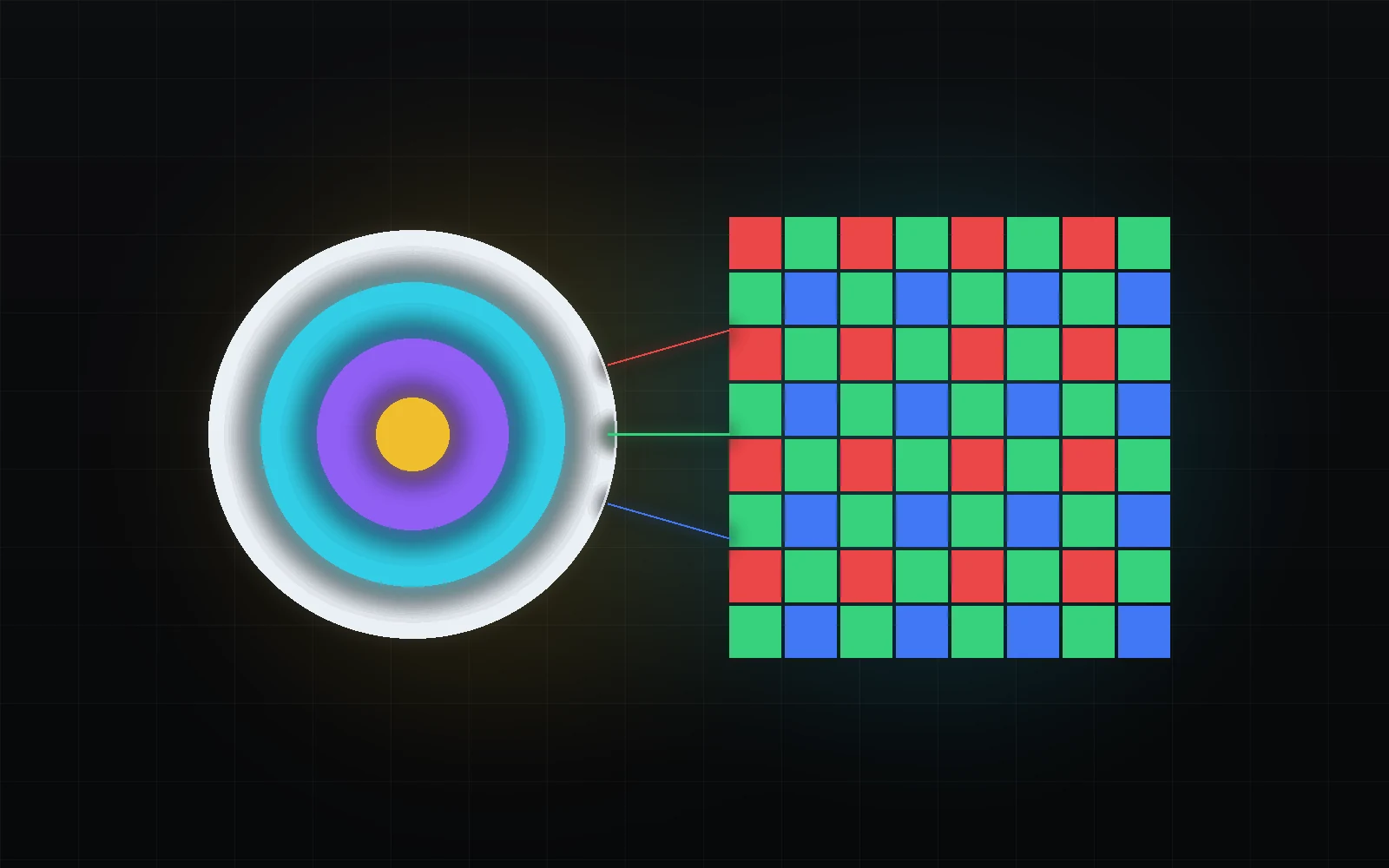
In a common single-chip colour-filter-array sensor, each photosite measures one spectrally weighted component, not a complete RGB pixel. Bayer is common, but it is not the only filter arrangement. Do not apply its layout automatically to every camera, RAW type or stored format.
Producing a full-colour image requires reconstructing missing spatial components. This differs from Y′CbCr subsampling of already developed video: both involve spatial samples, but at different stages and with different meanings. A RAW mosaic is not simply an undeveloped 4:2:0 video file.
What this means in practice
Fine coloured fabric tests optics, filters and reconstruction together. Colour moiré does not by itself prove a Y′CbCr matrix error.
What RAW retains, and what it does not promise
RAW is a family of ways to retain data close to capture and defer some interpretation. It does not guarantee that no processing has occurred. A format may include corrections, compression, nonlinear encoding or part of reconstruction. Read the specific format and decoder documentation.
Blackmagic RAW, for example, divides processing between camera and software, including a partial demosaic. Metadata provides adjustable decode settings, but those settings cannot return information absent from the recording. Sensor saturation, severe noise and losses from a particular compression method do not disappear because a file is called RAW.
What this means in practice
Do not compare “12-bit RAW” with “12-bit RGB” solely by bit count: encoding, data state and deferred processing may differ.
Reconstruction is part of image formation
Demosaicing estimates missing components using neighbouring measurements. The algorithm affects fine lines, coloured boundaries and false detail. It cannot know the scene perfectly: repetitive patterns can yield ambiguous observations. Later sharpening may emphasise a reconstruction error rather than useful texture.
After decoding, the image has definite values and a colour representation. Access to RAW controls is not the same as the state reaching the node graph. For a controlled comparison, fix decoder, version, quality and output settings. Different applications can display the same RAW differently without modifying the source file.
What this means in practice
When testing a coloured grid, disable creative sharpening and fix decode quality before comparing input transforms.
White balance: gains and retained information
In a simplified linear model, white balance changes relative channel gains. A real RAW decoder combines this with camera calibration and illuminant interpretation; Kelvin and Tint are not universal RGB coefficients across camera models. Changing a balance value does not change the spectrum that originally illuminated the object.
When original samples remain available, a decoder can apply a different decision without working backwards from an already limited result. Developed video may have combined the old balance with nonlinear processing, clipping and quantisation. Inverse gain cannot restore a clipped channel. RAW cannot undo saturation that already happened in the sensor either.
What this means in practice
At EV = 0 and R gain = 2 in the hero, retained R remains 0.72. The baked value is limited to one; division by two returns about 0.5, not 0.72.
From camera-native response to a defined RGB representation
Sensor channels should not automatically be treated as Rec.709, AWG or S-Gamut primaries. Calibration and processing translate camera response into a defined representation. Even when a stage is matrix-based, the entire camera colour pipeline is not one universal matrix for every illuminant.
Outputs may include a technical representation, a viewing rendering and a creative style. Distinguish them. A technical input transform need not immediately produce the desired contrast, while a marketing look does not replace the source definition. Establish the correct data state before choosing the artistic result.
What this means in practice
Skin can still need shot matching after a correct input transform. That is not a reason to arbitrarily change the declared source gamut.
Gamut and log each define a different property
The transfer function specifies encoding of light values; primaries and white point define the channels colorimetrically. A curve may accompany different gamuts. S-Log3, for example, can accompany S-Gamut3 or S-Gamut3.Cine: selecting only the correct log name is insufficient.
Check the generation as well. LogC3/AWG3 and LogC4/AWG4 are not interchangeable labels. Also determine whether the decoder has already transformed the image before your CST. The input profile must describe incoming values, not the original camera mode before intermediate processing.
What this means in practice
Choose S-Log3 + S-Gamut3.Cine from verified recording information, not because the word Cine seems appropriate for filmmaking.
RAW and log describe different layers
RAW describes a format and deferred interpretation of measurements; log describes value encoding. Nonlinear encoding can exist inside a RAW format, and a RAW decoder can output log-encoded imagery for further work. “RAW or log?” is therefore incomplete without identifying whether you are comparing recording modes or decoder outputs.
A developed log file may already be demosaiced, balanced and stored as RGB or Y′CbCr with chosen sampling and compression. It remains gradeable, but the reversible operations differ. Do not assume that a log intermediate retains the original RAW camera controls.
What this means in practice
Exporting RAW to log ProRes preserves a chosen developed image and encoding, not the original measurements and RAW decode controls.
Three families: what needs identifying
For ARRI, distinguish ARRIRAW from developed LogC recording, then identify LogC3/AWG3 or LogC4/AWG4 and decoder interpretation. For Sony, check not only S-Log3 but the accompanying gamut, recording mode and whether a viewing look was baked in. For Blackmagic RAW, identify colour-science generation, decode settings and any sidecar.
This is a checklist, not a universal camera-compatibility table. Features, menus and recorded metadata depend on model and version. When handing off footage, include exact recording and decoder-output descriptions rather than “everything was shot in log”.
What this means in practice
Matching MOV extensions from two cameras do not establish matching colour spaces, even when both images look low-contrast.
In Resolve, identify the decoder output first
Start with Camera RAW where the format exposes it, and with project colour management. Establish which operations belong to the decoder, RCM or ACES, and which remain in nodes. Supported fields depend on format; a missing control does not prove that the image is technically incorrect.
Do not add a habitual input CST on top of a transform that already occurred. Use a separate version, a known source and neutral patches to diagnose. Document three boundaries: decoder output, grading input and final output. This exposes double normalisation through the processing path rather than hiding it with contrast.
What this means in practice
When the decoder outputs the project working representation, an input CST set to the original camera log no longer describes its incoming values.
Camera matching: a technical basis and remaining differences
First bring each verified source pair into a consistent working process. Then compare exposure, neutrals, skin and saturated objects under the same viewing conditions. A meaningful comparison is impossible when one camera has already received display rendering and another has not.
Correct input handling does not guarantee identical images: spectral sensitivities, lenses, lighting and processing can leave differences. Neutral balance does not fix every coloured object simultaneously. Apply restrained targeted adjustments and inspect several frames instead of building a universal match from one patch.
What this means in practice
If the grey card matches but a fabric differs under LED light, consider illumination and material rather than assuming a white-balance setting error.
What can be recovered, and what can only be inferred
Inverting a gain is not the same as recovering lost information. A known transform that did not clip can be inverted within numerical precision. When many original values collapse to one, there is no unique inverse. Highlight reconstruction can use channel correlations and estimates without proving exact recovery of the original spectrum.
Distinguish sensor saturation from limits introduced by decoding or display. Change the relevant stage temporarily in a test version and check whether genuine detail differences remain. Do not promise recovery of every overexposure merely because the footage is RAW or log.
What this means in practice
The hero deliberately shows separate warnings for sensor saturation and processed-copy clipping. The cause matters more than their similar appearance.
A MODEL YOU CAN CHECK
At which stage can a decision be changed?
Keep the meaning, the calculation and the limitation together.
stored = min(sensor, 1); baked = Q₁₀(min(gain × stored, 1))Synthetic linear channels, positive gains and a chosen limit of one. After baking, dividing by gain does not restore clipped values. Q₁₀ rounds a full-scale ten-bit value. This is not a RAW SDK, exact demosaic or camera-range measurement.
| Concept | What it describes | What not to conclude |
|---|---|---|
| Sensor saturation | A limit of the original measurement. | Not removed by changing log or RAW profile. |
| RAW metadata | An available decoder decision without necessarily rewriting measurements. | Adjustable properties depend on format. |
| Developed Log | A developed image with a defined curve. | Not the original RAW mosaic. |
| Baked look | A decision incorporated into recorded values. | Full recovery is not guaranteed without reversibility. |
DO. OBSERVE. EXPLAIN.
Separate retained data from baked decisions.
Start with the synthetic lab. Then, using your own RAW if available, compare two decode versions without rewriting the source.
- 01
Remove processing clipping
Set EV = −1, R/B gains to 1, with undo enabled.
CHECKThe branches differ only by small ten-bit rounding error.
- 02
Bake an excessive gain
Return to EV = 0 and set R = 2. Inspect the value before clipping and after undo.
CHECKYou can explain why 0.72 cannot be recovered from 1/2.
- 03
Find the measurement limit
Raise EV until sensor saturation is reported, then undo the gain.
CHECKThe retained branch also cannot recover the ideal scene input.
- 04
Inspect the decoder
For your footage document format, RAW controls, output gamut/curve and colour-management input.
CHECKChanging decoder metadata is not confused with changing sensor capture.
Check your understanding
TEST THE EXPLANATION
A situation, not a trick question.
Answer first. Open the reasoning afterwards.
01RAW looks different in two applications. Is it corrupt?+
Not necessarily: decoder, settings, colour management and output may differ. Compare those states using a known test first.
02Two cameras still differ after correct input handling. Is CST useless?+
No. The technical representations are aligned, but sensitivities, illumination, optics and processing can leave real differences requiring shot matching.
03Is RAW always linear and untouched?+
No. Specific formats can use nonlinear encoding, compression and partial reconstruction. Blackmagic RAW explicitly divides processing before software completion.
Avoid these shortcuts
- Identifying camera log by how the Viewer looks.
- Treating RAW as merely '12-bit log'.
- Choosing Gamma without the matching camera gamut.
- Using one technical LUT for different camera families.
- Matching cameras before source-state normalisation.
- Expecting RAW to recover physically clipped or unmeasured information.
From the model to your workflow.
First identify the incoming values and operations already applied. Then check decoding, colour processing and the final export separately. The lab demonstrates its stated calculation; it does not measure your display, decode uploaded footage or certify camera settings.
CHECK THE FOUNDATION
Sources and model limits.
Editorial review: 1 October 2026. Links identify the definitions and formulas; exercises are independent teaching examples.
- [1]ARRI · LogC4 specification, §4.1–4.3 ↗
LogC4 software functions, AWG4, domain and bit-depth requirement. The lab uses §4, not the hardware curve in §3.
- [2]Sony · S-Gamut3.Cine / S-Log3 technical summary ↗
S-Gamut3 versus S-Gamut3.Cine and their relationship to S-Log3. Used for definitions, not a current camera-compatibility list.
- [3]Blackmagic Design · Blackmagic RAW ↗
Partial demosaic, embedded and sidecar metadata, decode controls. These properties are not attributed to every RAW format.
- [10]Apple · ProRes white paper, April 2022 ↗
Different family profiles: depth, chroma, alpha and visually versus mathematically lossless.
- [11]Adobe · Digital Negative specification resources ↗
RAW formats and the DNG specification: data requires interpretation and a compatible decoder.
- [12]Blackmagic Design · DaVinci Resolve Color ↗
Colour management and RAW processing. Available controls depend on the format, version and project mode.