RESOLVE FX · SURFACE-AWARE RELIGHTING
AI
Relight.
Build the surface first.
Then place the light.
AI Relight is a surface-aware lighting tool rather than a normal exposure mask. Resolve analyzes the 2D image, builds a Surface Map, then evaluates a Directional, Point Source or Spotlight against that representation. The practical order matters: validate the map, choose the correct light model, place and track it, shape falloff/material response, and only then judge the creative grade. Blackmagic explicitly describes the depth as an illusion rather than true 3D geometry, so physically impossible new cast shadows remain outside the tool’s promise.
Surface · Boundaries
Model · Position
Falloff · Motion
Try Point Source on the Portrait scene, open Relighting Map Preview, then move Light Source X/Y/Z. Switch to Surface Map to see why the same emitter reacts differently across the face. The lab is a teaching proxy, not a replica of Blackmagic’s neural solver.
Independent deterministic teaching proxy. The control names mirror visible Resolve controls, while numeric ranges, synthetic Surface Map generation, material response and lighting math are intentionally illustrative. Use it to understand causality — map → light model → position/falloff → material response — not to predict exact pixels from Blackmagic’s Neural Engine.
Eight native Inspector captures plus an independent surface-light teaching proxy.
SURFACE · LIGHT · POSITION · MATERIAL · QCTHE RELIGHT MODEL
Surface-aware lighting is useful precisely because it is not a flat window.
Read AI Relight as a dependency chain: Surface Map → light model → position/falloff → material response → grade/QC. Every downstream decision inherits errors from the surface representation.
Surface Map is not true 3D geometry
AI Relight analyzes the 2D frame and builds a surface representation that is sufficient for light to appear to wrap around objects. Blackmagic explicitly warns that the effect creates an illusion of depth rather than calculating true 3D geometry. A virtual Spotlight therefore does not have to cast a physically correct new shadow onto a wall; the tool is strongest when it reinforces believable lighting structure already present in the shot.
Build the influence map before the creative grade
Relighting Map Preview is a technical diagnostic. First make the light map land on the intended surfaces with believable falloff. Only then judge the final image and add the desired brightness/color with the node’s grading tools. If geometry, light properties and the grade are changed at the same time, haloing, flatness and spill become much harder to diagnose.
Directional, Point Source and Spotlight solve different spatial problems
Directional behaves like a distant source with a largely consistent direction; Point Source has a specific 3D position and naturally emphasizes local falloff; Spotlight adds a directed cone. Choose the light model from the scene rather than from a desire for “more effect” — the wrong model forces Reach and Contrast to compensate for incorrect geometry.
Output Surface Map turns expensive analysis into a reusable resource
Use Internal is simplest for one light. For multiple sources or a demanding shot, separate surface analysis from lighting: one Relight node outputs the Surface Map and later nodes receive it through Use Input 2. This reduces repeated analysis and makes troubleshooting clearer because the surface map and each individual light can be validated independently.
Blackmagic’s Relight reference explains the Surface Map, the illusion-of-depth boundary and the dual-node workflow. Relight guide ↗
REAL RESOLVE CONTROLS
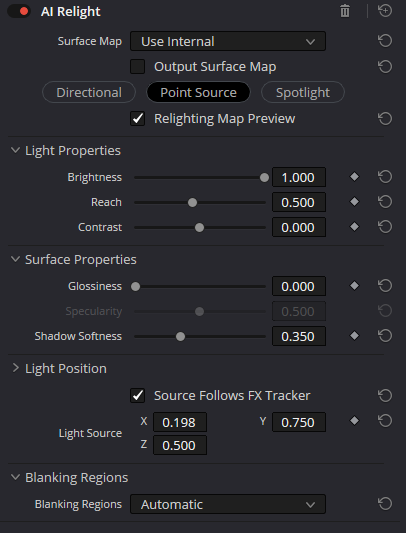
Eight native captures reveal six stages of the relighting pipeline.
The screenshots are evidence for current visible control names and menu states. The control map explains intent and failure modes without pretending that the numeric scale is a physical unit.
STAGE 01 · SURFACE
Surface Map and diagnostic output
- Surface Map · Use Internal · Use Input 2
Use Internal calculates the surface representation inside the current effect. Use Input 2 expects a prepared Surface Map on the second RGB input and is intended for multi-node workflows or reuse of a previously calculated map.
CHECKIf an external map has the wrong orientation or scale, lighting can react from the wrong side — validate the map before changing Brightness.
- Output Surface Map
Switches the effect output to the calculated Surface Map instead of the normal result so the map can be passed to another Relight node.
CHECKDo not leave Output Surface Map enabled on the final lighting node, or you will be viewing utility data instead of the image.
- Relighting Map Preview
Displays the virtual light influence map and is intended for positioning and diagnostics before the creative grade.
CHECKJudge boundaries and temporal stability of the map, not the aesthetics of the preview itself.
STAGE 02 · LIGHT MODEL
Directional · Point Source · Spotlight
- Directional · Point Source · Spotlight
Directional models a distant source by direction; Point Source is a local XYZ emitter; Spotlight is a local emitter constrained to a directed cone.
CHECKChoose the model from the real lighting logic of the shot. Do not use Spotlight merely because it seems easier to contain spill.
- Azimuth · Elevation
In Directional mode, the distant source is defined by its direction. The Open FX Overlay in the Viewer is often the most intuitive way to position it.
CHECKIf camera movement changes the apparent light direction, check the entire shot rather than a single hero frame.
- Spot Target · Beam Angle · Edge Softness
Spotlight adds a target, cone width and edge softness. These controls define the spatial shape of the spot before Brightness or Contrast.
CHECKAn overly narrow Beam Angle with a hard edge quickly reveals the post effect, especially in motion.
STAGE 03 · LIGHT RESPONSE
Light Properties
- Brightness
Scales the relighting response. It is not a substitute for normal node exposure; it operates inside the light-map model.
CHECKIf Brightness must be pushed simply to see the effect, validate the Surface Map and source position first.
- Reach
Controls spatial falloff, especially visible with Point Source and Spotlight.
CHECKExcessive Reach can make a local emitter feel like a flat full-frame wash.
- Contrast
Changes separation between more-lit and less-lit regions in the relighting map.
CHECKHigh Contrast amplifies Surface Map errors and can turn a smooth form into a hard-edged mask.
STAGE 04 · MATERIAL RESPONSE
Surface Properties
- Glossiness · Specularity
Glossiness introduces a stronger reflective response; once Glossiness is non-zero, Specularity becomes meaningful and strengthens the highlight-like response.
CHECKSkin and matte materials become plastic-looking quickly when these controls are pushed.
- Shadow Softness
Softens the virtual light response in shadow regions and helps avoid an overly cut-out result.
CHECKToo much Shadow Softness removes shape and turns the relight into uniform brightening.
STAGE 05 · POSITION & TRACK
Light Position and FX Tracker
- Source Follows FX Tracker
Attaches the virtual emitter position to the FX Tracker so it can follow an object or reference point in a moving shot.
CHECKThe track must be stable before Reach or Contrast is judged, otherwise spatial drift gets disguised as a lighting adjustment.
- Light Source X · Y · Z
For Point Source and Spotlight, these controls place the emitter in virtual space. X/Y move it across the frame while Z changes its depth relationship to the surface map.
CHECKUse the Open FX Overlay for coarse placement, then refine numerically if needed.
STAGE 06 · FRAME BOUNDARIES
Blanking Regions
- Process Entire Frame · Automatic · Auto + Extra Crop · Manual
Define which frame boundaries participate in analysis. Automatic is the normal starting point; the other modes are for baked bars, unusual crop/reframe situations or clear boundary-analysis failures.
CHECKDo not use Blanking Regions as a creative mask. First establish that the problem is genuinely caused by frame boundaries.
THE LIGHTING PATH
Fix the map before you fix the light.
This order keeps diagnosis cheap: edge failures belong to Surface Map/Blanking Regions, drift belongs to tracking/position, flatness belongs to light model/falloff, and plastic highlights belong to Surface Properties.
Validate the Surface Map first
Start with Use Internal. Inspect the surface representation and frame boundaries before trying to “fix” the light. For multi-light work, output and cache this map once.
Teaching workflow, not a literal Resolve node graph. Magic Mask, external mattes, ordinary grading nodes or compositing fixes may still be required when the shot needs subject isolation or physically impossible new shadows.
PRODUCTION PRACTICE
Four production patterns cover most useful Relight work.
These are decision frameworks rather than presets. Lens choice, existing key/fill, subject isolation, camera motion and texture all change the safe range.
Soft facial fill
Use Internal · Point Source · moderate Reach · low Contrast · gentle Shadow Softness
Place a Point Source slightly above and to the side of the face, validate the Relighting Map Preview across cheeks and nose, then add a modest grade. The goal is to open the shadows while preserving the existing key light.
Window or sun direction
Directional · medium Contrast · moderate Glossiness only when the material supports it
Directional is preferable to a local emitter when the whole subject should receive light from one direction. Watch for a flat-mask feeling on backgrounds and large surfaces.
Multiple virtual lights
Node A: Output Surface Map · Nodes B/C: Use Input 2 · one light per node
Calculate the Surface Map once, then separate key/fill/rim work into individual Relight nodes. This makes caching, bypassing and diagnosis of each light much clearer.
Letterbox or unusual crop
Start with Automatic → move to Auto + Extra Crop/Manual only for a proven edge problem
If the Surface Map reacts to black bars or empty boundaries, compare the Blanking Regions modes. Do not change them on a normal frame without evidence.
CHOOSE THE RIGHT TOOL
Relight solves surface-aware illumination, not every isolation or depth problem.
| Tool | Best at | Main boundary |
|---|---|---|
| AI Relight | Surface-aware virtual lighting that wraps around estimated forms. | Illusion of depth; not a true 3D renderer or cast-shadow solver. |
| Power Window | Simple local exposure/color shaping with explicit masks and tracking. | Does not infer surface orientation or wrap light around shape. |
| Depth Map | Separating near/far regions for independent grading. | Depth segmentation is not itself a virtual light model. |
| Magic Mask | Subject/object isolation to restrict where another operation can act. | Isolation does not calculate surface-light response. |
TROUBLESHOOTING
Most failures belong to the map, light geometry, material response or frame boundaries.
Classify the failure before moving sliders. A wrong-side response is not fixed by more Brightness; tracker drift is not fixed by Reach; a plastic face is not fixed by Blanking Regions.
01The light looks like a flat mask+
Likely cause: Contrast/Reach is too high, the light model is wrong, or the Surface Map geometry is weak.
Fix: Return to Relighting Map Preview, reduce Contrast, then validate the light model and emitter placement before creative grading.
02The light sticks to the wrong side of the object+
Likely cause: A Surface Map/Input 2 problem or incorrect virtual light position/direction.
Fix: Inspect the Surface Map in isolation, then the emitter. Do not compensate with Brightness or grading.
03Point Source drifts during motion+
Likely cause: Source Follows FX Tracker is disabled or the tracker itself is unstable.
Fix: Repair the track or Light Source X/Y/Z animation first, then revisit the lighting parameters.
04Skin looks plastic or metallic+
Likely cause: Glossiness or Specularity is too strong for the material.
Fix: Reduce Glossiness first, then Specularity; compare against bypass in motion and across highlights.
05Surface Map breaks near black bars+
Likely cause: Blanking Regions is interpreting the active image boundary incorrectly.
Fix: Compare Automatic, Auto + Extra Crop and, when needed, Manual; do not default to Process Entire Frame without a reason.
PRE-FLIGHT
The relight is finished when the map, motion and material response all survive review.
FAQ
Practical AI Relight questions.
Does AI Relight create real 3D geometry?+
No. Blackmagic describes the Surface Map as a representation that creates an illusion of depth. The effect does not build a full 3D scene and is not expected to generate physically correct new shadows.
When should I use Output Surface Map?+
Use it when the Surface Map should be reused by several Relight nodes or when you want to separate expensive surface analysis from individual virtual lights.
How is Point Source different from Directional?+
Directional represents a distant source primarily by direction. Point Source exists at a specific XYZ position and produces local spatial falloff.
What is Relighting Map Preview for?+
It lets you validate the light influence map before grading: where it acts, how it falls off and whether it catches the wrong surfaces.
Should I always change Blanking Regions?+
No. Automatic is the normal starting point. The other modes are for real problems involving black bars, crop/reframe or detection of the active image boundary.
Sources and boundaries
The page separates evidence from demonstration: current control names are grounded in native Resolve captures, Blackmagic documentation defines the Surface Map and its limitations, and the interactive surface/light model is an independent deterministic teaching proxy.