COLOR PIPELINE · RGB AND ALPHA
The same layer. A different edge.
Compare light and code mixing, a wrong alpha interpretation, hidden-RGB filtering and a curve on premultiplied colour. Pixels and numerical values update together.
Read the numbers. Notice the assumptions. Then apply the idea to your footage.
Feathered test shape over an opaque background. Pixel values are calculated; these are not CSS blur or blend modes.
Trace, formula and limits+
Cₒ = Cₛ + Cᵦ (1 − αₛ)
αₒ = αₛ + αᵦ (1 − αₛ)
C here is associated RGB. The hero uses an opaque backdrop; the formula also supports transparent backdrops. Alpha has no sRGB transfer function. Only the final opaque preview is encoded for display.
The edge experiment is linear interpolation between two samples, not a specific blur or keyer. The power curve is a teaching operation, not a Resolve correction. A wide gamut, a linear encoding and an alpha convention are independent properties.
Synthetic scene-linear RGB in the sRGB/Rec.709 basis; 8-bit SDR preview. No file decoding, chroma key, HDR display or Resolve emulation.
 TOPIC ILLUSTRATION
THE ESSENTIAL IDEA
Linear compositing and transparency
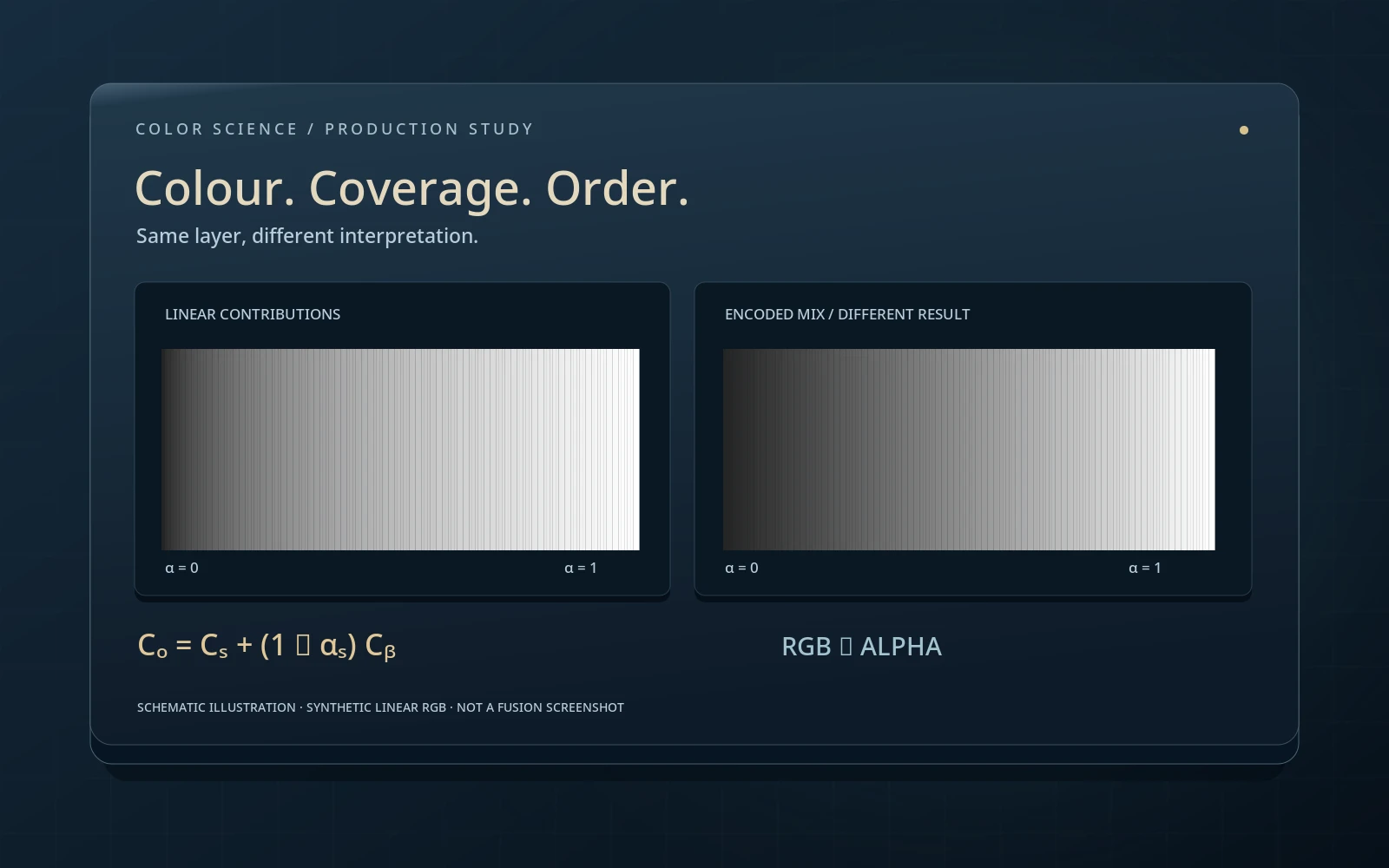
A transparent edge stores both colour and a rule for how that colour contributes. A matte is not the only possible problem: RGB may be multiplied by alpha twice, code values mixed instead of light, or hidden colours filtered into the edge. Each cause is tested separately here.
- Distinguish linear RGB encoding from the straight/premult convention.
- Locate dark or coloured fringes using a controlled edge.
- Deliver graphics with explicit colour and alpha conventions.
Before Merge: what does each layer represent?
Before mixing, identify at least three independent properties: RGB basis, transfer function and alpha convention. “Wide gamut” does not imply linear light; “premultiplied” does not identify the RGB colour space. Two files with the same four values can mean different things when these conditions differ.
For physically meaningful addition of contributions, prepare layers in a consistent scene-linear representation. Technical transforms should bring both images into one basis and scale rather than merely relabel metadata. The laboratory starts with prepared linear RGB in the sRGB/Rec.709 basis. It does not infer the colour space of an imported file or automatically fix a wrong input.
What this means in practice
If an EXR and PNG respond differently after one node, first record each colour input and alpha convention. Changing Merge cannot substitute for decoding the graphic’s sRGB.
Alpha is not a fourth colour channel
In the simple model, alpha specifies the foreground contribution and attenuation of the background. It may combine geometric pixel coverage and material opacity, but does not by itself describe refraction, coloured transmission or complex scattering. A value of 0.5 is not a universal model of “half a sheet of glass.”
sRGB, Log and PQ functions describe their respective colour signals, not coverage fractions. Alpha should not pass through the same gamma curve just because it sits next to RGB. Inspect which channels a colour operation changes. Deliberately editing a matte is a separate operation with its own purpose, not an accidental side effect of a colour transform.
What this means in practice
Change only the RGB encoding in a test RGBA. If the translucent region becomes geometrically more opaque, check whether alpha was also changed.
Source-over: colour and opacity are separate calculations
For premultiplied RGB, source-over is Cₒ = Cₛ + Cᵦ(1 − αₛ), with output alpha αₒ = αₛ + αᵦ(1 − αₛ). C already contains the alpha-weighted contribution. The formula also supports transparent backgrounds. If straight output RGB is needed, divide Cₒ by αₒ only when output alpha is nonzero.
With an opaque background, αᵦ = 1 and output alpha equals one. The colour formula reduces to αₛF + (1 − αₛ)B for straight colours F and B. The first experiment uses this case. Source-over is not commutative: reversing foreground and background changes the scene. Grouping successive over operations is associative in ordinary arithmetic, but intermediate clipping and rounding can destroy numerical equivalence.
What this means in practice
White F = 1 over black B = 0 at α = 0.5 gives a linear value of 0.5. sRGB display encoding maps it to roughly code 0.735, not 0.5.
Straight and premult: two representations of a layer
Straight RGB stores colour separately from its contribution. Premultiplied RGB stores colour multiplied by alpha. For an ordinary non-emissive layer, straight → premult is C = αF. Dividing by α > 0 recovers F, but small alpha amplifies numerical error and zero alpha makes the division undefined.
These are not two artistic modes or a “better-looking” choice. With consistent storage and interpretation they describe the same composition. Errors arise from a mismatched convention or a changed processing order. Straight is sometimes confused with linear: the first describes the RGB/alpha relationship; the second describes the light-signal representation. Nonlinearly encoded straight RGB and linear premultiplied RGB are both possible.
What this means in practice
In Alpha interpretation, match storage and reading. Switch Straight/Premult: with matching conventions the reference and test branches agree.
Why fringes become dark or excessively bright
Reading premultiplied RGB as straight causes compositing to multiply by alpha again. The contribution becomes α²F instead of αF. The error is most visible in partially transparent regions, so an opaque centre may look correct while its edge darkens.
The opposite error treats straight RGB as an already weighted contribution. Colour is added without the required attenuation; at low alpha the edge becomes too bright and may exceed the display range. Not every dark fringe comes from this mismatch: wrong colour decoding, hidden-RGB filtering, a poor matte or a baked old background can look similar. Diagnose with controlled changes rather than immediately blurring or contracting the matte.
What this means in practice
Set α = 0.5 and Premult → Straight, then match reading without changing the matte. If the error disappears, interpretation—not tracking—was responsible.
Why averaging code values does not mix light
Adding linear contributions generally differs from adding their nonlinear encodings. To combine two sRGB images as light, decode RGB, composite, then encode the result for display. Simply averaging codes does not become physically linear because the arithmetic looks simple.
Design workflows may deliberately operate on codes to match a legacy layout, achieve a particular blend or create an artistic result. Such operations are not forbidden, but should be named and tested as intentional choices. Our experiment compares precisely defined alternatives without HDR rendering or inferred application settings. An edge difference does not prove that every nonlinear artistic operation is wrong.
What this means in practice
Place white over a dark background and compare the middle of the soft edge. Then choose a coloured backdrop: channel relationships change as well as overall density.
Filter the contribution together with coverage
When resampling an ordinary layer, associated RGB and alpha should be filtered with consistent weights. An opaque red sample and a transparent sample containing arbitrary hidden RGB then produce an intermediate red contribution attenuated by intermediate alpha. Hidden colour in a fully transparent neighbour should not accidentally tint an ordinary non-emissive edge.
Interpolating straight RGB first brings hidden black or magenta into the intermediate colour. Multiplying by alpha afterwards cannot undo that mixture. The lab models only linear interpolation between two samples, not a specific Resize, Blur or keyer. Real filters also depend on kernels, boundaries, negative weights and storage precision. Extending foreground colour into transparent regions can hide a symptom but does not replace correct interpretation.
What this means in practice
In the edge mode, switch hidden RGB between black, magenta and the object colour. The reference stays unchanged; the wrong path may agree only in a specially favourable case.
A curve on premultiplied RGB: order matters
For ordinary colour correction of a non-emissive layer, the usual sequence is to obtain straight RGB where alpha is safe, apply the nonlinear function, then reassociate. Generally f(αF) is not αf(F). A curve applied directly to the associated contribution can affect a partially transparent region differently from the same object’s opaque centre.
Not every operation needs this detour. A linear matrix without an offset commutes with scalar alpha: M(αF) = αM(F). Pure exposure gain is also linear. Offsets, nonlinear transfer functions, clipping and many creative operations do not have that property. Do not surround every node with unpremult/premult blindly: establish what it computes and how it handles zero values first.
What this means in practice
In Curve and alpha, set the exponent to one: both branches agree. With exponent 0.5 and partial alpha they diverge without changing the source matte.
Zero alpha: division is undefined, erasing is not always valid
At α = 0, straight colour cannot be recovered by dividing premultiplied RGB by alpha. Very small alpha can also amplify noise or rounding, so the handling policy must be explicit. For ordinary layers created by multiplying bounded straight RGB by alpha, a zero contribution is expected. This is not a universal rule for every valid image.
OpenEXR permits nonzero RGB at zero alpha, representing emission that does not occlude the background. The associated source-over formula adds that contribution without division. Unconditionally clearing RGB wherever alpha is zero destroys it. The hero uses ordinary non-emissive shapes; this special case is explained here and covered by mathematical tests. A pipeline carrying emissive images must preserve that policy.
What this means in practice
When exporting an emission effect, compare numerical RGB and alpha. A zero matte does not automatically make every nonzero colour value garbage.
Graphics, scenes and output rendering
Finished graphics may target a particular display appearance, while a scene render is intended for further scene-linear processing. Before combining them, decide whether to preserve scene-light contribution or a logo’s specific final appearance. Merely removing a transfer function may not invert an already applied artistic rendering transform.
Rendering each layer nonlinearly before mixing generally differs from rendering the completed mixture. Position titles, highlights and graphics deliberately relative to the output transform, and document that decision. The introductory scene/display chapter demonstrates this noncommutativity; this chapter focuses on alpha and edge preservation. A viewing transform must remain distinct from modifying working data, or an extra stage can be baked accidentally.
What this means in practice
Compare a title before and after the output transform for one target master. Choose for the task, not an absolute rule that all graphics must always go before or after it.
PNG, EXR and the application boundary
The PNG specification defines unassociated alpha. OpenEXR describes a premultiplied convention for colour channels. These are important starting points, but an application may convert decoded data into its own working representation. Inspect not only the filename extension but decoding settings, colour space, precision and actual post-import values.
For delivery, state the colour input, alpha mode, channel or layer, precision, range and any already applied rendering. Create a control file with an opaque centre, soft edge and known alpha. Reimport the export and compare RGB and alpha separately. If changing format, ensure that negative, above-white or emissive values required downstream are not lost.
What this means in practice
A PNG export may look fine on a checkerboard yet fail on white. A round trip against two solid backgrounds can expose a problem before the real shot does.
Diagnose the edge without blindly treating symptoms
First verify the technical representation and compare numerical values in the opaque centre. Then inspect the same edge against black, light and saturated backgrounds. If the defect appears only after scaling, investigate filtering and hidden RGB; after a curve, inspect colour-operation order; immediately after import, check input interpretation and alpha convention.
Change one factor at a time and retain a reference branch. Do not start with matte erosion, fringe suppression or blur: they can hide symptoms while destroying detail. After correcting the cause, repeat export/reimport, motion inspection and full-frame review. This sequence cannot guarantee perfect keying, but separates technical interpretation from artistic matte work.
What this means in practice
For one faulty edge, record the first divergent stage, preceding RGB/alpha, the condition changed and confirmation after reimport.
A MODEL YOU CAN CHECK
Similar symptoms, different causes
Keep the meaning, the calculation and the limitation together.
Cₒ = Cₛ + (1 − αₛ) Cᵦ ; αₒ = αₛ + (1 − αₛ) αᵦC is associated RGB in a consistent linear basis. At nonzero output alpha, straight colour is Cₒ / αₒ. Division at zero alpha is undefined; the original associated contribution is not automatically erased.
| Concept | What it describes | What not to conclude |
|---|---|---|
| Premult → Straight | Alpha is multiplied twice. | Do not erode the matte before checking interpretation. |
| Straight → Premult | A missing contribution weight. | A bright edge is not necessarily source overexposure. |
| Code-value mixing | Compositing before RGB decoding. | Not equivalent to mixing linear light. |
| Hidden RGB | A transparent neighbour’s colour enters straight filtering. | Editing the matte does not undo the mixed-in colour. |
| Curve on premult | A nonlinear operation on an already attenuated contribution. | Not every matrix needs unpremultiplication: check linearity. |
| Alpha = 0, RGB ≠ 0 | A permitted emissive contribution in the OpenEXR convention. | Do not erase unconditionally or divide by zero. |
| PNG / EXR | File conventions and possible application-side conversion. | The extension does not describe every subsequent operation. |
DO. OBSERVE. EXPLAIN.
Examine one soft edge in four ways
Keep a reference branch and change one condition at a time. In Fusion, prepare a layer with known RGB/alpha and an opaque backdrop; preserve the original composition.
- 01
Compare light and code
Choose the first experiment, white foreground and dark backdrop. Sweep alpha from zero to one and inspect the edge.
CHECKThe ordinary branches agree at the endpoints and differ at partial alpha.
- 02
Verify the convention
Switch to Alpha interpretation. Match each storage/read pair, then introduce each mismatch in turn.
CHECKMatched conventions produce the same result without changing the matte.
- 03
Find the hidden colour
In the edge experiment, compare black and magenta hidden RGB, then extend the foreground colour.
CHECKReference filtering does not depend on hidden RGB in an ordinary transparent sample.
- 04
Check operation order and export
Compare exponents one and 0.5 in the curve experiment. Recreate the chosen chain on test graphics in your application, export and reimport.
CHECKRGB and alpha are checked separately on two backdrops, and the first divergent stage is identified.
Check your understanding
TEST THE EXPLANATION
A situation, not a trick question.
Answer first. Open the reasoning afterwards.
01The opaque centre is correct but the edge is dark. Contract the matte?+
First check for premult read as straight: multiplication again gives α²F. If matched reading fixes the issue without changing the matte, erosion is unnecessary. Similar symptoms can have other causes, so compare stages.
02Must every colour matrix be wrapped in unpremult?+
No. A linear matrix without an offset commutes with scalar alpha. Nonlinear functions, offsets and clipping are different. Establish the actual operation and zero-alpha policy.
03An EXR has zero alpha but glowing RGB. Delete it?+
Not automatically. OpenEXR permits emission without background occlusion. Agree on sender/receiver conventions; division by zero alpha or unconditional clearing loses information.
Avoid these shortcuts
- Straight and scene-linear are not synonyms.
- Multiplying by alpha again does not fix a wrong interpretation.
- Do not unconditionally erase zero-alpha RGB in emissive EXR data.
From the model to your workflow.
In Fusion and Color, verify the data state entering each operation. Parameter names and node order depend on the tool; the article does not promise identical controls in every version. The criterion is a consistent numerical path, controlled edge and repeatable export—not one universal “fix alpha” button.
CHECK THE FOUNDATION
Sources and model limits.
Editorial review: 2 October 2026. Links identify the definitions and formulas; exercises are independent teaching examples.
- [9]W3C · Compositing and Blending Level 1 ↗
Source-over formulas and separate alpha values. The mathematical section is used; the lab does not reproduce the whole CSS process. The document is a Candidate Recommendation Draft.
- [10]OpenEXR · Technical introduction ↗
Premultiplied RGB convention, compositing and nonzero RGB at zero alpha. Such pixels must not be unconditionally erased.
- [11]W3C · PNG specification, Third Edition ↗
PNG stores unassociated alpha. The file convention does not prevent an application from converting to another internal representation after decoding.
- [12]ICC · sRGB registry ↗
Piecewise sRGB transfer function, primaries and D65. It is applied to colour components, not alpha.
- [14]OpenColorIO · Displays and views ↗
Separate display/view stage and view-transform organization; the configuration and actual processing path must be known.