FAIRLIGHT / FOLEY / PERFORMANCE
Foley Sampler in Fairlight
Prepare the sound. Perform the scene.
A footstep, rustle or prop action can be performed to picture rather than placed one hit at a time. Start with a clear source-to-trigger map, check one short take, then build the scene without confusing live sound with recorded audio.
- 01Prepare distinct sound variants
- 02Build an unambiguous trigger plan
- 03Verify captured audio, not only live sound
Select a pad to change the selected sound and teaching waveform. No audio.
Know the source↗
Choose an appropriate attack and tail before assigning it.
The file plays and its action fits the picture.Change the controls to explore the diagram. No audio playback, native DSP or connection to Resolve.
Reference scope · reviewed 6 October 2026
Reviewed on 6 October 2026 against the manufacturer’s Fairlight page and the existing Instrument menu capture. The official training page offers the Resolve 20 Fairlight Audio Guide; its full PDF could not be retrieved here. These sources do not establish the exact current build or the complete Foley Sampler interface. Documented actions are separated from workflow recommendations. Library loading, MIDI, recording and listening in an installed Resolve session were not tested.
Read the source notes ↓On this page
01 / UNDERSTAND & APPLY
Foley Sampler is a performance instrument, not a catalog
Blackmagic identifies Foley Sampler as a DaVinci Resolve Studio feature: assign sounds to keys or pads, then perform them in real time with the picture.
Its practical purpose is to perform footsteps, clothing movements or object actions while following movement on screen. First choose the sounds, then assign them, and finally verify both the performance and its capture.
The existing site capture shows Instrument expanded with Foley Sampler listed. It confirms the entry, not the instrument window, every loading method, preset contents or a completed recording. The resolve21 filename does not establish an exact build.
Material
Prepared sounds with known attacks and tails.
Assignment
A clear relationship between the performer’s action and the intended sound.
Performance
Rhythm and accents against picture, followed by a separate check of the captured audio.
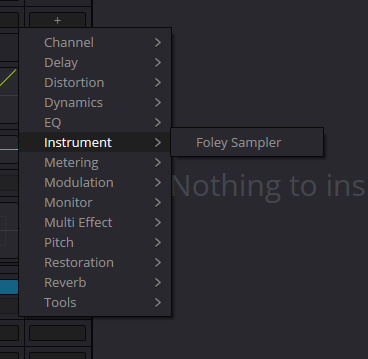
Instrument → Foley Sampler
Existing site capture: only the menu entry is visible, not Sampler controls or recorded audio. The filename is retained; the exact build is not established.
Reference: Blackmagic Design — Foley Plus Sound Effects / Fairlight · Videomontazher — original Instrument / Foley Sampler menu capture
02 / UNDERSTAND & APPLY
Start with one sound and one short test
Do not build a large set until the minimum chain has been checked.
Choose the scene
Five to ten seconds with a clear action is easier than a long sequence. Use a test copy and retain the original edit.
Prepare one source
Listen to the complete file, then select the attack and necessary tail. Confirm the object and perspective fit.
Open the instrument
Find Foley Sampler under Instrument. If it is missing, check the edition and installed documentation rather than installing an arbitrary substitute.
Assign and verify
Use the loading and assignment controls present in your Sampler window. Record which action triggers this exact sound; this guide does not substitute an unverified universal drag-and-drop path.
Check capture
Perform two or three events, finish the test and listen to the new audio take without live triggering. Only then expand the set.
Reference: Blackmagic Design — Foley Plus Sound Effects / Fairlight · Videomontazher — original Instrument / Foley Sampler menu capture
03 / UNDERSTAND & APPLY
Sample preparation matters more than pad count
Convenient triggering does not make an unsuitable source appropriate.
Check the file’s beginning. A long pause before the attack prevents a trigger at the picture event from producing an immediate impact. Retain intentional lead-in but do not confuse it with device latency. Use the Sound Library guide’s placement model to examine the relationship.
Compare variants by listening in the scene. Abrupt level differences between neighboring footsteps make rhythm harder to judge. Do not automatically normalize every sound to the same peak when contrasting force is part of the action.
Retain enough tail for a natural ending. With repeated triggers, separately check whether the previous sound continues or is interrupted. That is behavior of the actual configuration, not a universal promise of this model.
| Check | Compare | Retain |
|---|---|---|
| Attack | Picture contact and the start of useful sound | A known reference point and intentional lead-in. |
| Tail | Decay and the following impact | A natural ending without an unnecessary pause. |
| Variants | Left/right foot or light/heavy contact | Distinct names instead of identical “sample” labels. |
| Context | Surface, distance and room | The reason for choosing this material. |
04 / UNDERSTAND & APPLY
Make an assignment map before performing
The performer should not be surprised: a checked pad should call an identifiable sound.
The panel below has four educational pads, A–D. Edit each label and note number; selecting a pad displays the current pair. The numbers are examples for your plan, not Foley Sampler factory assignments or a recommendation for a particular keyboard.
This model requires distinct numbers to keep the exercise unambiguous. That is a rule of the exercise, not a claim that the real instrument cannot support layers or complex mappings. The panel neither sends MIDI nor discovers connected equipment.
After transferring the plan into the real instrument, test every input separately and then the sequence. Record the observed outcome: which sound played, whether it overlapped and whether the expected audio take was produced.
FOLEY / TRIGGER PLAN
Four sounds. Four distinct triggers.
Name the sounds and choose note numbers for your plan. Select a pad to inspect its assignment — the button does not play sound or send MIDI. This model deliberately excludes layered assignments.
A → Step / left
Note 36 · plan only; recording not verified
In Resolve, test each assignment separately, then check two in sequence. A highlighted key does not prove that the intended source was recorded.
No audio engine, MIDI device access or Resolve connection. Note numbers avoid octave-name ambiguity; they are example choices, not a factory layout. JSON is a human-readable plan, not a Sampler preset.
Reference: Blackmagic Design — Foley Plus Sound Effects / Fairlight
05 / UNDERSTAND & APPLY
Control input and captured audio are separate paths
A pressed key, an audible instrument and a recorded clip need separate confirmation.
Do not automatically reuse the microphone Input setup from the recording guide for an instrument. Establish the actual source that must reach capture first. If the route is unclear, stop at a short test; sound from speakers is not itself a captured result.
The exact way of recording Sampler output depends on the verified interface and session route. It was not tested live in this pass, so this guide does not promise that any insert on an armed track automatically prints the instrument to a file. Do not create an output-to-own-input feedback loop as a test.
| Check | Observation | What it does not prove |
|---|---|---|
| Control | The instrument reacts to the selected key or pad | That the right source plays or is being captured. |
| Monitoring | The intended sound is audible through the selected listening system | That the instrument output reaches the capture path. |
| Capture | A new audio clip and an accessible source appear | That the file contains only the intended performance. |
| Playback | The take plays without live triggering | That the entire longer sequence is in sync and ready for delivery. |
Reference: Blackmagic Design — Foley Plus Sound Effects / Fairlight · Blackmagic Design — Fairlight / VO and Multi Track Recording
06 / UNDERSTAND & APPLY
Perform a trial and check timing against events
Choose a few visible contacts and record a short sequence.
Rehearse to picture first without correcting every mistake as you go. Then make one trial pass. Compare the recorded attack against picture near the start and end, not merely the file’s starting position.
If all attacks are displaced by roughly the same amount, record that observation and investigate monitoring and capture. If the difference changes, the performance or another problem may be responsible. One failed trial does not establish a sample-rate fault.
Do not prescribe an arbitrary minimum buffer for every user. Find a setting that lets this specific system play and capture the trial reliably. Record both the setting and outcome; crackles, missing audio or unstable response are reasons to stop a long pass.
Keep it short
Two or three clear contacts are easier to verify than continuous long noise.
Do not substitute live sound
Playback must demonstrate the captured take, not a new key press.
Check multiple events
One aligned impact does not validate the complete sequence.
Reference: Blackmagic Design — Foley Plus Sound Effects / Fairlight
07 / UNDERSTAND & APPLY
Ordinary sound editing follows the performance
The sampler helps you play; it does not make the editorial decision.
Choose the strongest take, adjust individual attacks, inspect joins and balance against dialogue. Keep alternatives until the choice is approved. Showing track layers is not automatic selection of the best performance.
A rhythmic sequence need not sound identical throughout. Match accents to force and movement in the picture. A quiet touch and heavy step may require different sources rather than different levels of one file.
Group material by scene or purpose so another editor can distinguish footsteps, clothing and props. Before the final comparison, verify routing and remove accidental playback of earlier duplicate attempts.
08 / UNDERSTAND & APPLY
Retain sources, assignments and the chosen take
A repeatable outcome includes both the material and a record of the pass.
The learning panel’s JSON is a planning card, not a preset or Sampler backup. It contains no audio and cannot restore the instrument. Use a verified project-and-media archiving workflow, and confirm reopening on the required workstation before handover.
| Hand over | Record |
|---|---|
| Environment | Resolve version/build, edition, OS and controller if used. |
| Sources | Exact names and sound identifiers, usage conditions and stable storage. |
| Assignments | Which key or pad triggers each variant; the checked setup, not only a draft. |
| Take | Captured audio file, timeline location and selected alternative. |
| Verification | Listening, several sync points and unresolved limitations. |
09 / UNDERSTAND & APPLY
Five common failures without random fixes
| Observation | Check | Do not assume |
|---|---|---|
| Foley Sampler is missing | Studio, the version and the actual Instrument list. | That any similarly named third-party sampler is equivalent. |
| Pad responds but stays silent | Assigned source and the audio signal path. | That an animation proves the file played. |
| Sound is audible but the take is empty | Actual capture source and routing. | That everything you hear is automatically recorded. |
| The wrong sound plays | Every key/pad assignment individually. | That importing labels established the desired mapping. |
| The sequence sounds artificial | Sources, variation, attacks, tails and rhythm. | That another plug-in must solve it. |
Reference: Blackmagic Design — Foley Plus Sound Effects / Fairlight · Videomontazher — original Instrument / Foley Sampler menu capture
PRACTICE / NO AUTOPILOT
A small task. A checkable result.
Work in a test copy, listen before and after, and write down what you actually observed. The checklist contains no pre-approved results.
Choose a short scene
Use two or three clear contacts in a test copy and retain the original edit.
Prepare two sources
Record names, attacks, tails and why the variants belong to the scene.
Check assignments
Transfer the intended mapping into your actual setup and test each trigger separately.
Make one trial take
Establish the capture route, perform a short pass and play the new audio without live triggering.
Document the outcome
Record several sync points, source availability, exact environment and unresolved capture issues.
FAQ / BEFORE THE NEXT MOVE
Questions that matter in practice
Is Foley Sampler a Studio feature?
The current manufacturer’s Fairlight page identifies it as available in DaVinci Resolve Studio. Check your edition and build.
Reference: Blackmagic Design — Foley Plus Sound Effects / Fairlight
Does the capture show every Sampler control?
No. It shows Instrument and the Foley Sampler entry. Parameter ranges and complete menus cannot be inferred from it.
Reference: Videomontazher — original Instrument / Foley Sampler menu capture
Are the panel’s note numbers factory defaults?
No. They form an editable educational plan. No controller is detected and no MIDI is sent.
Why does a heard instrument produce an empty take?
Monitoring and capture may follow different routes. Establish the actual recording source; hearing the instrument does not prove its output was captured.
Reference: Blackmagic Design — Fairlight / VO and Multi Track Recording
Does the plan recreate my Sampler preset?
No. Its JSON has labels and note assignments, no audio, native settings or project state.
Should I record the whole scene after one meter response?
No. First verify a short recorded take by playback without live triggering, then inspect several picture/sound events.
Reference: Blackmagic Design — Foley Plus Sound Effects / Fairlight
REFERENCES / 2026-10-06
What this guide is based on
Reviewed on 6 October 2026 against the manufacturer’s Fairlight page and the existing Instrument menu capture. The official training page offers the Resolve 20 Fairlight Audio Guide; its full PDF could not be retrieved here. These sources do not establish the exact current build or the complete Foley Sampler interface. Documented actions are separated from workflow recommendations. Library loading, MIDI, recording and listening in an installed Resolve session were not tested.
Blackmagic Design — Official Training ↗
The official page still offers the Resolve 20 Fairlight Audio Guide. The full PDF could not be read during this pass; it is not presented as a verified current interface reference.
Blackmagic Design — Fairlight / VO and Multi Track Recording ↗
Reviewed recording section: Input, Patch, R, transport, stopping and further takes on layers. Also checked layers and Elastic Wave. A workflow reference, not proof of microphone or OS compatibility.
Blackmagic Design — Sound Effect Libraries / Fairlight ↗
Manufacturer description of search, marking a portion, Audition, Confirm/Cancel and aligning a waveform point with Sync. Checked 6 October 2026. Does not establish the complete add-library dialog, any particular collection’s parameters or a live test of this example.
Blackmagic Design — Foley Plus Sound Effects / Fairlight ↗
Identifies Foley Sampler as a Studio feature for assigning sounds to a keyboard or pads and performing to picture. Not used to invent controls, limits, automatic variations or an exact instrument-to-file capture route.