FAIRLIGHT / TONAL REPAIR / 07.03
De-Hummer
Remove the hum. Keep the voice.
A persistent tone and its multiples need a precise target, not removal of the entire low end. Identify a plausible fundamental, balance the treatment and check what useful sound is being lost.
- 01Establish the fundamental, not a guess
- 02Separate Amount from Slope
- 03Check removed material and the remaining voice
Change the fundamental: its multiples move together. This is not a measured spectrum.
One fundamental. Several multiples.↗
50, 100, 150 and 200 Hz form a calculated series, not a measurement of a recording. Check whether the observed tone belongs to that family.
Compare a pause with a spoken phrase.Change the controls to explore the diagram. No audio playback, native DSP or connection to Resolve.
Sources and scope · 7 October 2026
Purpose checked against the official Blackmagic page. Controls and GUI checked against primary Resolve 21 manual text and an illustration hosted by independent iMaster. Illustrated scales do not establish every build. The original site image path is retained, but its bytes are absent from the ZIP and reinspection failed. The teaching calculation does not model filters. No listening or installed-Resolve test was performed in this pass.
Read the source notes ↓On this page
01 / UNDERSTAND & APPLY
When De-Hummer fits the problem
Start with a short scene containing a pause, an ordinary phrase and a quiet ending. Compare the source without restoration inserts with the current edit. Note where the tone occurs and whether it persists between words. An isolated analyzer line may belong to the voice or a musical instrument; a line alone does not establish interference.
Blackmagic describes De-Hummer as an electrical-hum repair tool. A practical clue is a stable fundamental with related multiples. It is not a universal remover of traffic, wind, hiss, reverberation or clicks. Hum in a file also does not identify the cable or device that caused it.
Tonal hum
Check the frequency and its multiples at several points. Start with one narrowly defined problem.
Broadband noise
For hiss without a stable series, investigate Noise Reduction. Deep De-Hummer notches are not a substitute.
Useful low end
Low notes and voices can overlap the interference. Preserving the material matters more than making a pause perfectly silent.
Reference: Blackmagic Design — Fairlight / Clean Up and Repair Sound · Blackmagic Design — Resolve 21 Reference Manual · Fairlight FX, pp. 4101–4102 (iMaster mirror)
02 / UNDERSTAND & APPLY
What the window actually contains
Open the Effects Library and find De-Hummer among Fairlight FX. Placing the effect on a clip limits its scope to that occurrence; a track insert processes the signal passing through that track. Do not start on a shared bus to fix one affected take. Check the clip or channel name before adjusting anything.
The manual illustration shows three frequency modes, Frequency, Amount, Slope, Listen to Hum only, a graph and the main enable switch. The top strip contains common Fairlight FX preset, A/B and Reset controls. A closed preset list cannot establish the names of all available presets.
| Control | Checked evidence | How to read it without assumptions |
|---|---|---|
| 50 Hz / 60 Hz / Variable | Two fixed choices and manual adjustment | The project country does not select the correct mode. |
| Frequency | Illustrated scale: 50–400 Hz | Sets the fundamental in Variable. Check the limits in your own build. |
| Amount | Illustrated scale: 0 to −30 dB; example −15.0 | Extraction amount, not the level of the completed file. |
| Slope | Low ↔ High; example 0.0 | Balances treatment of the fundamental and its multiples. |
| Listen to Hum only | Monitors the removed component | Diagnostic output, not normal processed audio. |
| Graph | Shows frequencies and harmonics targeted by the controls | Not a measured spectrum of your source or a listening result. |

De-Hummer
The illustrated Variable mode and 50 Hz value do not identify the frequency of your interference. The graph is not a measurement of your recording.
Image source ↗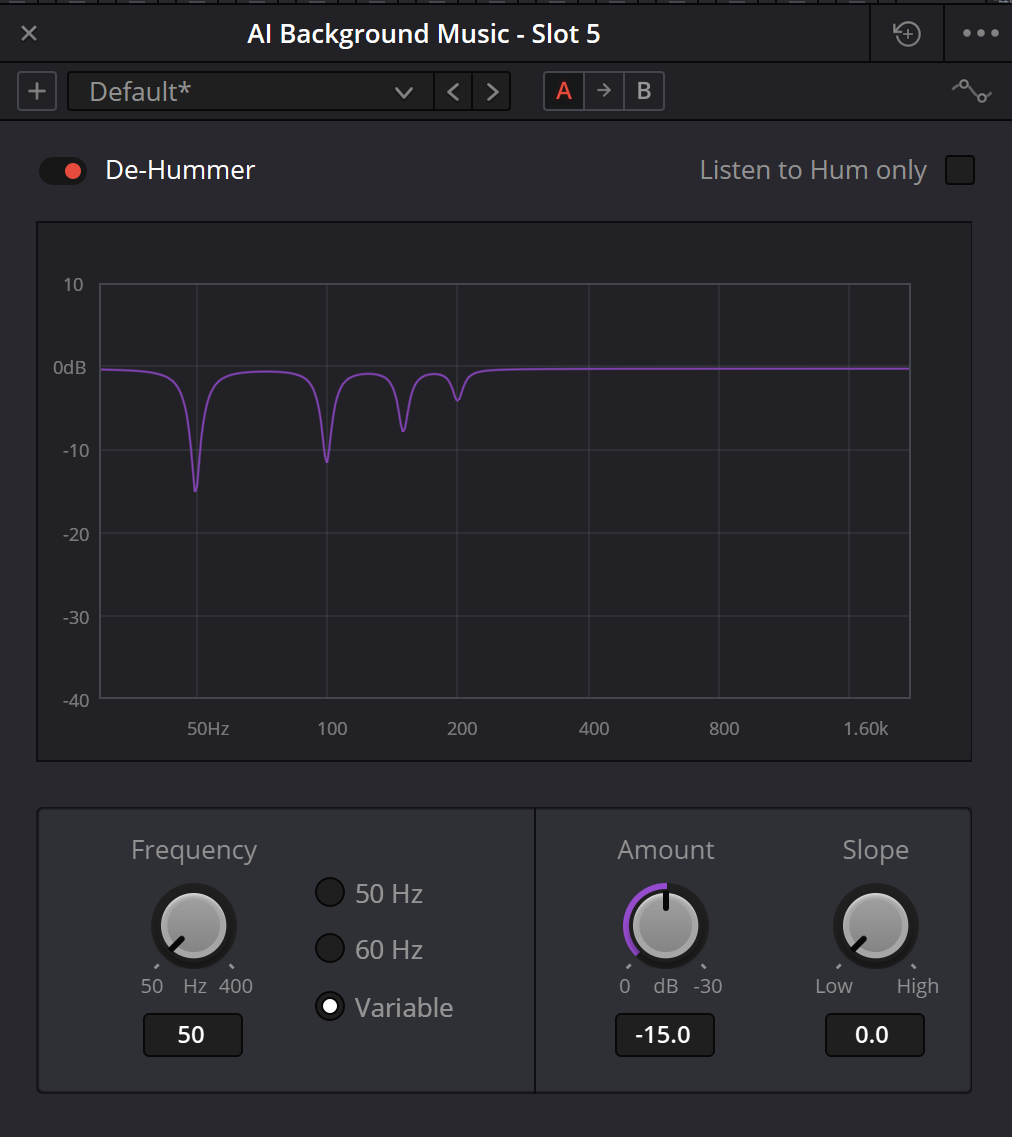
Original site illustration
The existing path is retained. The file is absent from the supplied archive and was not successfully reinspected; its name does not establish an installed software version. The controls below were checked against the separately available manual illustration.
Reference: Blackmagic Design — Fairlight / Clean Up and Repair Sound · Blackmagic Design — Resolve 21 Reference Manual · Fairlight FX, pp. 4101–4102 (iMaster mirror) · Blackmagic manual illustration — De-Hummer (independent hosting)
03 / UNDERSTAND & APPLY
50, 60 or Variable: follow the recording
50 and 60 Hz are convenient initial hypotheses. Listen to a pause and compare several persistent tones with multiples of the proposed fundamental. The most prominent peak need not be the fundamental: a 100 Hz line could be the second harmonic of 50 Hz or a separate 100 Hz tone. One line cannot distinguish those explanations.
Use Variable when the hypothesis calls for a different fundamental. A small change moves the entire calculated series: at 59.9 Hz, multiples two through four are 119.8, 179.7 and 239.6 Hz. That is arithmetic, not a promise of automatic detection or tracking inside the plugin.
Do not increase extraction to compensate for an evidently incorrect frequency. Recheck the source, mode and stability of the tone first. If it changes within the scene, or two devices produce different families, make separate observations for each section. Do not carry one preset between them without comparison.
| Fundamental | 2 × f₀ | 3 × f₀ | 4 × f₀ |
|---|---|---|---|
| 50 Hz | 100 Hz | 150 Hz | 200 Hz |
| 60 Hz | 120 Hz | 180 Hz | 240 Hz |
| 59.9 Hz | 119.8 Hz | 179.7 Hz | 239.6 Hz |
Reference: Blackmagic Design — Resolve 21 Reference Manual · Fairlight FX, pp. 4101–4102 (iMaster mirror)
04 / UNDERSTAND & APPLY
Amount and Slope are not two strength controls
Amount controls the quantity of hum extraction. On the inspected illustration, moving from zero towards more negative values increases the requested reduction. Begin with modest treatment and listen to words, not just the pause. A −15 dB setting does not imply that all output becomes exactly 15 dB quieter, and it does not set the file peak ceiling.
Slope changes the relationship between treatment of the fundamental and its multiples. The manual gives three landmarks: 0 emphasizes the fundamental, 0.5 provides even extraction, and 1.0 emphasizes higher partials. These describe the control direction, not a published filter equation. Do not assign linear weights or exact attenuation to intermediate values without measurement.
Accordingly, “raise Slope until every harmonic disappears” is too crude. Recheck both the lower and upper parts of the interference after changing it: you are changing the balance, not simply adding another cleanup stage. Slope is not a dB/oct high-pass slope, harmonic-count selector or Q control.
| Observation | Check next | Avoid |
|---|---|---|
| The fundamental remains | Frequency and Slope emphasis towards the fundamental | Blindly increasing upper-harmonic emphasis. |
| The low tone is acceptable but buzz remains | The multiples and Slope balance | Assuming every buzz belongs to the same series. |
| The voice sounds thinner | Amount, frequency, Slope and insertion scope | Trying to restore the lost timbre by simply raising volume. |
Reference: Blackmagic Design — Resolve 21 Reference Manual · Fairlight FX, pp. 4101–4102 (iMaster mirror) · Blackmagic manual illustration — De-Hummer (independent hosting)
05 / UNDERSTAND & APPLY
Listen to Hum only: the cost of the repair
This mode lets you hear the component being removed. Make short comparisons at a moderate, unchanged monitoring level. If useful notes, vocal body or important atmosphere become clear in the removed component, revisit the settings and the processing scope.
The diagnostic output need not be a mathematically perfect sine wave: real interference may contain several components. However, recognizable speech is not an acceptable loss merely because hum is removed alongside it. Assess the cost on the words that must survive.
Turn Listen to Hum only off before normal comparison and export. Then check bypass separately. Removed-signal monitoring, full bypass and normal processed output are three different states. Neither the graph nor an enabled insert establishes which state reached the output file.
Reference: Blackmagic Design — Resolve 21 Reference Manual · Fairlight FX, pp. 4101–4102 (iMaster mirror)
06 / UNDERSTAND & APPLY
Teaching map: fundamental, multiples and an observed line
Choose a mode and optionally enter an observed frequency. The table calculates four multiples and “observation minus candidate” for each row. A positive difference puts the entered line above the candidate. A tie is not hidden: both equally close rows remain highlighted.
This map does not measure audio or detect the fundamental. Amount and Slope are recorded choices; they do not become an invented frequency response or attenuation on the graph. Switching to a fixed mode retains the manual-frequency text as an unused draft.
HUM / FREQUENCY MAP
Test a frequency hypothesis
The map calculates candidate multiples. It does not locate interference, read audio or estimate plugin attenuation. Amount and Slope below are a record, not an audio process.
These limits follow the inspected illustration and the teaching form; they do not certify every installed build. A blank observation means “not entered,” never 0 Hz.
Four calculated frequencies, not measured peaks
Solid lines: calculated candidates. Dashed line: the entered observation, when it fits the chart. Equal heights carry no level information.
Δ = observation − candidate. A positive difference means the observed line is higher.
| n | n × f₀, Hz | Δ, Hz | Match |
|---|---|---|---|
| 1 / f₀ | 50 | — | — |
| 2 | 100 | — | — |
| 3 | 150 | — | — |
| 4 | 200 | — | — |
No observation supplied. Nothing has been diagnosed.
Amount: -12 dB · Slope: 0.5
Manual landmark 0.5: even extraction across the targeted family. No native attenuation is calculated.
Normal output selected in this card. The application has not been checked.
No audio playback, uploads, Resolve connection or automatic storage. Downloaded JSON is a teaching record, not a Resolve preset. Notes are lost when you leave unless you save them. Do not enter secrets or personal data.
07 / UNDERSTAND & APPLY
A practical sequence without an automatic effects chain
Prepare the comparison
Keep the source and a test timeline copy accessible. Choose a pause and a complete phrase. Record existing inserts and the new processing scope.
Check the frequency
Compare several tones against the proposed fundamental. Start with the appropriate 50/60 or Variable mode, not maximum Amount.
Adjust Amount and Slope
Change one parameter at a time. Check the remaining hum and useful low end. Use Hum only for an additional diagnostic listen.
Compare the whole scene
Return to normal output. Compare quiet and loud phrases without a loudness advantage, then enable the rest of the mix and downstream dynamics.
Save the reviewed version
Use A/B and a preset for repeatable comparison. After reopening, check actual controls, monitoring mode and insertion scope, not just the preset name.
Reference: Blackmagic Design — Fairlight / Clean Up and Repair Sound · Blackmagic Design — Resolve 21 Reference Manual · Fairlight FX, pp. 4101–4102 (iMaster mirror)
08 / UNDERSTAND & APPLY
When the result does not match the expectation
| Symptom | Next check | Stop condition |
|---|---|---|
| Hum barely changes | Correct clip/channel? Insert enabled? Matching frequency family? | Do not increase Amount with an unconfirmed target. |
| You hear interference instead of speech | Is Listen to Hum only still enabled? | Restore normal output before assessing quality. |
| Voice or bass timbre changes | Compare the original, reduce treatment and narrow the scope | Do not trade essential material for a silent pause. |
| One tone disappears but another remains | Check another family or source | Do not assign every line to one fundamental. |
| Acceptable in solo, noticeable in the mix | Check downstream compression, gain and other sources | Do not add a second master-bus De-Hummer without a fresh check. |
| Reopening or export sounds different | Controls, bypass, Listen, active layer, range and Deliver bus | An old audition does not verify a new file. |
09 / UNDERSTAND & APPLY
What to preserve with the result
Record the project, timeline, clip or track, Resolve version and edition, OS, test range and insert settings. Give a preset a meaningful name, but do not use its name instead of mode, Frequency, Amount and Slope details. Reset restores default settings; it is not the same operation as bypass.
Before final export, audition normal output, then open the actual resulting file: the same pause, quiet phrase and useful low end. Check the audio source in Deliver and the intended range. For a track insert, make sure neighboring clips from another microphone were not harmed.
Record more than “hum is quieter.” For example: “checked the pause and two word endings; no obvious loss of vocal body; normal output, Listen off.” Leave anything not auditioned unverified. Keep the original file and a route back to it regardless of whether this attempt succeeds.
Reference: Blackmagic Design — Fairlight / Clean Up and Repair Sound · Blackmagic Design — Resolve 21 Reference Manual · Fairlight FX, pp. 4101–4102 (iMaster mirror)
PRACTICE / NO AUTOPILOT
A small task. A checkable result.
Work in a test copy, listen before and after, and write down what you actually observed. The checklist contains no pre-approved results.
Identify the target
Test copy, source, channel and time range. Preserve the original separately.
Test the frequency hypothesis
Compare a pause and a phrase. Record the proposed fundamental and several observed components, not just the tallest peak.
Change one parameter
Note mode, Frequency, Amount and Slope. Change only one in each comparison.
Check useful material
Briefly audition Hum only, then normal output. Compare timbre, quiet endings and the full mix.
Check repeatability
Reopen the project and audition a test export. Record the observed result or the remaining gap.
FAQ / BEFORE THE NEXT MOVE
Questions that matter in practice
Should I always start at 50 Hz?
No. 50 and 60 Hz are common interference frequencies and available choices, but the recording may call for Variable or another tool. Follow the source, not the application language or project country.
Reference: Blackmagic Design — Resolve 21 Reference Manual · Fairlight FX, pp. 4101–4102 (iMaster mirror)
Does a 100 Hz peak mean Frequency must be 100?
Not necessarily. It could be a 100 Hz fundamental, the second harmonic of 50 Hz, or useful content. Compare several components and pauses; one frequency is not conclusive.
How does Slope differ from Amount?
Amount sets extraction strength. Slope distributes the treatment between the fundamental and its multiples. Increasing Slope does not mean an equal increase in cleanup across the whole series.
Reference: Blackmagic Design — Resolve 21 Reference Manual · Fairlight FX, pp. 4101–4102 (iMaster mirror)
Can I leave Listen to Hum only enabled?
For a diagnostic audition, yes. Turn it off and recheck the output for an ordinary result. Otherwise you are assessing the removed component rather than the processed material.
Reference: Blackmagic Design — Resolve 21 Reference Manual · Fairlight FX, pp. 4101–4102 (iMaster mirror)
Does the site model show real De-Hummer notches?
No. It multiplies the entered fundamental by 1, 2, 3 and 4, compares frequencies and records chosen settings. It does not calculate native filter count, frequency response or actual attenuation.
Is a clean pause sufficient?
No. Check speech, music and other useful sound in the same scope, then the mix and export. A clean pause may conceal lost timbre or an incorrect monitoring mode.
REFERENCES / 2026-10-07
What this guide is based on
Purpose checked against the official Blackmagic page. Controls and GUI checked against primary Resolve 21 manual text and an illustration hosted by independent iMaster. Illustrated scales do not establish every build. The original site image path is retained, but its bytes are absent from the ZIP and reinspection failed. The teaching calculation does not model filters. No listening or installed-Resolve test was performed in this pass.
Blackmagic Design — Fairlight / Clean Up and Repair Sound ↗
Primary source for the purposes of De-Esser, De-Hummer and Noise Reduction and clip/channel placement. Read 7 October 2026; not a test of an installed build.
Blackmagic Design — Resolve 21 Reference Manual · Fairlight FX, pp. 4101–4102 (iMaster mirror) ↗
Primary Blackmagic text on an independent mirror; De-Esser, De-Hummer and Common Controls read. Range names, Reaction and removed-signal monitoring checked. The Listen to Ess Only text/image discrepancy is explicitly noted.
Blackmagic manual illustration — De-Hummer (independent hosting) ↗
Inspected Frequency, 50 Hz / 60 Hz / Variable, Amount, Slope and Listen to Hum only. It depicts settings, not a measurement of user audio.