FAIRLIGHT / ORGANIZATION / FOLDERS
Fairlight track folders
Fewer rows. The same underlying session.
Turn dialogue, ambience and effects into a readable hierarchy without confusing visual organization with the mix. Learn what the folder shows, what remains inside, and which operations need a separate check.
- 01Create a folder from selected tracks
- 02Separate disclosure, Solo/Mute and bus routing
- 03Verify membership after restructuring
Collapse the folder: members remain, only the representation changes.
A group instead of a long track list↗
A container presents selected tracks in a composite view. Music and the main bus can remain outside a dialogue group.
Record the intended members first.Change the controls to explore the diagram. No audio playback, native DSP or connection to Resolve.
Reference scope · reviewed 6 October 2026
Documentation reviewed on 6 October 2026. Folder Tracks: Resolve 21 New Features Guide, pages 105–107. All four existing images inspected. These are written procedures and local learning models, not live Resolve certification. Exact build, edition and operating-system behavior must be checked in your installation. Original screenshot filenames do not establish a build.
Read the source notes ↓On this page
01 / UNDERSTAND & APPLY
Folder, layer or bus?
These are three different forms of grouping, not interchangeable shortcuts.
Folder Tracks were introduced on the Fairlight page in Resolve 21. A folder collects several tracks into a composite presentation while retaining access to the originals when expanded. It is useful when a well-understood session has become difficult to navigate.
For example, an interview’s two microphones and room tone can belong to Dialogue. That does not mean they should automatically feed a particular bus. Verify their Mixer assignments independently; conversely, sharing an output does not require tracks to share a folder.
| Object | What it combines | What remains a separate check |
|---|---|---|
| Folder Track | Multiple tracks in a hierarchy | Member routing and processing |
| Audio Track Layers | Alternative clips within one track | Which take portion is selected at a given time |
| Bus | Signals through explicit assignments | Format, processing, returns and file output |
Reference: Blackmagic Design — Resolve 21 New Features Guide · pp. 105–107
02 / UNDERSTAND & APPLY
Create: Add Tracks to New Folder
Choose the members before creating the container.
On the Fairlight page, select the headers of two or more intended tracks. Check that the selection is a set of tracks rather than just one clip. Right-click the selection and choose Add Tracks to New Folder.
Click the resulting folder name to rename it. Names such as Dialogue, Ambience or Foley describe the material or task. Vague labels such as “new 3” become unhelpful when a colleague opens the session; output-like names can also imply a routing relationship that has never been checked.
Check the selection
The interview microphones belong inside; unrelated music remains unselected.
Create and expand
Verify the members’ names and count, not merely the appearance of a new folder row.
Compare the starting state
Check clip positions and assignments. Correct mistaken membership on a test copy rather than deleting a source track to tidy the view.

Before grouping
Record membership and order first. This image shows layout, not verified routing or audibility.
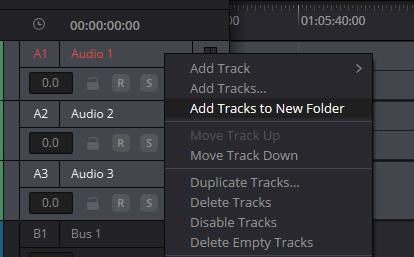
Selected-track menu
Use Add Tracks to New Folder to create the container. Delete Tracks here applies to the selected tracks; it is not a substitute for removing the folder itself.
Reference: Blackmagic Design — Resolve 21 New Features Guide · pp. 105–107 · Videomontazher — original Folder Tracks captures
03 / UNDERSTAND & APPLY
Expanded and collapsed views
The disclosure triangle controls visible detail; it is not a substitute for audio controls.
A collapsed folder shows compact, colored blocks indicating its members’ clip positions. This is a composite overview without normal detailed waveforms. Color helps you navigate; it does not establish completeness, synchronization or audibility.
The Resolve 21 guide specifically notes that the collapsed view does not show level meters, and reopening restores them. Missing meters in the closed presentation are not a reason to raise the fader or change the speaker output. Expand the relevant group first.
Bus 1 appears outside the folder in the original captures. That illustrates the visible distinction between a track container and a bus; it is not evidence that their connections have been tested.
| Action | Presentation change | What it does not prove |
|---|---|---|
| Collapse | Member rows are hidden; composite blocks remain | Tracks were deleted or sound was muted |
| Expand | Individual tracks and meters become accessible | Their routing was automatically fixed |
| Inspect colored blocks | Broad material layout is visible | A transition or mix has passed listening checks |

Expanded folder
Original tracks are accessible inside while the composite remains an overview. Bus 1 in this image is not a folder member.

Collapsed folder
Blocks show material placement without detailed waveforms. Hidden rows and meters do not imply deletion or muting.
Reference: Blackmagic Design — Resolve 21 New Features Guide · pp. 105–107 · Videomontazher — original Folder Tracks captures
04 / UNDERSTAND & APPLY
Explore the hierarchy
Close the outer folder, then reopen it. The underlying track set should still be present.
In this learning tree, Dialogue contains Voices and ROOM; Voices contains D1 and D2. MUSIC stays outside. Two folder rows are containers, not two additional sound sources: four original tracks have not become six audio tracks.
The inner disclosure choice persists while the outer folder is closed. This demonstrates the independence of presentation from membership. Exported JSON records this teaching model only; it cannot be installed in Resolve.
FOLDER / VISIBILITY LAB
Collapse the view, not the tracks
Two nested folders and four source tracks. This model changes row visibility only, never bus connections.
Voices contains D1 and D2. ROOM is the other Dialogue member. MUSIC stays outside. The inner disclosure selection persists while the outer folder is closed.
Visible rows
The visible row count includes folders. It is not the audio-track count or a file channel count.
The model does not calculate Solo/Mute, processing, routing or audibility. Collapsing changes only the row list. The JSON is a teaching record, not a Resolve configuration. No Resolve connection, audio analysis, data upload or automatic saving.
05 / UNDERSTAND & APPLY
Folder Solo/Mute and composite editing
Disclosure, group controls and editing are separate actions.
The Folder Tracks documentation provides group Solo and Mute controls. Use them deliberately and recheck both folder and member states after diagnosis. Verify the audible result in the actual session with its current signal routing rather than relying on one familiar icon.
Editing in the composite presentation is supported. That general statement does not specify every tool’s behavior with locked tracks, linked clips or automation. Before a group edit, expand the folder and define exactly what should be affected.
On a short section of a test copy, record affected positions, perform one operation, then expand again. Compare every member and adjacent clips with the starting state. Stop if the change reaches beyond the intended scope instead of chaining more group operations.
Reference: Blackmagic Design — Resolve 21 New Features Guide · pp. 105–107
06 / UNDERSTAND & APPLY
Nesting: up to three levels
Count folder levels, not the individual tracks contained inside them.
The Resolve 21 document specifies a maximum of three nested folder levels. Dialogue → Scene 01 → Microphones is a three-level hierarchy. Mic 1 and Mic 2 inside Microphones are member tracks, not a fourth level of folders.
Start with one or two meaningful levels. An unnecessarily deep tree makes Solo/Mute checks and microphone selection harder. Nesting is most useful when it reflects how the material is actually used: scene, character group or category of effects.
When restructuring an existing hierarchy, confirm the resulting parent and sibling order on a copy rather than inferring success from a drag gesture. Expand neighboring folders afterward. A refused nesting action is not a reason to delete original tracks.
Group by task
Separate dialogue and ambience when they serve different phases of the work.
Group by material
Collect microphones for a scene when you regularly compare them together.
Avoid decorative nesting
An extra container should reduce searching, not merely make a symmetrical tree.
Reference: Blackmagic Design — Resolve 21 New Features Guide · pp. 105–107
07 / UNDERSTAND & APPLY
Remove the container, not its members
The documented command applies to the folder header itself.
To remove a Folder Track and restore the original tracks, the guide describes right-clicking the folder and choosing Delete Track. Select the container deliberately, read the menu context and test the operation on a duplicate timeline first.
Do not confuse it with Delete Tracks in the context menu for selected ordinary tracks. That plural command is visible in the creation capture; its presence does not establish that deleting the selection will safely remove only a folder.
After removing the container, compare source-track names and count, clip positions and output assignments. A missing member is not a successful cleanup. Return to the preserved copy and establish what was selected before continuing.
Reference: Blackmagic Design — Resolve 21 New Features Guide · pp. 105–107 · Videomontazher — original Folder Tracks captures
08 / UNDERSTAND & APPLY
When the result is unexpected
Separate presentation problems from signal problems.
| Observation | First check | Avoid guessing |
|---|---|---|
| No Add Tracks to New Folder | Resolve 21, Fairlight page, at least two selected track headers | Do not substitute a delete command |
| Members are missing from view | Outer and inner disclosure states | Do not reimport the sources |
| No meters in the closed view | Expand, then check the normal signal path | Do not change gain just because a meter is hidden |
| A group is silent | Folder/member Solo and Mute, then routing | Do not blame disclosure alone |
| An edit moved too much | Selection, links, tool and the control copy | Do not continue bulk edits without comparison |
| Nesting is refused | Current number of nested folder levels | Do not delete tracks to work around the limit |
Reference: Blackmagic Design — Resolve 21 New Features Guide · pp. 105–107
09 / UNDERSTAND & APPLY
Before handing over the session
The structure should make sense to someone other than its author.
Open and close each group, check names and clear accidental diagnostic Solo/Mute states. Document bus assignments separately so the recipient does not have to infer routing from a folder label.
Listen to a short passage using all relevant groups before and after restructuring. That is a check of one passage, not proof that the entire timeline is error-free. Normal checks of sync, processing, output selection and the delivered file still apply.
Write an observation such as “D1, D2 and ROOM are present after expansion; MUSIC remains outside.” A note saying “all good” cannot be reproduced and does not help locate a lost member later.
Reference: Blackmagic Design — Resolve 21 New Features Guide · pp. 105–107
PRACTICE / NO AUTOPILOT
A small task. A checkable result.
Work in a test copy, listen before and after, and write down what you actually observed. The checklist contains no pre-approved results.
Record the starting state
Duplicate a timeline with four named tracks. Record their order and bus assignments, then listen to a selected passage.
Create Dialogue
Select the two dialogue tracks, create and name a folder, and verify the other two tracks remain outside.
Compare both views
Collapse and expand. Record the change in visible rows and meters without touching faders or assignments.
Test one group control
On the copy, test folder Mute and restore the starting state. Record the listening observation separately from the button appearance.
Test container removal
Select the folder header and follow the documented removal command. Compare track count, names, positions and routing with the first step.
FAQ / BEFORE THE NEXT MOVE
Questions that matter in practice
Are Folder Tracks audio buses?
No. They organize tracks into a hierarchical composite view. Check routing and summing separately in the Mixer; matching folder and bus names do not prove a connection.
Reference: Blackmagic Design — Resolve 21 New Features Guide · pp. 105–107
Which version is required?
The feature is documented in the Resolve 21 New Features Guide. This article does not promise it in Resolve 20 or establish an exact build from a screenshot filename.
Reference: Blackmagic Design — Resolve 21 New Features Guide · pp. 105–107
Why is the folder command unavailable?
The documented workflow selects two or more tracks on the Fairlight page. Check the version, page and track-header selection before looking for a workaround.
Reference: Blackmagic Design — Resolve 21 New Features Guide · pp. 105–107
Does collapsing mute the folder?
Disclosure controls presentation. Group muting is a separate control. If sound disappears, expand the folder and check its controls, members and signal path.
Reference: Blackmagic Design — Resolve 21 New Features Guide · pp. 105–107
How many nesting levels are supported?
The Resolve 21 guide specifies a maximum of three. Count nested containers; source tracks within the third folder are not an additional folder level.
Reference: Blackmagic Design — Resolve 21 New Features Guide · pp. 105–107
Can I remove a folder and retain its tracks?
The guide documents Delete Track in the context of the folder itself, restoring the original tracks. Do not apply that advice to selected ordinary tracks. Test on a copy and verify membership afterward.
Reference: Blackmagic Design — Resolve 21 New Features Guide · pp. 105–107 · Videomontazher — original Folder Tracks captures
REFERENCES / 2026-10-06
What this guide is based on
Documentation reviewed on 6 October 2026. Folder Tracks: Resolve 21 New Features Guide, pages 105–107. All four existing images inspected. These are written procedures and local learning models, not live Resolve certification. Exact build, edition and operating-system behavior must be checked in your installation. Original screenshot filenames do not establish a build.
Blackmagic Design — Resolve 21 New Features Guide · pp. 105–107 ↗
Folder Tracks text and figures inspected on pages 105–107: creation from two or more tracks, composite view, meters, Solo/Mute, three nesting levels and removing the container. Documentation review does not replace operation tests in your build.
Videomontazher — original Folder Tracks captures ↗
Four original captures inspected on 6 October 2026. The creation menu shows Add Tracks to New Folder; its Delete Tracks item must not be substituted for the command that removes the folder itself. Exact build and audibility are not established by images.