FAIRLIGHT / FINAL MIX / METERING · 11
Loudness Meter
Measure the programme. Know what entered the result.
Identify the measured bus and programme boundaries, select the required standard and read the Loudness panel. Understand why Integrated differs from a short window and a simple average, then perform a repeatable measurement of the final mix.
- 01Distinguish M, Short, Integrated and true peak
- 02Explain the LU reference and quiet-block gating
- 03Repeat the correct programme measurement after a change
Change gain and quiet-block level in the authored example. Follow which blocks pass the gates and enter the final calculation.
See what the number is made of.↗
These bars are supplied loudness values for equally weighted example blocks. Gain shifts them together; the quiet-block control changes the example material. Blue ticks retain the before-gain levels.
Check: this is an authored value list, not analysis of your recording.Change the controls to explore the diagram. No audio playback, native DSP or connection to Resolve.
Sources and scope · 9 October 2026
Checked on 9 October 2026 against the complete DaVinci Resolve 21 Reference Manual: Audio Metering on page 167; Loudness, transport, offline analysis and history on pages 4134–4140. Physical and printed page numbers match; text and the panel on page 4137 were inspected. Time windows and gating were checked against EBU Tech 3341 and ITU-R BS.1770-5; Range against EBU Tech 3342. Short Term uses the 3 s window confirmed by EBU and manual page 4138; the conflicting 30 s line on page 4136 is not adopted as a specification. Original illustrations and URLs are retained. The lab calculates averaging and selection of an authored list of supplied values; it does not measure a recording or reproduce the native meter.
Read the source notes ↓On this page
01 / UNDERSTAND & APPLY
Name the programme and the measurement point first
The Loudness Meter helps describe material over time. Integrated becomes a programme result only when the required programme actually enters the pass. Measuring one scene, an entire episode and an isolated stem answers three different questions, even if the numbers look similar.
The upper Loudness panel analyses the bus selected for monitoring. Before measuring, check its contents: tracks, sends, processing and automation. The name Bus 1 alone does not prove that this signal is selected for export. Record the object and its boundaries alongside the reading.
Programme
A self-contained video, episode or another agreed delivery item. Include its beginning, body and ending according to the brief.
Scene
A local measurement helps compare a line with a neighbouring scene. Label it a scene measurement and keep its scope explicit.
Stem
Isolated dialogue, music or effects have their own contents. Their loudness is different from that of the summed bus.
Reference: Blackmagic Design — DaVinci Resolve 21 Reference Manual · Loudness and monitoring · EBU R 128 — Loudness normalisation and permitted maximum level
02 / UNDERSTAND & APPLY
Read Loudness beside the Control Room
The right side of the monitoring panel contains graphical Loudness meters and numerical Short, Short Max, Range and Integrated readings. The neighbouring Control Room contains peak meters and a true-peak value. Their physical proximity does not give every reading the same scale.
Read the selected standard and units first. On a relative display, a positive Integrated value means the loudness exceeds the reference by that many LU. It does not mean a positive LUFS value and does not itself demonstrate digital clipping.
The panel menu contains standard selection, Absolute Scale and Lock Metering to Transport. Pause and Reset control accumulated measurement. This panel has no gain control that automatically raises the programme to its target: reading the measurement and changing the mix are separate actions.
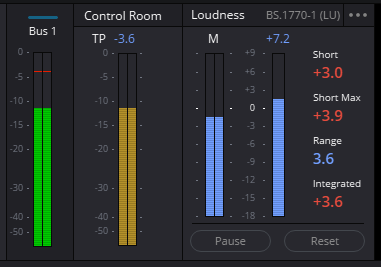
Control Room and Loudness · active pass
The neighbouring areas describe different quantities. TP concerns peaks; Short, Range and Integrated concern loudness. A value on an LU scale must not automatically be relabeled LUFS.
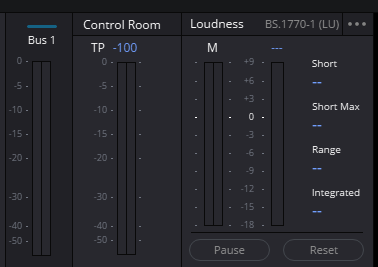
Loudness · before a measurement
The original example has BS.1770-1 (LU) selected and unpopulated programme readings. Dashes do not mean 0 LUFS. The selected standard describes this example and does not establish your delivery requirement.
Reference: Blackmagic Design — DaVinci Resolve 21 Reference Manual · Loudness and monitoring
03 / UNDERSTAND & APPLY
Separate a short window, accumulation and the peak ceiling
In EBU Mode, Momentary uses a 400 ms window, Short Term uses 3 s, and Integrated covers the selected accumulation interval with gating. M and S are not gated. A quiet pause can therefore reduce the current readings quickly while having much less effect on Integrated.
Short Max retains the highest short-term reading in the pass. It is not calculated by subtracting Integrated from Short and cannot replace a full-programme measurement. On a relative scale, read M, Short and Integrated against the chosen reference; Range remains a difference in LU.
| Reading | What it describes | Practical question |
|---|---|---|
| M / Momentary | Fast loudness variation in a 400 ms window in EBU Mode. | How does an attack, syllable or brief accent behave? |
| Short / Short Term | A steadier observation over 3 s in EBU Mode. | How do adjacent lines and musical phrases compare? |
| Short Max | The highest short-term reading in the current pass. | Which short section was the loudest? |
| Integrated | Loudness of material included in the measurement, with selection defined by the algorithm. | What is the result for the agreed programme or segment? |
| Range / LRA | Loudness variation on a scale longer than a single peak, expressed in LU. | How widely does programme loudness vary? |
| True Peak / TP | An estimate of the reconstructed waveform maximum, expressed in dBTP. | Is the separate delivery peak ceiling satisfied? |
Reference: Blackmagic Design — DaVinci Resolve 21 Reference Manual · Loudness and monitoring · EBU Tech 3341 — Loudness Metering: EBU Mode · EBU Tech 3342 — Loudness Range · ITU-R BS.1770-5 — Programme loudness and true-peak algorithms
04 / UNDERSTAND & APPLY
Select the required standard, then read its target
The standard defines analysis and the context for evaluation. Resolve 21 documents BS.1770-1, BS.1770-4, ATSC A/85, EBU R128 and a YouTube profile among other choices. A service name in a menu does not replace the current delivery specification: establish the delivery object, permitted deviation and true-peak ceiling separately.
The original illustration selects BS.1770-1. This is a historical option, not the latest ITU recommendation. On the review date, ITU lists BS.1770-5 (11/2023) as in force and BS.1770-1 and BS.1770-4 as superseded. An application retaining an older algorithm and a document being current are different questions.
EBU R128 uses a programme target of −23 LUFS in its stated broadcast context. Do not transfer that target to every video or treat −14 LUFS as a universal mandatory internet level. Record the name and revision of the requirement against which your file will be accepted.
Algorithm
Which version or profile is required, and does it include block gating? Historical BS.1770-1 must not silently be equated with a modern gated measurement.
Tolerance
Which target and deviation are allowed for this delivery? Panel colour is meaningful in the context of the selected mode.
Scope
Is the requirement for the whole programme, a dialogue component, short-form material or a separate version? Establish this before the pass.
Reference: Blackmagic Design — DaVinci Resolve 21 Reference Manual · Loudness and monitoring · ITU-R BS.1770 — Recommendation status and editions · EBU R 128 — Loudness normalisation and permitted maximum level
05 / UNDERSTAND & APPLY
LU and LUFS: distinguish the reference from signal loudness
LUFS gives an absolute loudness value relative to digital full scale. LU expresses a difference; one LU corresponds to a change of one dB. With a −23 LUFS reference, 0 LU means −23 LUFS and +2 LU means −21 LUFS. This is reference-scale arithmetic, not a sample-peak reading.
Project Settings → Fairlight → Audio Metering contains Target Loudness level and Loudness Scale. The manual gives an initial reference of −23 LUFS; EBU +9 and EBU +18 provide different relative display ranges. Absolute Scale is located in the Loudness panel menu itself.
Changing the reference or display range does not make the source mix louder. A different file level requires a gain, balance or processing change followed by measurement. Before comparing screenshots, check the reference: similar LU values can describe different LUFS values.
| Example reference | LU reading | Equivalent LUFS value |
|---|---|---|
| −23 LUFS | −2 LU | −25 LUFS |
| −23 LUFS | 0 LU | −23 LUFS |
| −23 LUFS | +2 LU | −21 LUFS |
Reference: Blackmagic Design — DaVinci Resolve 21 Reference Manual · Loudness and monitoring · EBU Tech 3341 — Loudness Metering: EBU Mode
06 / UNDERSTAND & APPLY
Make one repeatable measurement pass
Reset clears accumulated data. Start accumulation and play the required material. Pause suspends analysis and Resume continues it; ordinary transport stops and position changes require separate attention to the panel settings.
Lock Metering to Transport links resetting to moving the playhead to a different position. With it enabled, jumping to another scene can begin a new measurement history. With it disabled, previous history can remain. An accidental collection of auditioned sections should therefore not be labeled a full-programme measurement.
Name the object
Record the timeline, bus or file, mix revision and exact boundaries. Check that Solo, Mute and routing match this object.
Set the reading
Select the standard, check Absolute Scale or the LU reference, and confirm Lock Metering to Transport behaviour. Establish the displayed units.
Clear the previous pass
Use Reset and begin analysis at the agreed start. Do not add the new mix to measurements retained from a previous revision.
Measure the whole object
Traverse the agreed interval without omissions or repeats. Pause for inspection only when a correct continuous pass can be resumed.
Record the result
Write down Integrated, applicable additional readings, mode and measured interval. After a change, run a fresh measurement.
Reference: Blackmagic Design — DaVinci Resolve 21 Reference Manual · Loudness and monitoring
07 / UNDERSTAND & APPLY
Why Integrated is not the arithmetic mean of LUFS values
Loudness is logarithmic. Averaging LUFS readings as ordinary numbers is incorrect: first convert to a quantity proportional to energy. Two equally weighted blocks at −20 and −30 LUFS, for example, produce approximately −22.60 LUFS before gating, not −25 LUFS.
The modern BS.1770 algorithm includes K-weighting, channel weights and overlapping 400 ms blocks. Integrated first retains blocks above −70 LUFS; their energy mean sets a second threshold 10 LU lower. The final result uses blocks above both thresholds. This selection changes measurement statistics and does not remove sound from the mix.
Absolute boundary
It stays fixed relative to full scale. A sufficiently quiet block does not even contribute to calculation of the next threshold.
Relative boundary
It depends on material retained by the first stage. It is neither a delivery target nor a noise-reduction control.
Fresh pass after a change
Changing material or level can change the included blocks. An old Integrated reading does not establish the new revision.
Reference: ITU-R BS.1770-5 — Programme loudness and true-peak algorithms · EBU Tech 3341 — Loudness Metering: EBU Mode
08 / UNDERSTAND & APPLY
Practice: change the average while retaining explicit source values
Start with the dialogue-shaped list, 0 dB gain and six quiet blocks at −45 LUFS. Compare the all-block mean with the estimate after both gates. Raise the quiet blocks towards −30 LUFS and watch when the included count changes. Select the contrasting list to expose the role of individual quieter blocks.
With fixed gate membership, linear gain shifts loudness by the same amount. When blocks cross the fixed absolute threshold, check that assumption. The Comparison view shows original and current estimates; changing the view does not change the calculation.
Which blocks enter the final average?
Start with twelve already-measured example loudness values and add a chosen number of quiet blocks. Every value represents an equally weighted 400 ms block. Change gain and inspect how the absolute and relative gates affect the energy mean. These controls edit the teaching example.
Example gain: 0.0 dB. 12 of 18 blocks are included. Integrated estimate: −22.9 LUFS.
6 block(s) pass −70 LUFS but are below or equal to the relative threshold. Their energy helps establish that threshold, then they are excluded from the final mean. Gating changes measurement membership; it does not mute the audio.
Source values, exact rules and limits
Before-gain list in LUFS, including added blocks:
−24 · −23 · −22 · −23 · −25 · −24 · −22 · −21 · −23 · −24 · −22 · −23 · −45 · −45 · −45 · −45 · −45 · −45
For a set J of equally weighted, already-measured block values L[j], use an energy mean. The constant loudness calibration is already in L[j], so it must not be applied a second time.
E(J) = 10 log10(Σ 10^(L[j]/10) / |J|)
A = { j : L[j] > −70 LUFS }
G = E(A) − 10 LU
B = { j : L[j] > −70 LUFS and L[j] > G }
I = E(B)
Boundaries are strict: a block exactly on a gate is excluded. Silence has zero energy. If A is empty, the relative gate and Integrated are undefined. Gain adds the same number of dB to each finite source value; comparison bypasses only this gain. Reset restores all controls, closes this explanation and returns to the overview.
Only the final averaging and gating stage is calculated. The list is not validated as a set of overlapping windows from a waveform. No PCM, K-weighting, channel weighting, M/S time history, LRA, true peak, transport accumulation or native preset is simulated. The graphical scale is −96 to 0 LUFS; source values remain available above.
Reference: ITU-R BS.1770-5 — Programme loudness and true-peak algorithms
09 / UNDERSTAND & APPLY
Check Range and true peak separately from Integrated
Loudness Range describes the distribution of short-term loudness values. EBU Tech 3342 uses a separate gate and the difference between the 10th and 95th percentiles. It is not maximum minus minimum loudness, crest factor or Short minus Integrated. Its relative gate differs from the Integrated gate.
Range can poorly represent very short material: there are few observations and isolated events can have disproportionate influence. EBU advises against LRA for programmes shorter than one minute. Assess the actual transitions, pauses and intelligibility; apply additional constraints when the brief requires them.
True peak estimates reconstructed waveform peaks that can fall between digital samples. Check its separate ceiling in dBTP. Acceptable Integrated does not guarantee acceptable TP; substantial limiting also does not prove clear speech or intact attacks. After processing and export, check the resulting file.
Reference: EBU Tech 3342 — Loudness Range · EBU R 128 — Loudness normalisation and permitted maximum level · ITU-R BS.1770-5 — Programme loudness and true-peak algorithms · Blackmagic Design — DaVinci Resolve 21 Reference Manual · Loudness and monitoring
10 / UNDERSTAND & APPLY
Compare the panel, bus history and file analysis
The live Loudness Meter is useful while mixing. Loudness History helps locate changes in Integrated, Momentary and Short Term over time. Resolve 21 documents history for Main 1: open Automation Controls, show the required bus through the Index and increase the track height until the curve controls appear.
For offline file measurement, right-click the file in the Timeline and choose Analyze Audio Level. Select the standard in the analysis panel and run Analyze. This is useful for imported audio or a rendered mix when another real-time pass is unnecessary.
Measuring one source file does not establish the loudness of a track sum with processing and automation. For delivery verification, first render the required bus with the agreed boundaries and settings, then analyse that file. Comparisons need matching material, standard, channels and interval.
| Method | Useful for | What to record |
|---|---|---|
| Loudness panel | Observing and measuring the selected bus during playback. | Bus, revision, standard and traversed interval. |
| Loudness History | Locating loudness changes over time. | Bus and visible curves; confirm the result with a valid pass. |
| Analyze Audio Level | Quickly checking a particular audio file. | File name and revision, selected analysis mode. |
Reference: Blackmagic Design — DaVinci Resolve 21 Reference Manual · Loudness and monitoring
11 / UNDERSTAND & APPLY
Investigate a disagreement in a useful order
Before changing a compressor to obtain a different number, compare the measurement conditions. Establish whether the object, boundaries, mode and scale match. A processing change can legitimately change the result; a display-scale change may instead explain a presentation difference.
Write the observation separately from the next check. For example, “the previous Integrated disappeared after a timecode jump” is an observation; “check Lock Metering to Transport” is an action. This keeps an untested explanation from becoming an assumed property of the meter.
| Observation | First check | Useful action |
|---|---|---|
| Integrated shows a dash | Is analysis accumulating, and does the selected bus carry signal? | Check routing, Reset/Start and playback over a meaningful interval. |
| A scene jump reset the value | Is Lock Metering to Transport enabled? | Choose transport behaviour for the task and repeat a clean pass. |
| LU changed after setting a new target | Did the relative reference change? | Use a matching reference or compare absolute LUFS. |
| Offline file and live readings differ | Same file, bus, interval, channel format and standard? | Check export routing and measure both versions under matching conditions. |
| Integrated is acceptable, but the sound overloads | What do TP and auditioning the problem section reveal? | Check peaks, limiting and audible distortion separately. |
Reference: Blackmagic Design — DaVinci Resolve 21 Reference Manual · Loudness and monitoring · EBU Tech 3341 — Loudness Metering: EBU Mode
12 / UNDERSTAND & APPLY
Hand the measurement to mastering with its context
A useful record identifies the programme and revision, measurement source, boundaries, standard, scale and actual values. Without that context, Integrated can easily be attached to a different edit or channel configuration. Add a note if the pass was interrupted or the measured object differed from the complete master.
Then address the mix problem: overall level, local dialogue/music balance, peaks, tonal imbalance or excessive loudness variation. A frequency analyser helps reveal the frequency distribution of energy while serving a different purpose from loudness measurement. Final verification combines instruments with listening to the delivered file.
Mastering
Connect delivery requirements, the final bus, peak headroom and file verification.
↗Frequency Analyzer
Identify a frequency feature and evaluate it in the sound.
↗Level Meter
Distinguish channel levels, sample peak and a separate RMS calculation.
Reference: Blackmagic Design — DaVinci Resolve 21 Reference Manual · Loudness and monitoring · EBU R 128 — Loudness normalisation and permitted maximum level
PRACTICE / NO AUTOPILOT
A small task. A checkable result.
Work in a test copy, listen before and after, and write down what you actually observed. The checklist contains no pre-approved results.
1 · Identify the object and requirement
In a test copy, choose a short complete programme. Record the timeline or file, bus, boundaries, channel format, required standard, target and separate true-peak ceiling from the brief.
2 · Set up and make the first pass
Check LU/LUFS and Lock Metering to Transport, use Reset and measure the complete object. Record Integrated, Short Max, TP and Range when that measure suits the duration and requirement.
3 · Explain gating with the model
In the lab, compare quiet blocks at −45 and −30 LUFS with the same block count. Record both means, the relative threshold and included count. Select silence and explain −∞ and the missing Integrated result.
4 · Change one cause
Make one deliberate level or local-balance change in Resolve. Repeat the clean measurement over the same boundaries and listen to the consequences. Record the actual difference instead of substituting a predicted number.
5 · Verify the resulting file
Export the agreed route, analyse that file and compare it with the live pass. Record the standard, interval, result, remaining question and next action.
FAQ / BEFORE THE NEXT MOVE
Questions that matter in practice
Does 0 LU mean 0 dBFS?
No. 0 LU is the reference of the selected relative loudness scale. With a −23 LUFS reference, it means −23 LUFS. Sample peak in dBFS and true peak in dBTP answer separate peak questions.
Reference: Blackmagic Design — DaVinci Resolve 21 Reference Manual · Loudness and monitoring · EBU Tech 3341 — Loudness Metering: EBU Mode
Is Short Term a 3-second or a 30-second window?
In EBU Mode it is 3 seconds. EBU Tech 3341 and Loudness History on Resolve 21 page 4138 confirm this. The 30-second Short line on page 4136 conflicts with those sources and is not used here as a normative definition.
Reference: EBU Tech 3341 — Loudness Metering: EBU Mode · Blackmagic Design — DaVinci Resolve 21 Reference Manual · Loudness and monitoring
Should every internet video be mixed to −14 LUFS?
The Resolve menu does not establish a universal rule for every online delivery. Obtain the current requirement for the actual client or service: object, target, tolerance and peak ceiling. A platform-named preset alone does not establish its acceptance conditions.
Reference: Blackmagic Design — DaVinci Resolve 21 Reference Manual · Loudness and monitoring · EBU R 128 — Loudness normalisation and permitted maximum level
Why can added silence have little effect on Integrated?
A gated measurement can exclude blocks with zero or sufficiently low energy. But do not assume every quiet section is excluded: its level, the absolute gate and the calculated relative gate matter. Measure the required material in full.
Reference: ITU-R BS.1770-5 — Programme loudness and true-peak algorithms
Why does Integrated reset when I move through the timeline?
Check Lock Metering to Transport in the panel menu. The manual links the enabled setting to resetting when the playhead moves to another position. For a final measurement, decide how accumulation should behave and perform a separate clean pass.
Reference: Blackmagic Design — DaVinci Resolve 21 Reference Manual · Loudness and monitoring
Why do a clip’s Analyze Audio Level result and the bus differ?
First identify the compared objects. A file may differ from the track sum, pass through different processing, or cover a different interval and channel set. To verify a master, analyse that master’s rendered file using the same standard.
Reference: Blackmagic Design — DaVinci Resolve 21 Reference Manual · Loudness and monitoring
Can verification stop when Integrated meets the target?
Check the separate true-peak ceiling and any additional readings required by the brief. Then listen to speech, transitions, quiet sections and attacks. One compliant number does not establish freedom from distortion or the correct contents of the exported file.
Reference: EBU R 128 — Loudness normalisation and permitted maximum level · Blackmagic Design — DaVinci Resolve 21 Reference Manual · Loudness and monitoring
Does the lab calculate the actual LUFS of my audio?
It starts with authored block values and calculates their energy mean and two selection stages. It does not calculate K-weighting, channel contributions, overlapping windows, M/S, LRA or true peak. Use a meter or analyser in the required mode for a real file.
Reference: ITU-R BS.1770-5 — Programme loudness and true-peak algorithms · Blackmagic Design — DaVinci Resolve 21 Reference Manual · Loudness and monitoring
REFERENCES / 2026-10-09
What this guide is based on
Checked on 9 October 2026 against the complete DaVinci Resolve 21 Reference Manual: Audio Metering on page 167; Loudness, transport, offline analysis and history on pages 4134–4140. Physical and printed page numbers match; text and the panel on page 4137 were inspected. Time windows and gating were checked against EBU Tech 3341 and ITU-R BS.1770-5; Range against EBU Tech 3342. Short Term uses the 3 s window confirmed by EBU and manual page 4138; the conflicting 30 s line on page 4136 is not adopted as a specification. Original illustrations and URLs are retained. The lab calculates averaging and selection of an authored list of supplied values; it does not measure a recording or reproduce the native meter.
Blackmagic Design — DaVinci Resolve 21 Reference Manual · Loudness and monitoring ↗
Full official PDF: Project Settings Audio Metering on 167; loudness and monitoring on 4134–4140; panel and menu on 4137. Text and panels reviewed on 9 October 2026. The Short descriptions on 4136 state 30 seconds, while 4138 and EBU Tech 3341 specify 3-second Short-Term measurement. This discrepancy is recorded; native engine timing was not measured. Standard, Absolute Scale and Lock Metering to Transport are distinguished from the authored model.
ITU-R BS.1770 — Recommendation status and editions ↗
Official ITU catalogue: BS.1770-5 (November 2023) is In force; earlier editions including -1 and -4 are Superseded. Checked on 9 October 2026. A legacy option in a Resolve compatibility menu does not change the current recommendation status.
ITU-R BS.1770-5 — Programme loudness and true-peak algorithms ↗
BS.1770-5, November 2023: Annex 1, printed pages 2 and 6–7 (PDF pages 4 and 8–9), K weighting, channel weights, 400 ms blocks with 75% overlap, strict absolute gate > −70 LKFS and relative gate 10 LU below the absolute-gated mean; Annex 2 covers true peak. Reviewed on 9 October 2026. The teaching model starts from supplied measured block loudness values and performs no audio filtering or true-peak reconstruction.
EBU Tech 3341 — Loudness Metering: EBU Mode ↗
November 2023 edition, pages 4–7: ungated 400 ms Momentary and 3 s Short-Term windows; gated Integrated measurement; LU/LUFS, relative scale, measurement controls and reset. Primary normative source for these time windows; reviewed on 9 October 2026.
EBU Tech 3342 — Loudness Range ↗
November 2023 edition, pages 4–6: Loudness Range uses the Short-Term distribution, a separate −20 LU relative gate, and P95 minus P10; it is not the maximum minus minimum. Reviewed on 9 October 2026. The teaching model does not calculate LRA.
EBU R 128 — Loudness normalisation and permitted maximum level ↗
November 2023 edition, pages 3–4: broadcast programme scope, −23 LUFS and −1 dBTP maximum true peak for linear production, with distribution qualifications. This recommendation has a specific scope and is not a universal platform target. Reviewed on 9 October 2026.