FAIRLIGHT / PEAK CONTROL / 06.03
Limiter
Control peaks. Keep the performance.
Follow the dedicated Fairlight FX Limiter from its input to the chosen output. A useful setting is more than a ceiling number: know which signal it controls, what follows it, and how the final result will be checked.
- 01Separate the insert from Dynamics
- 02Read input, ceiling and Release
- 03Verify the path to the file
Ceiling and drive change the limit on the static diagram.
Input / balance first↗
One unusually loud line and a constantly overloaded mix are different problems.
Identify the channel and passage.Change the controls to explore the diagram. No audio playback, native DSP or connection to Resolve.
Sources and scope · 7 October 2026
Controls and illustrations were checked against Blackmagic’s primary Resolve 21 manual, chapter 181, reproduced on the independent iMaster mirror, and the manufacturer’s Fairlight overview. The complete official PDF exceeded the retrieval size limit; the mirror does not establish your installed build. Manual images are external and load only on request. Original local PNGs are absent from the supplied archive; their paths are retained. The website models are authored mathematics, not Blackmagic DSP implementations. No live listening or rendered-file measurements were performed.
Read the source notes ↓On this page
01 / UNDERSTAND & APPLY
Start with the problem, not maximum input
When one line is louder than its neighbours, inspect the clip levels first. A bus processor sees the material routed to that bus, not merely the troublesome line. Write down the objective: occasional peak control, a specified deliverable, or a deliberate effect. That gives your comparison a purpose beyond making the result louder.
Save a test copy and choose a short contrasting passage: a quiet ending, a louder word, a pause and a sharp onset. Listen in musical context, then return to consonants and tails. A smaller peak number is not by itself evidence of a better-sounding edit.
Clip
A local problem in one segment. Check which clip instances received any copied processing.
Track
A sequence of related material. Very different input levels may need adjustment before processing.
Bus
Shared control of a routed sum. Record the assignments and confirm the Deliver source actually passes through this processor.
Reference: Blackmagic Design — Fairlight / Dynamics, FX and Deliver
02 / UNDERSTAND & APPLY
The Fairlight FX window: identify the channel first
The manual illustration shows Limiter on Music 2, Slot 1: Soft/Level at the input, Ceiling and Release in Limit, and Input, Reduction and Output meters. The pictured values belong to an example; they are neither voice defaults nor delivery requirements.
The Limiter inside channel Dynamics is a different interface element. Determine which processor you are comparing: bypassing all Dynamics, one module or an FX insert creates different comparisons. Record the channel, slot and states of the other processes.
| Area | What to check |
|---|---|
| Input / Reduction / Output | Do not read Reduction as the output-file level. It is a separate observation about attenuation. |
| A/B / Preset / Reset | Preserve the original state before experimenting. Do not rely on Reset as your saved comparison. |
| S/C / On / Listen / Source | Check the source and avoid accidentally leaving diagnostic listening enabled. |

Limiter
Music 2, Slot 1: Ceiling is labelled dBTP; Soft belongs to the input section. DIALOGUE is the selected sidechain source in this example, not a universal default.
Image source ↗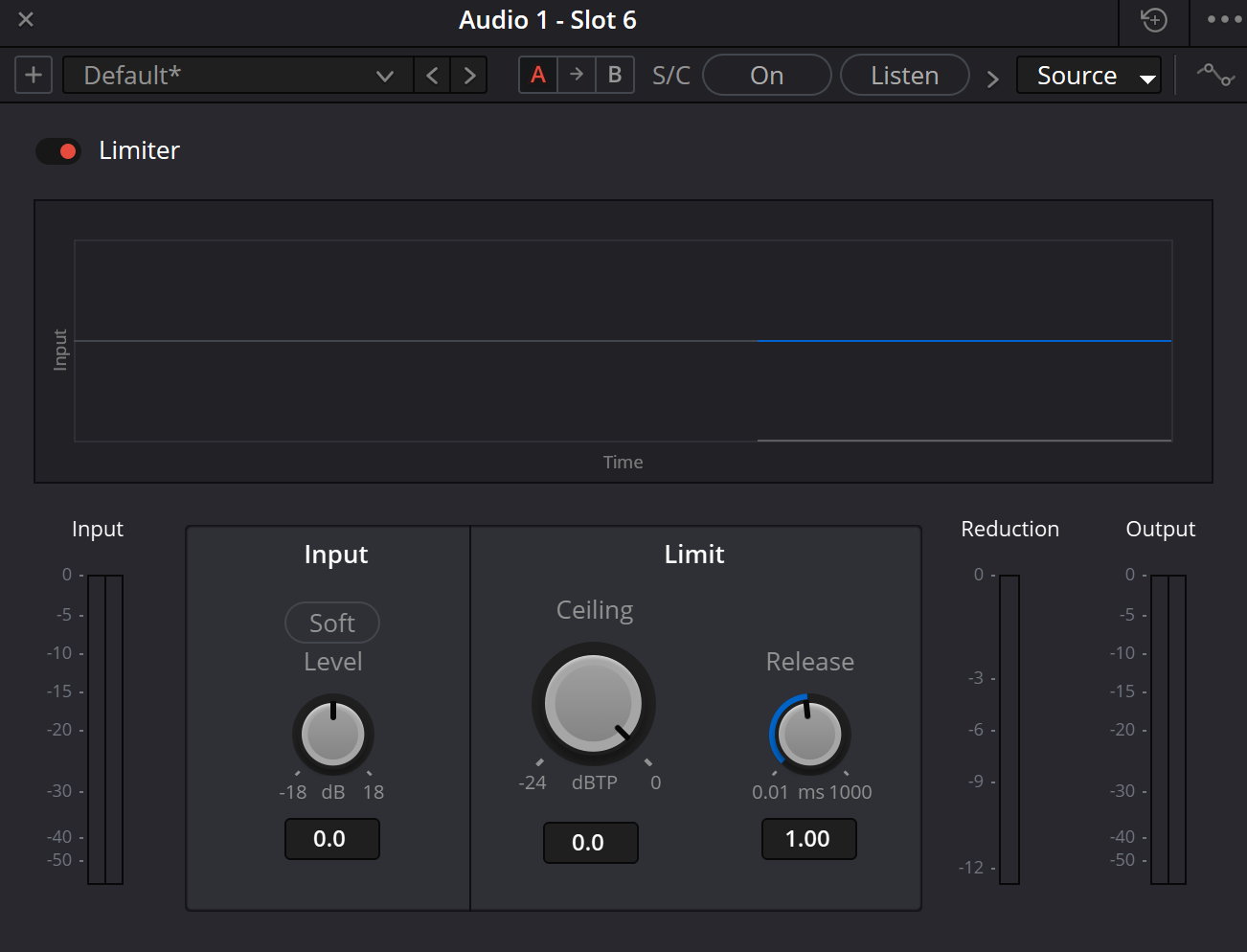
Original Limiter illustration on this site
Path retained from the original project. Bytes are absent from the supplied ZIP and network reinspection failed. Its exact build and labels are not certified in this pass. The parameter guide relies on the separately inspected manual illustration.
Reference: Blackmagic manual — Limiter window (iMaster mirror) · Blackmagic Design — Fairlight / Dynamics, FX and Deliver
03 / UNDERSTAND & APPLY
Input Level, Soft, Ceiling and Release
The controls address different decisions: signal drive, a limiting boundary and recovery. For an interpretable comparison, change one control while keeping the others fixed.
Limiter’s Soft button is not an embedded instance of the separate Soft Clipper. The manual describes a gentler attack. Do not assign the other effect’s Shape or Threshold behaviour to it. Numerical markings below refer to the reviewed window, not tests of every Resolve build.
| Control | Meaning and check |
|---|---|
| Input Level · −18…+18 dB | Compare the same line after a small drive change. More reduction is not necessarily preferable; return to intelligibility and attack. |
| Soft | Compare enabled and disabled states at equal drive. It changes the reaction, not the need to check distortion. |
| Ceiling · −24…0 dBTP | Choose a boundary appropriate to the deliverable. It is neither a programme loudness target in LUFS nor a bypass command. |
| Release · 0.01…1000 ms | Listen after a transient or stressed syllable. Inspect the following quiet material and repeated hits, not just one peak. |
Reference: Blackmagic — Resolve 21 manual, ch. 181 / Limiter & Soft Clipper (iMaster mirror) · Blackmagic manual — Limiter window (iMaster mirror)
04 / UNDERSTAND & APPLY
Sample peak, true peak and loudness ask different questions
The largest stored sample and the reconstructed continuous waveform are different objects. A dBTP reading cannot be replaced by a sample maximum or fader position. Integrated loudness describes a programme over time rather than its single highest point.
State the measurement object: file, selected bus, interval, meter standard and units. Do not turn a tutorial number into a delivery agreement. This guide does not offer one loudness preset for web video, cinema and broadcasting.
Reference: EBU R 128-2023 — loudness and permitted maximum level · ITU-R BS.1770-5 — recommendation record
05 / UNDERSTAND & APPLY
Sidechain: control source and audible result
Begin ordinary peak control without external control routing. Sidechain is a separate task: one source influences another. In the documented dialogue/background example, the insert belongs on the material being attenuated, not on the dialogue used as the control source.
Test the route with a short line. Select Source, audition it with Listen, then restore normal monitoring. Check what happens when the line ends. A visible source name is not proof that every routing assignment in the project is correct.
Evaluate background ducking separately from final output peak control. Successful attenuation of music does not establish the ceiling on another output or certify the rendered file.
Reference: Blackmagic — Resolve 21 manual, ch. 181 / Limiter & Soft Clipper (iMaster mirror) · Blackmagic manual — Limiter sidechain strip (iMaster mirror)
06 / UNDERSTAND & APPLY
Teaching model: what happens after the ceiling
The ideal stage limits a hypothetical level instantly. This deliberately simple model has no detector, timing or true-peak reconstruction. It answers a gain-placement question, not how the native Limiter sounds.
With an input of −3 dB, +6 dB drive and a −1 dB ceiling, the model reduces gain by 4 dB. Adding +3 dB after it produces +2 dB. Bypass skips only the modelled stage; the separate downstream gain remains.
CEILING / DOWNSTREAM LAB
A ceiling only applies at its own stage
Author-defined teaching calculation. No audio is read, played or measured; no Resolve connection, server submission or automatic storage. Numerical agreement is not a listening test or a true-peak certificate.
stage = min(input + drive, ceiling); reduction = max(0, input + drive − ceiling); final = stage + post.
Bypass skips input gain and ceiling in this model. Post remains outside the bypass boundary. The formula describes the enabled case.
07 / UNDERSTAND & APPLY
A workflow without the louder-is-better trap
Prepare a balanced passage and preserve version A. Identify the insert and what follows it. Set a ceiling from the brief, then increase drive only as far as the task needs rather than aiming for persistent heavy reduction.
Compare Soft and a few Release settings on the same passage. Match listening levels for tone and attack comparisons without silently changing export settings. Save two named variants and revisit them after a short break.
Dialogue
Listen to consonant onsets, the breath after a stressed line and the background in pauses. Describe the actual change.
Music
Check repeated attacks and tail recovery. One good hit does not establish the behaviour of the whole chorus.
Mix
Compare the whole scene, including the moment dialogue, music and effects coincide.
Reference: Blackmagic Design — Fairlight / Dynamics, FX and Deliver
08 / UNDERSTAND & APPLY
When the result is not what you expected
| Observation | Next check |
|---|---|
| Persistently large reduction | Review upstream levels and the insert’s purpose. Address one outlier separately and preserve a comparison. |
| The background dips after a loud word | Compare Release, sidechain routing and bus processing. Do not diagnose from one control alone. |
| File peaks exceed the expectation | Check later processing, gain, Deliver source, codec and measurement of the decoded file. |
| The result became harsh | Try less drive and compare attacks. Existing clipped audio and processing-induced distortion are different causes. |
| Bypass seems ineffective | Check the active insert, its scope, the monitored bus and whether the passage triggers reduction. |
09 / UNDERSTAND & APPLY
Finish the check on a specific file
Render a short test using the intended audio source, format and route. Measure the file separately and listen on a familiar system. The filename, interval, settings and measurements must all refer to the same version.
Record maximum true peak and programme loudness only when actually measured with an appropriate tool. Check channels, sync, boundaries and audible defects separately. “Not checked” is more useful than a number copied from a screenshot.
Reference: Blackmagic Design — Fairlight / Dynamics, FX and Deliver · EBU R 128-2023 — loudness and permitted maximum level
PRACTICE / NO AUTOPILOT
A small task. A checkable result.
Work in a test copy, listen before and after, and write down what you actually observed. The checklist contains no pre-approved results.
Preserve the original
Record project, timeline, track or bus and interval. Save a copy and briefly describe the audible task.
Identify processor and scope
Check the window title, chain position, bypass and Deliver source. Do not change neighbouring processes at the same time.
Compare one control
Preserve A, change one control and compare without a level advantage. Record an observation rather than “the graph looks better”.
Check a specific file
Verify the intended export: channels, sync, boundaries and audible defects. Record meter values only after measurement.
Save and recall
After reopening, verify scope, order, parameters and bypass. Leave unchecked items unfilled.
FAQ / BEFORE THE NEXT MOVE
Questions that matter in practice
Is this the same window as the Dynamics limiter?
No. This guide focuses on the Fairlight FX insert. Channel Dynamics contains its own Limiter module; the shared name does not make their interfaces or bypass boundaries identical.
Reference: Blackmagic Design — Fairlight / Dynamics, FX and Deliver
Does Soft enable Soft Clipper?
The manual describes Limiter Soft as a gentler attack, not as enabling a separate Soft Clipper. The separate effect has Threshold, Shape and Output Level controls.
Reference: Blackmagic — Resolve 21 manual, ch. 181 / Limiter & Soft Clipper (iMaster mirror)
Does Ceiling set LUFS?
No. Ceiling concerns peak control; programme loudness needs a separate measurement over the intended interval. Equal peaks can accompany different programme loudness.
Reference: EBU R 128-2023 — loudness and permitted maximum level
Can I set −1 once and forget it?
No. Establish units and delivery requirements, then check routing and the file. Later gain, another output or another export version need their own check.
Reference: EBU R 128-2023 — loudness and permitted maximum level
How long are 64 samples of look-ahead?
The manual specifies 64 samples of look-ahead. The calculation 1000 × 64 / sample rate gives about 1.333 ms at 48 kHz and 0.667 ms at 96 kHz. This is arithmetic for that interval, not a measurement of total system latency.
Reference: Blackmagic — Resolve 21 manual, ch. 181 / Limiter & Soft Clipper (iMaster mirror)
Can the calculator JSON be loaded as a preset?
No. It records a hypothetical calculation, not audio, a measured true peak or the native Limiter algorithm.
REFERENCES / 2026-10-07
What this guide is based on
Controls and illustrations were checked against Blackmagic’s primary Resolve 21 manual, chapter 181, reproduced on the independent iMaster mirror, and the manufacturer’s Fairlight overview. The complete official PDF exceeded the retrieval size limit; the mirror does not establish your installed build. Manual images are external and load only on request. Original local PNGs are absent from the supplied archive; their paths are retained. The website models are authored mathematics, not Blackmagic DSP implementations. No live listening or rendered-file measurements were performed.
Blackmagic Design — Fairlight / Dynamics, FX and Deliver ↗
Reviewed 7 October 2026: inserts versus channel Dynamics, plug-in order and bus/track selection in Deliver. Not an installation test.
Blackmagic — Resolve 21 manual, ch. 181 / Limiter & Soft Clipper (iMaster mirror) ↗
Primary text reproduced on third-party hosting; Limiter (pp. 4116–4117) and Soft Clipper (p. 4125). Read 7 October 2026. Full official PDF exceeded the retrieval limit at 187 MB. Not a native-algorithm measurement.
Blackmagic manual — Limiter window (iMaster mirror) ↗
Image inspected: Music 2, Slot 1; Soft/Level, Ceiling dBTP, Release, three meters and DIALOGUE selected. Displayed values are not recommendations. External image loads only on request.
Blackmagic manual — Limiter sidechain strip (iMaster mirror) ↗
Inspected S/C On / Listen / DialogBus strip. An example source selection, not a complete source catalogue for the current project.
EBU R 128-2023 — loudness and permitted maximum level ↗
Primary PDF read: separate programme loudness and maximum true peak; linear production-audio scope. Not universal delivery requirements for every online service.
ITU-R BS.1770-5 — recommendation record ↗
Official record for programme-loudness and true-peak measurement checked. This package does not implement a compliant meter.