FAIRLIGHT / PEAK CONTROL / 06.03
Soft Clipper
Shape a peak. Make the colour deliberate.
Soft Clipper is not just a way to reduce peaks. It changes the character of processing. Separate drive, curve shape and output gain, and do not mistake deliberate saturation for repairing a damaged recording.
- 01Understand the three main controls
- 02Separate colour from a ceiling
- 03Compare without a level advantage
Change softness and drive to reshape the actual teaching curve.
Drive / what reaches the curve↗
Threshold participates in drive before clipping; it is not programme normalisation.
Preserve the untreated version first.Change the controls to explore the diagram. No audio playback, native DSP or connection to Resolve.
Sources and scope · 7 October 2026
Controls and illustrations were checked against Blackmagic’s primary Resolve 21 manual, chapter 181, reproduced on the independent iMaster mirror, and the manufacturer’s Fairlight overview. The complete official PDF exceeded the retrieval size limit; the mirror does not establish your installed build. Manual images are external and load only on request. Original local PNGs are absent from the supplied archive; their paths are retained. The website models are authored mathematics, not Blackmagic DSP implementations. No live listening or rendered-file measurements were performed.
Read the source notes ↓On this page
01 / UNDERSTAND & APPLY
Choose the job before choosing the curve
Describe the problem first: an aggressive onset, deliberate colour for an effect, or preparation for later level control. For uneven narration, adjusting individual line levels may be the more direct solution. A clipper does not belong in every chain merely because someone else uses one.
A soft setting rounds the transition into limiting; a hard setting makes it sharper. Heavy drive can create pronounced saturation. “Soft” and “warm” describe an intention or character, not guaranteed transparency on every recording.
Voice
Check consonants and breath. Unwanted colour is not a necessary price for more even levels.
Percussive effect
Compare the onset and decay. A lower peak does not automatically make the event more effective.
Whole mix
The decision affects interacting elements. Return to the original and check quieter details.
Reference: Blackmagic — Resolve 21 manual, ch. 181 / Limiter & Soft Clipper (iMaster mirror)
02 / UNDERSTAND & APPLY
The actual window: three controls and meters
The manual illustration shows Threshold, Shape and Output Level with Input, Reduction and Output meters. Its graph is a transfer characteristic, not a spectrum or the selected clip’s waveform. A clean-looking static line does not describe the quality of your audio.
The retained Dynamics-menu screenshot shows access to the effect, not its full interface. A separate source provides the open-window illustration. If that external image fails to load, the control names and checks remain in the table below.
| Element | How to use it |
|---|---|
| Input / Reduction / Output | Compare input and result over the same passage. Reduction is not a LUFS measurement. |
| Graph | Use it as a shape guide. It does not provide your source waveform, file peaks or noise measurements. |
| A/B / Preset | Preserve a version and verify recall. Keep the intended task and input material with the preset description. |

Soft Clipper
Shape shows Hard on the left and Soft on the right. Threshold and Output Level are separate. The displayed state is not a delivery preset.
Image source ↗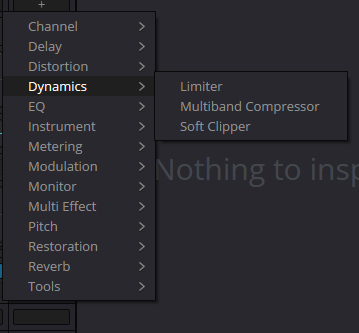
Dynamics menu from the original project
Retained source URL for the insertion menu, not the open Soft Clipper window. PNG is absent from the supplied ZIP; retain the server original. Network reinspection was not completed in this pass.
Reference: Blackmagic manual — Soft Clipper window (iMaster mirror) · Blackmagic — Resolve 21 manual, ch. 181 / Limiter & Soft Clipper (iMaster mirror)
03 / UNDERSTAND & APPLY
Threshold, Shape and Output are not interchangeable
The manual describes Threshold in terms of gain before the clipper. Its number is not a guaranteed maximum for the delivered file. Consider the graph, reduction and sound together: driving processing harder differs from increasing output afterwards.
The manual does not publish the complete Threshold-to-transfer algorithm. The calculator below therefore has its own Drive and explicit formula rather than claiming a one-to-one reproduction of the native control.
| Control | Decision | Check |
|---|---|---|
| Threshold · −18…+18 dB | Drive before clipping. | Compare a transient at nearby settings while holding Shape fixed. Preserve the original. |
| Shape · Hard → Soft | Transition character: harder at the left, softer at the right. | Listen beyond the maximum level. Equal output peaks do not imply equal character. |
| Output Level · −18…+6 dB | Level after the curve. | Remove the loudness advantage in A/B and check peaks again. Output gain is not a new protective ceiling. |
Reference: Blackmagic — Resolve 21 manual, ch. 181 / Limiter & Soft Clipper (iMaster mirror) · Blackmagic manual — Soft Clipper window (iMaster mirror)
04 / UNDERSTAND & APPLY
Soft Clipper, Limiter and the Limiter Soft button
These are three distinct things: the Soft Clipper insert, the Fairlight FX Limiter, and Soft within that Limiter’s input section. Do not transfer controls between them. The Limiter guide focuses on boundaries and recovery; here the focus is deliberate shaping and its consequences.
Being able to use both does not make both necessary. Compare the individual processes before their combination. Two processors showing reduction do not automatically produce a better mix.
Level only
Consider clip volume, automation and compression. Saturation may be unnecessary.
Deliberate shaping
Choose Soft Clipper when you can describe the intended character change.
File requirement
Verify suitable peak control and measure the export regardless of the chosen colour.
Reference: Blackmagic — Resolve 21 manual, ch. 181 / Limiter & Soft Clipper (iMaster mirror) · Blackmagic manual — Limiter window (iMaster mirror)
05 / UNDERSTAND & APPLY
Teaching curve: drive, shape, output
No clip is measured and no plug-in is executed. The input is a hypothetical amplitude coordinate; the curve shows where other coordinates would go. Full bypass returns the input, including bypassing the model’s gain stages.
The hard curve is bounded by ±1. The soft curve uses a cubic formula with a smooth join at ±1.5. Shape blends these two authored curves. These are not hidden Fairlight parameters; this display cannot assess aliasing or inter-sample peaks in real audio.
SHAPE / TRANSFER LAB
Change the shape, then check the output
Author-defined teaching calculation. No audio is read, played or measured; no Resolve connection, server submission or automatic storage. Numerical agreement is not a listening test or a true-peak certificate.
u = x · 10^(Drive/20); H(u) = clamp(u, −1, 1); S(u) = u − 4u³/27 for |u| < 1.5, otherwise sign(u); y = [(1−Shape)H(u) + Shape·S(u)] · 10^(Output/20).
Drive is a model parameter, NOT a numeric translation of native Threshold. Full bypass returns x unchanged. At zero, JSON magnitude in dB is null, not zero.
06 / UNDERSTAND & APPLY
Compare character over a short passage
Choose a passage with a distinct onset and preserve its original state. Compare a small Threshold change with Shape and output held fixed, then restore drive and compare Shape. This sequence makes it easier to identify the source of each change.
Judge colour without a level advantage and record output settings separately for the test render. If the louder version seems better, remove that difference before deciding on the shaping.
Repeat the comparison on several passages. A quieter section after a dense one can make unwanted processing easier to notice. Name the preset for its material and task rather than calling it “perfect audio”.
07 / UNDERSTAND & APPLY
Let the task decide what comes before and after
Order matters together with scope. A clipper on one impact and a clipper on the mix bus receive different material. Before reordering, record what passes through each processor and preserve the original sequence.
If gain follows a bounded stage, that stage’s boundary no longer describes the new output. Later processing can also change the waveform. Place and verify final control deliberately instead of assuming one protective effect somewhere in the project covers every file.
Before the change
Name the input and preserve the chain.
After reordering
Compare the same passage with the original version.
After rendering
Listen to and measure the specific selected file.
Reference: Blackmagic Design — Fairlight / Dynamics, FX and Deliver
08 / UNDERSTAND & APPLY
Changes that are easy to mistake for improvement
| Situation | Next step |
|---|---|
| Louder must mean finished | Match comparison levels; listen to attacks, endings and background. |
| Clarity changed after Shape | Try less drive and compare the source. Do not assume another EQ must solve it. |
| The output peak increased | Check Output Level and later stages. The internal curve does not describe the entire chain. |
| Existing recorded clipping needs repair | Inspect the unprocessed source. Additional clipping does not restore a lost waveform. |
| The curve looks good but sounds wrong | Decide from listening, the task and measurements rather than the appearance of the line. |
09 / UNDERSTAND & APPLY
Verify the result and reopen the project
Render a test passage and return to the original version. Check channels, sync and boundaries, then listen to the onset and tail at a familiar level. Measure the properties the deliverable actually requires.
Save the project and reopen the intended insert. Check recall of parameters, scope and order. Record what you actually checked and what remains an assumption. The teaching JSON on this page is not importable as a Fairlight audio preset.
Reference: EBU R 128-2023 — loudness and permitted maximum level
PRACTICE / NO AUTOPILOT
A small task. A checkable result.
Work in a test copy, listen before and after, and write down what you actually observed. The checklist contains no pre-approved results.
Preserve the original
Record project, timeline, track or bus and interval. Save a copy and briefly describe the audible task.
Identify processor and scope
Check the window title, chain position, bypass and Deliver source. Do not change neighbouring processes at the same time.
Compare one control
Preserve A, change one control and compare without a level advantage. Record an observation rather than “the graph looks better”.
Check a specific file
Verify the intended export: channels, sync, boundaries and audible defects. Record meter values only after measurement.
Save and recall
After reopening, verify scope, order, parameters and bypass. Leave unchecked items unfilled.
FAQ / BEFORE THE NEXT MOVE
Questions that matter in practice
Is Threshold the output-file ceiling?
Do not interpret it that way. The manual relates it to drive before clipping. Output Level and subsequent stages are separate; verify the rendered file.
Reference: Blackmagic — Resolve 21 manual, ch. 181 / Limiter & Soft Clipper (iMaster mirror)
Which direction makes Shape softer?
The reviewed window labels Hard at the left and Soft at the right. That describes the transition, not guaranteed transparency.
Reference: Blackmagic manual — Soft Clipper window (iMaster mirror)
Will Soft Clipper repair an already clipped recording?
New shaping does not restore missing source information. Compare the original and determine whether distortion is recorded or introduced later in the chain.
Does it always need a Limiter afterwards?
Not automatically. Decide from the task and peak checks. Compare before adding a second processor; colour and file compliance are separate decisions.
Reference: EBU R 128-2023 — loudness and permitted maximum level
Does the calculator reproduce Resolve Shape?
No. It is an explicitly defined cubic model blended with a hard curve. It does not know Blackmagic’s native filters, oversampling or internal settings.
Why is the dB value null at zero amplitude?
A zero amplitude has no finite logarithmic level. The display reads −∞ dB; zero decibels would mean something different.
REFERENCES / 2026-10-07
What this guide is based on
Controls and illustrations were checked against Blackmagic’s primary Resolve 21 manual, chapter 181, reproduced on the independent iMaster mirror, and the manufacturer’s Fairlight overview. The complete official PDF exceeded the retrieval size limit; the mirror does not establish your installed build. Manual images are external and load only on request. Original local PNGs are absent from the supplied archive; their paths are retained. The website models are authored mathematics, not Blackmagic DSP implementations. No live listening or rendered-file measurements were performed.
Blackmagic Design — Fairlight / Dynamics, FX and Deliver ↗
Reviewed 7 October 2026: inserts versus channel Dynamics, plug-in order and bus/track selection in Deliver. Not an installation test.
Blackmagic — Resolve 21 manual, ch. 181 / Limiter & Soft Clipper (iMaster mirror) ↗
Primary text reproduced on third-party hosting; Limiter (pp. 4116–4117) and Soft Clipper (p. 4125). Read 7 October 2026. Full official PDF exceeded the retrieval limit at 187 MB. Not a native-algorithm measurement.
Blackmagic manual — Limiter window (iMaster mirror) ↗
Image inspected: Music 2, Slot 1; Soft/Level, Ceiling dBTP, Release, three meters and DIALOGUE selected. Displayed values are not recommendations. External image loads only on request.
Blackmagic manual — Soft Clipper window (iMaster mirror) ↗
Image inspected: Threshold −18/+18, Shape Hard left / Soft right, Output Level −18/+6, input/output, Reduction and transfer curve. A manual illustration, not a capture from our session.
EBU R 128-2023 — loudness and permitted maximum level ↗
Primary PDF read: separate programme loudness and maximum true peak; linear production-audio scope. Not universal delivery requirements for every online service.