FAIRLIGHT / CHAIN FX / BUILD · COMPARE · RECALL
Chain FX: a chain you can explain
Build it once. Check it every time you reuse it.
Chain FX groups several plug-ins inside one container. The point is not to fill every slot: it is to repeat a deliberate processing setup, understand its order and output level, and check what actually came back when you recalled a preset.
- 01Separate the channel, container and internal processors
- 02Check order, bypass and output gain independently
- 03Save a chain and verify a newly recalled instance
Reorder modules and change their number to rebuild the path.
Six slots, not six compulsory effects↗
Keep only the stages that serve the task. An empty slot is not missing processing.
Every occupied slot has a specific purpose.Change the controls to explore the diagram. No audio playback, native DSP or connection to Resolve.
Reviewed 7 October 2026 · Blackmagic documentation and illustration
Capacity and preset support were checked against Blackmagic’s current description; the window was inspected in its official product illustration. Chain FX was already announced for Resolve 20: resolve21 in an old menu filename does not date the feature’s introduction. The illustration identifies no exact build and does not expose closed menus. The full Fairlight 20 training PDF could not be retrieved; hidden commands, native preset file formats and arbitrary plug-in compatibility are not certified here. Listening and recalling a chain in Resolve remain practical checks.
Read the source notes ↓On this page
01 / UNDERSTAND & APPLY
What Chain FX brings together
Choose the target and the task before building a container.
Blackmagic describes up to six effects with individual settings inside one Chain FX, saved together as presets. Longer processing setups can use multiple Chain FX instances in channel effects slots. This is not a promise of unlimited recursive nesting inside a container.
Keep three levels in mind: the destination channel, its Chain FX insert, and the processors inside. A track instance processes that track’s signal; a bus instance addresses the combined sources routed to the bus. Check routing first. Do not place a dialogue chain across the entire mix just because it worked on one line.
Start in a test copy with a short representative passage. Write down the task: reducing an abrasive voice without losing consonants is more useful than making it sound professional. Keep a way to hear the unprocessed version. Chain FX is not automatic mastering, a project backup or a way to package plug-in installers inside a media file.
One task
A container may add little when you need just one EQ. Its value grows when you genuinely need to repeat a set of processors.
One destination
Record the track or bus name and the container’s position among other inserts. Matching preset names do not establish matching scope.
Only the necessary stages
Do not add dynamics, de-essing or reverb to fill a list. Establish a purpose for each stage first.
Reference: Blackmagic Design — Chain FX / What’s New · Blackmagic Design — Fairlight FX and Plugins / Mixer
02 / UNDERSTAND & APPLY
Find the container and start small
An add-effect menu is not the same as a working instance.
The supplied site material retains Mixer → Effects → Multi Effect → Chain FX and an illustration of that menu. Its PNG is absent from the supplied archive, and a fresh network view could not be completed in this pass. The caption preserves that provenance without claiming a new visual check of your build.
On a test track, open the available insert list and locate Chain FX. Check the target channel in the opened window’s header. When the entry is missing, first check Resolve version, category and insertion context; do not substitute an unrelated third-party product with a similar name.
Add one available effect, open its settings and make a clear, controlled change on a short passage. Add the next stage only after that check. Available menus depend on the installation; the closed lists in the illustration below are not treated as a verified catalogue of effects or commands.
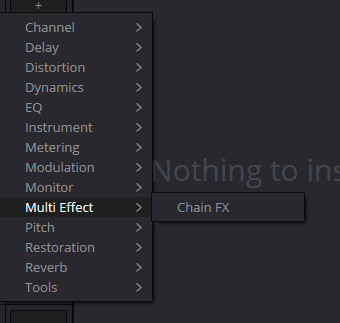
Original Multi Effect menu illustration
The path is retained from the supplied project. The PNG is absent from the ZIP baseline, and a fresh visual check was not completed. It does not replace the official open-container illustration below or certify the current build.
Reference: Videomontazher — original Chain FX menu reference · Blackmagic Design — Fairlight FX and Plugins / Mixer
03 / UNDERSTAND & APPLY
Read the window without inventing hidden controls
The official illustration contains five processors. That is a sample configuration, not its capacity limit.
The illustration below is an actual Blackmagic product image, not an invented application window. It shows Fairlight EQ, Reverb, Modulation, Pitch and Limiter. This demonstrates the container; it is not a recommended dialogue chain.
The descriptions cover readable areas only. A still image cannot establish meter movement, sound or a successful preset save. Check the contents of closed menus and gesture-specific commands in the installed application.
| Window area | What is visible | What to check |
|---|---|---|
| Input / Output | Vertical scales at the sides | During playback, compare signal presence before and after. A picture does not prove audio is flowing. |
| Plugin Chain | An ordered list of processor names | Match each entry to its task and current order. Settings belong to a specific instance. |
| “+” below the list | An add control beneath the last entry | Open it in your installation to check available effects. The closed menu is not enumerated here. |
| Output → Level | A dB control with −18 / 18 marks and a 0.0 readout | This is output gain, not a LUFS target or limiter ceiling. Visible marks do not replace checking your build’s actual range. |
| Top toolbar | Channel/slot identity, a preset field and host controls | Distinguish the container’s toolbar from an internal effect window. Unverified buttons are not assigned behavior from their appearance alone. |
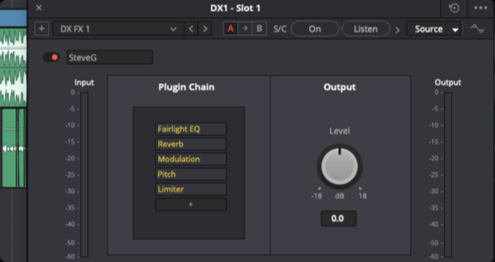
Chain FX
Five occupied entries, a “+” control and Output Level. This is an example, not a recommended dialogue preset. The exact build is not identified and closed menus are not documented from the image.
Image source ↗Reference: Blackmagic Design — official Chain FX illustration
04 / UNDERSTAND & APPLY
Effect order: test a hypothesis
Each serial stage receives the result produced upstream.
Reordering is useful when you know what should reach the next processor. Keep the original variant and change one part of the order. Use the reordering controls available in your build, then read the complete list again; a highlighted row does not prove that a move happened.
EQ before a compressor can change the signal driving its response; EQ after it shapes the processed result. That does not mean every swap must be audible: neutral settings or suitable linear operations may produce no difference.
Reverb before nonlinear dynamics and reverb after it are different hypotheses as well. Check tails, gaps and intelligibility, not just the loud middle of a phrase. No single order suits every source.
Cleanup before dynamics
A working hypothesis: reduce a distracting component, then control the remaining signal. Check speech integrity and processor behavior, not the number of enabled modules.
Tone after dynamics
Another hypothesis: stabilize behavior before applying color. Compare attacks and consonants in quiet and loud passages.
Space on a separate route
For a shared parallel effect across tracks, first examine sends and returns. A serial Chain FX list does not replace bus routing.
Reference: Blackmagic Design — Fairlight FX and Plugins / Mixer
05 / UNDERSTAND & APPLY
Bypass, output and a fair comparison
Everything off does not necessarily mean the whole channel is unprocessed.
Identify what was bypassed: one internal processor, the container, or a different channel insert. A bypassed internal effect still belongs to the stored structure until removed. Removal frees its place but may remove a convenient route back to its settings.
Even with every internal processor bypassed, check the container’s Output Level and other channel inserts. The teaching model below treats them separately: bypassed internal stages with +3 dB at the output are not the same path as bypassing the entire container. This describes structure, not a certification of every plug-in’s bypass or latency implementation.
Compare the same passage at a comparable perceived level. Matching peaks do not establish matching loudness. Remove the level advantage before judging tone, intelligibility, breathing, tails or noise.
Turning down the final output does not undo distortion introduced upstream. Inspect the input and output of the problematic stage, not just the final meter. A gain value in dB does not predict dBFS or LUFS without knowing the input signal.
Reference: Blackmagic Design — Fairlight FX and Plugins / Mixer
06 / UNDERSTAND & APPLY
Save, recall and transfer
Saving a set and verifying a recalled instance are separate actions.
Build and audition a short chain. Use preset management in the open Chain FX to save a distinct name such as Dialogue_Clean_v01. Keep the working version until the new one is checked. Blackmagic confirms saving the group with its settings; the accessible illustration does not establish the native file format or exact import/export commands.
Create another test instance in an equivalent location and recall the saved variant. Compare processor count and order, each processor’s settings, bypass states and output gain. Then play the same passage. A matching name in the preset field is not a substitute for those checks.
For handoff, record Resolve version, OS, exact internal plug-in names and versions, channel format and the container’s place in the wider chain. Do not treat a preset as installers, licenses, media and automation bundled together. Test a third-party plug-in’s restored state on the receiving system instead of trusting a similar display name.
When an effect is missing or the result differs, preserve the original state and identify the first diverging stage. Do not silently substitute another processor. A separately verified processed audio copy may serve an agreed handoff, but that is a different deliverable from restoring an editable chain.
Save a version
Record the task, container name, channel and effects list; keep the original available.
Recall separately
Do not stack the new instance onto the old processing along the same path. Check for accidental double processing.
Inspect, then listen
Compare settings and output, then two different passages. Record a mismatch as an observation instead of hiding it behind “the preset loaded”.
Reference: Blackmagic Design — Chain FX / What’s New · Blackmagic Design — Fairlight FX and Plugins / Mixer
07 / UNDERSTAND & APPLY
Map the chain and compare variants
Six places, reordering, bypass and a snapshot A. No audio processing.
Build a teaching list: choose a processor, move an entry, bypass it or free its place. Repeated names are allowed; two EQ instances are not an error. Occupied slots and active stages are counted separately.
Remember A holds only the current card inside this open page. Subsequent changes show structural differences between B and A. The card contains no real plug-in parameters, so matching structures do not establish matching sound and are not a complete Resolve preset.
CHAIN / SIX PLACES · A/B
Arrange it. Bypass it. Compare it.
A structural sketch with editable labels. Choices are examples, not a live plug-in catalogue. No audio, no parameter presets, no Resolve connection.
- 01Internal effectON
- 02Internal effectON
- 03Internal effectON
- 04Empty place—
- 05Empty place—
- 06Empty place—
CURRENT B / ENTERED DATA ONLY
- Occupied
- 3 / 6
- Enabled inside
- 3
- Stages on model path
- 3
IN → Fairlight EQ → Compressor → De-Esser → OUT +0 dB
This target represents one track; its routing and other processing are outside the model.
No sound, peaks, latency or plug-in compatibility are evaluated here.
JSON is a teaching card, not a native preset. A is only an in-memory snapshot, not a backup. No files, audio, network calls or automatic saving. Leaving the page loses edits and A.
08 / UNDERSTAND & APPLY
Three situations where grouping helps
These are task prompts, not ready-made settings.
Choose the stages from the source and verify each one. The examples below are original exercises for a test copy, not a list of Blackmagic factory presets.
An interview series
Save a minimal working group for one speaker’s material. At the next session, compare recording conditions and input level before reusing dynamic thresholds.
A telephone or loudspeaker
Separate spectral restriction, coloration and space. Check whether the dialogue remains intelligible in the scene; more distortion need not sound more convincing.
Scene sound effects
A bus can shape the character of an assembled group. First check that unrelated dialogue or music has not been included in that sum.
09 / UNDERSTAND & APPLY
Troubleshoot from the first mismatch
Do not rebuild everything at once.
Record the state before changing it. Missing plug-ins, routing, level and performance require different checks. Changing several conditions at once makes it difficult to identify what actually fixed the result.
| Observation | Next check | Avoid |
|---|---|---|
| Chain FX is missing from the list | Application version, category and insertion context | Do not declare it Resolve 21-only because of an image filename. |
| Another effect cannot be added | Occupied places, including bypassed processors | Do not confuse bypass with removal or promise infinite nesting. |
| The preset sounds different | Order, settings, versions, channel, other inserts and output | Do not use the same preset name as evidence of the same result. |
| Bypass does not restore the original sound | Exactly what was bypassed, Output Level and processing outside the container | Do not delete the whole chain before recording its state. |
| Louder, not better | Comparable level, peaks and upstream nonlinear stages | Do not treat a level increase as a quality improvement. |
| Clicks, delay or system overload | Playback without the chain, then one stage at a time; individual plug-in settings | Do not promise lower resource use just because effects are grouped. |
| Double processing after Bounce | Which file is playing and which effects remain on its path | Do not remove the original or accidentally sum it with the processed copy. |
Reference: Blackmagic Design — Chain FX / What’s New · Blackmagic Design — Fairlight FX and Plugins / Mixer
PRACTICE / NO AUTOPILOT
A small task. A checkable result.
Work in a test copy, listen before and after, and write down what you actually observed. The checklist contains no pre-approved results.
Choose the target
Create a test copy and record the channel, format, task and comparison passage. Listen to the source.
Build the minimum chain
Add one or two available processors. Record order, settings and output. Leave other slots empty unless they have a job.
Compare one change
Keep A, change one stage or its position, and compare at a similar level. Describe what you heard; no audible difference is a valid observation.
Recall a new instance
Save a distinct preset and recall it on a test target. Check structure, states, output and the absence of double processing.
Check another passage
Listen to quiet and loud lines, gaps and tails. Record results and limits. A preset name alone does not complete the exercise.
FAQ / BEFORE THE NEXT MOVE
Questions that matter in practice
Was Chain FX introduced only in Resolve 21?
No. Blackmagic announced Chain FX with Resolve 20 on 4 April 2025. Its current product page continues to describe the feature. Check individual internal effects separately.
Reference: Blackmagic Design — DaVinci Resolve 20 announcement, 4 April 2025
Are six effects the limit for the entire channel?
Six is the capacity of one container. Blackmagic describes using multiple Chain FX instances in channel slots. That is not a promise of recursive nesting or unlimited performance.
Reference: Blackmagic Design — Chain FX / What’s New
Can I use two EQs and leave some places empty?
The teaching map does not require unique processor names: two EQ instances can represent different jobs. Check the actual available list and instances in Resolve. Filling all places is not a quality criterion.
Does a preset install a third-party plug-in on another computer?
Do not treat a preset as an installer or license. Check the required plug-in, version, availability inside Resolve and restored settings. Installation and sound verification are separate tasks.
Reference: Blackmagic Design — Fairlight FX and Plugins / Mixer
Does Output Level 0.0 mean the sound is normalized?
No. In the illustration it is output gain in decibels. It does not itself set a LUFS or dBFS target, and it cannot prove that earlier processing introduced no distortion.
Reference: Blackmagic Design — official Chain FX illustration
Can the planner JSON be imported into Chain FX?
No. It is a teaching card for composition, order, bypass and chosen output. It has no real plug-in parameters, is not a native preset and applies nothing to Resolve.
REFERENCES / 2026-10-07
What this guide is based on
Capacity and preset support were checked against Blackmagic’s current description; the window was inspected in its official product illustration. Chain FX was already announced for Resolve 20: resolve21 in an old menu filename does not date the feature’s introduction. The illustration identifies no exact build and does not expose closed menus. The full Fairlight 20 training PDF could not be retrieved; hidden commands, native preset file formats and arbitrary plug-in compatibility are not certified here. Listening and recalling a chain in Resolve remain practical checks.
Blackmagic Design — Fairlight FX and Plugins / Mixer ↗
Reviewed 7 October 2026: clip/track effects, list order, separate EQ/Dynamics, VST and Mac Audio Units, Mixer operations and cache/bounce. Not a third-party compatibility matrix or a listening test.
Blackmagic Design — Chain FX / What’s New ↗
Checked 7 October 2026: up to six internal effects, individual settings, presets and multiple instances in channel slots. Does not establish recursive nesting or arbitrary plug-in compatibility.
Blackmagic Design — official Chain FX illustration ↗
Visually inspected: Input / Output, a five-processor Plugin Chain, “+”, Output Level with −18 / 18 dB marks and 0.0. The exact build and closed menus are not shown. External image is not bundled or presented as an author-captured screenshot.
Blackmagic Design — DaVinci Resolve 20 announcement, 4 April 2025 ↗
The original announcement already mentions Chain FX. Used for its introduction date, not to certify the current installation’s UI.
Videomontazher — original Chain FX menu reference ↗
Original URL retained. PNG is absent from the ZIP baseline; network reinspection could not be completed. This is a source-delivery dependency, not an established live-site 404.