FAIRLIGHT / FX / SCOPE & ORDER
Fairlight FX: scope and order
Fix the intended sound. Leave the rest alone.
A single line, a track and a complete mix have different needs. Choose the processing scope, add one necessary effect and judge it in context. This guide explains that workflow and connects it to the individual processor articles.
- 01Distinguish clip FX, track processing and bus inserts
- 02Control order and compare before / after
- 03Reuse a chain while retaining the original version
Reorder modules and change their number to rebuild the path.
A local problem↗
One damaged line does not require the same processing on every line on its track.
Check the intended clip instance and its neighbour.Change the controls to explore the diagram. No audio playback, native DSP or connection to Resolve.
Reviewed 7 October 2026
Core actions reviewed on 7 October 2026 against Blackmagic’s current Fairlight FX and Plugins, External Processing and Chain FX pages. This is a workflow guide, not a compatibility matrix for every plugin. Original image URLs are retained, but their binary files are absent from the ZIP and fresh network inspection failed in this pass. The exact build, closed menus and external-process arguments are not established from those images. Plugin installation, listening, Bounce and the Resolve file-return workflow have not been tested here.
Read the source notes ↓On this page
01 / UNDERSTAND & APPLY
Name the problem before choosing a processor
Do not start with a universal voice chain. Identify what interferes with the sound and where it occurs.
Listen without the new treatment, both on its own and with music, ambience and adjacent lines. Describe one audible defect or creative intention. “The consonants are too sharp in this line” is more useful than “the audio sounds unprofessional”.
Channel EQ and Dynamics, Fairlight FX inserts and dedicated Track FX are not interchangeable names for one block. Establish which window you opened and which object owns it. The word EQ can refer to different instances in the signal path.
Repair
Match the tool to the defect. Tonal hum and broadband noise call for different decisions; excessive removal can damage wanted sound.
Shape and character
Judge tone, dynamics and space against the scene. Loudspeaker coloration may suit an announcement but not a clean interview.
Measurement
A meter helps test a hypothesis; it does not replace listening. A tidy spectrum alone does not establish intelligible dialogue.
Reference: Blackmagic Design — Fairlight FX and Plugins / Mixer
02 / UNDERSTAND & APPLY
Clip, track or bus: three distinct scopes
Where you place an effect matters more than how many effects you add.
Use clip processing for a local line. Consider a track channel when similar material needs a shared correction. Use a bus for a group that is actually routed there. Check Mixer / Routing before deciding where the processor belongs.
A strong processor on the entire mix may change music and ambience along with the dialogue. The opposite mistake is maintaining dozens of identical clip instances for one track-wide task. Material and routing determine the choice, not the preset name.
| Scope | What the processor receives | What to check |
|---|---|---|
| Clip | The selected clip instance | A neighbour or multiple objects were not selected accidentally; check the edit boundaries. |
| Track | The corresponding channel signal | The treatment suits other lines, pauses and elements on the track. |
| Bus | A sum of assigned sources | No unwanted music, duplicated path or intended source bypasses the bus. |
FX / SCOPE & ORDER
One effect. A different scope.
Teaching session: dialogue C1 and C2 on A1, music C3 on A2; both tracks feed Main. This is an insert list, not a model of the complete Fairlight signal path.
Processing target: C1
- Contributing clips
- C1
- Active order
- Equalizer → Compressor → Reverb
Only C1 is selected for clip processing. The other dialogue fragment and music keep their own paths.
Reordering changes the written plan; this panel does not calculate or audition its sonic effect. This order is an example, not a recommended recipe.
No audio, file or plugin is read. No network requests or automatic saving. JSON is a teaching record, not a Resolve preset.
Reference: Blackmagic Design — Fairlight FX and Plugins / Mixer
03 / UNDERSTAND & APPLY
Adding, opening, bypassing and deleting are different actions
Use one familiar passage and one effect instance.
Blackmagic describes dragging an effect from the library onto a clip or Mixer channel. Its parameter window opens after insertion. Immediately inspect the target: an open window does not prove that the processor went where you intended.
Parameter sets depend on the effect. This article covers shared operations; individual processor articles cover specific controls and ranges. Unseen menus are not filled in with assumed options.
| Action | What changes | How to check |
|---|---|---|
| Add | A new instance appears at the chosen scope | Confirm the target and processing list. Avoid unintentionally adding a second instance. |
| Open | The existing instance’s controls are shown | Confirm the same channel or clip, not a similar effect on another object. |
| Bypass / Disable | The chosen processing is bypassed | Compare the same passage. This is not the channel Mute or source deletion. |
| Reorder | Processing sequence changes | Check the list and revisit stages that respond to their input level. |
| Delete | An instance is removed | Retain the required version first; use bypass for temporary comparison. |
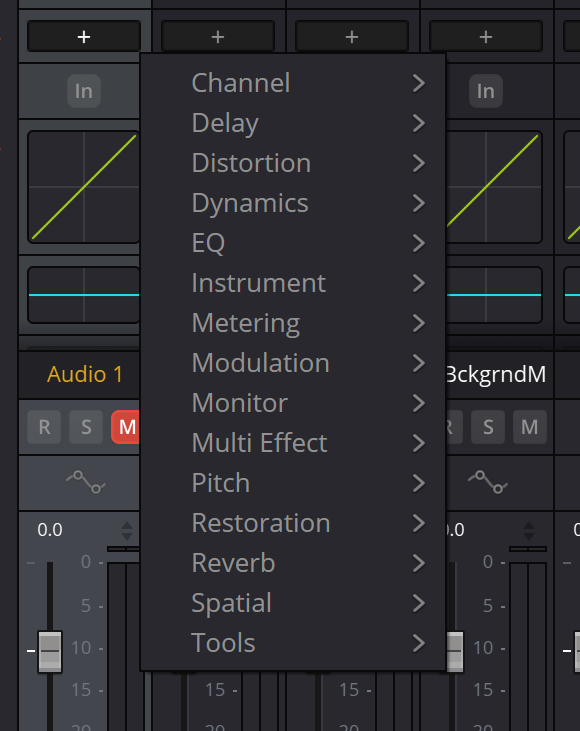
Mixer FX categories
Existing article capture with its URL retained. Fresh visual inspection was not completed in this pass. Compare it with your installation; it does not establish a complete catalog, settings or exact version.
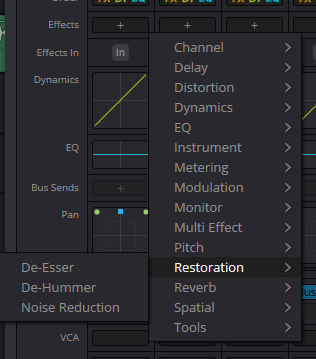
Restoration menu
Existing article capture with its URL retained. Fresh visual inspection was not completed in this pass. Compare it with your installation; it does not establish a complete catalog, settings or exact version.
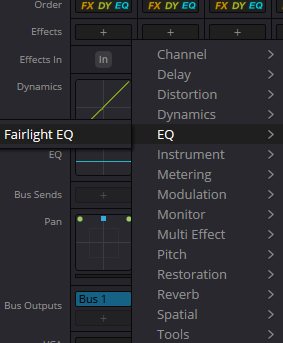
EQ menu
Existing article capture with its URL retained. Fresh visual inspection was not completed in this pass. Compare it with your installation; it does not establish a complete catalog, settings or exact version.
Reference: Blackmagic Design — Fairlight FX and Plugins / Mixer
04 / UNDERSTAND & APPLY
Order is part of the setting
A serial plugin list is processed from top to bottom. The whole channel path, however, contains more than that list.
A compressor after tone correction receives an already modified signal. Move it before that correction and its input conditions change. This is a reason to compare both arrangements, not a rule that EQ must always come first.
Reverb before dynamics and reverb after dynamics also serve different intentions. A separate send can provide shared space; inspect the return instead of treating a parallel branch as another serial insert.
Move one stage at a time, watch input and output levels and listen to quiet endings. Do not infer every Mixer block’s signal position from screen height alone; check Order and routing.
Reference: Blackmagic Design — Fairlight FX and Plugins / Mixer
05 / UNDERSTAND & APPLY
Compare sound, not just a gain increase
Before deciding that processing is better, approximately level-match the treated and original versions.
Listen to the full meaningful passage, then the problem and its boundaries. Useful treatment solves the initial task without introducing conspicuous lisping, lost endings, abrupt ambience changes or an inappropriate tail.
Bypass the instance under investigation, not an accidental combination of the entire path. Inspect automation too: a moving parameter can invalidate repeatable A/B comparisons. Explicitly restore the chosen working state after testing.
Make the final decision in the mix. Isolation helps locate a defect, but picture and the other sounds determine whether the treatment is sufficient.
One passage
Choose a region containing wanted sound, a pause and an edit; retain the comparison boundaries.
One variable
Change one parameter or one ordering decision. Note the actual difference.
One context
Compare at similar levels with the same tracks active.
Reference: Blackmagic Design — Fairlight FX and Plugins / Mixer
06 / UNDERSTAND & APPLY
Native effect, VST and external application
Fairlight FX run inside Resolve. Third-party inserts and separate audio editors use different integration paths.
Blackmagic describes Steinberg VST support and Audio Units on Mac. That does not promise compatibility with every plugin version and operating system. A build for one OS is not suitable for another merely because the product name matches.
External Audio Process exchanges a file with a separate application. Pointing to that application does not turn it into a Mixer insert. Discovery, compatibility checks and file return are covered in the companion article.
Reference: Blackmagic Design — Fairlight FX and Plugins / Mixer
07 / UNDERSTAND & APPLY
One-effect presets, chains and Chain FX
Saved settings are not a universally correct result for a new source.
Distinguish one instance’s parameters from an entire sequence. When reusing a setup, check the number and order of stages, active states and processing scope. Moving settings between projects does not install a missing third-party dependency.
Blackmagic’s current page separately describes Chain FX: up to six effects inside a chain, with Chain FX instances combinable in channel effect slots. It is a container with its own structure, not evidence that every other list or clip has the same capacity.
The separate Chain FX article covers its window, output level and recall checks. For this workflow, retain the distinction between one preset, a serial insert list and a Chain FX container.
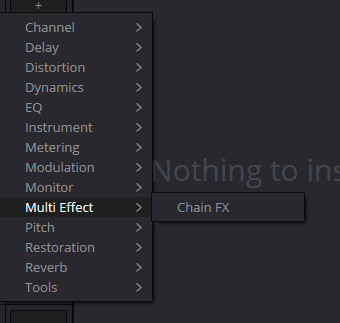
Multi Effect
Existing article capture with its URL retained. Fresh visual inspection was not completed in this pass. Compare it with your installation; it does not establish a complete catalog, settings or exact version.
Reference: Blackmagic Design — Fairlight FX and Plugins / Mixer · Blackmagic Design — What’s New / Chain FX
08 / UNDERSTAND & APPLY
Cache and Bounce: performance is not archiving
Identify the expensive stage before deciding whether to keep processing live or commit a file.
Compare playback with one suspect instance bypassed. If the problem disappears, record the plugin version and settings. Disabling everything at once makes it harder to locate a cause.
Blackmagic offers cache and bounce options for processor-heavy work. The chosen command determines scope, channels, output and destination. Caching playback and delivering a final WAV are not the same task.
After committing, confirm the version you hear and avoid applying the same treatment twice. For handoff, retain sources, the project, dependency information and a checked printed version. Do not treat a temporary cache as a complete archive.
Reference: Blackmagic Design — Fairlight FX and Plugins / Mixer
09 / UNDERSTAND & APPLY
Find the next article by task
These are navigation links, not certificates of freshness for every linked guide.
The map retains the earlier encyclopedia’s categories and pages. Check each processor in your own Resolve edition. A closed menu does not establish a complete category, and a shared topic group does not make every tool a conventional insert.
This package updates only the FX overview and the integration guide. Individual processors receive editorial review in later stages; the links below no longer inherit unconditional “verified guide” badges.
Dialogue
Build a dialogue workflow from source balance to listening in the scene.
↗Audio Plugins / External Processing
Find a plugin, register an editor and verify the returned file.
↗Bounce / Cache
Reduce playback load while keeping a clear route back to the original.
↗Multiband Compressor
Explore band-based dynamics and listen for unintended tonal changes.
↗Soft Clipper
Compare peak softening with limiting and check for audible distortion.
↗Foley Sampler
Prepare sound assignments and check a performance against picture.
↗Chain FX
Build a repeatable chain without losing processor order and bypass states.
↗Equalizer
Locate a problem range and compare tone at a similar listening level.
↗Limiter
Control peaks and separately assess the effect on transients.
↗Dialogue Processor
Explore a dialogue channel treatment without enabling every section by habit.
↗Vocal Channel
Treat vocal processing as a set of tasks, not a universal preset.
↗Delay
Relate delay timing and repeats to the scene’s rhythm and space.
↗Echo
Check repeat clarity and the ends of spoken phrases.
↗Distortion
Add character deliberately and compare without a loudness advantage.
↗Chorus
Assess width and tonal movement alongside a mono check.
↗Flanger
Explore moving coloration and check the effect’s depth in context.
↗Modulation
Choose a type of movement rather than cycling through effects at random.
↗Noise Reduction
Balance noise reduction against consonants, pauses and background detail.
↗De-Esser
Target harsh sibilance without dulling the whole voice.
↗De-Hummer
Distinguish persistent hum from broadband noise and useful low frequencies.
↗Reverb
Relate room impression, speech intelligibility and the effect tail.
↗Music Remixer
Assess changes to musical components and check separation artifacts.
↗Pitch
Explore pitch changes and separately check duration and sync.
↗Frequency Analyzer
Compare a spectrum observation with what you actually hear.
↗Loudness Meter
Distinguish loudness measurements, units and the delivery requirement.
↗Level Meter
Distinguish level, peaks and missing signal without guessing from a waveform.
↗Monitor
Separate monitoring from recording and the source chosen for the output file.
↗Panner
Check sound position, channel format and the target playback result.
↗Voice Isolation
Assess voice isolation along with breaths, word endings and artifacts.
↗Dialogue Separator
Compare treatment of dialogue components and keep a verifiable original.
↗Ducking
Relate music attenuation to speech and check level recovery.
↗EQ / Dynamics
Start with the channel’s built-in sections before adding more inserts.
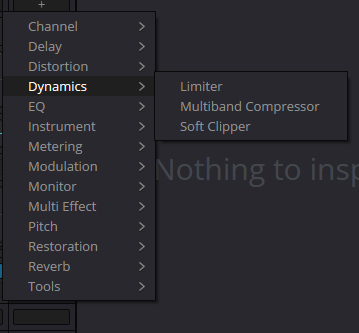
Dynamics menu
Existing article capture with its URL retained. Fresh visual inspection was not completed in this pass. Compare it with your installation; it does not establish a complete catalog, settings or exact version.
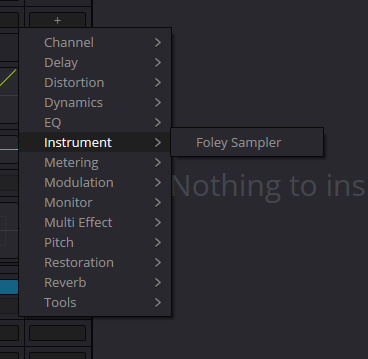
Instrument
Existing article capture with its URL retained. Fresh visual inspection was not completed in this pass. Compare it with your installation; it does not establish a complete catalog, settings or exact version.
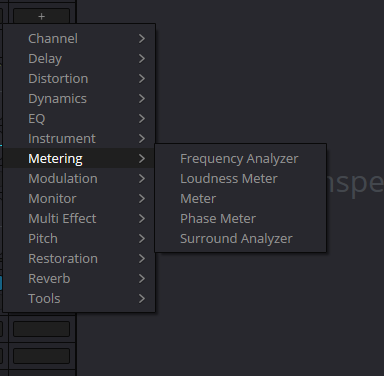
Metering menu
Existing article capture with its URL retained. Fresh visual inspection was not completed in this pass. Compare it with your installation; it does not establish a complete catalog, settings or exact version.
Reference: Blackmagic Design — Fairlight FX and Plugins / Mixer · Videomontazher — archived FX / Audio Plugins illustrations
PRACTICE / NO AUTOPILOT
A small task. A checkable result.
Work in a test copy, listen before and after, and write down what you actually observed. The checklist contains no pre-approved results.
Retain the original state
In a timeline copy, select one line and a neighbouring passage. Record the task and processing scope.
Add one effect
Verify the target, instance and initial settings. Do not load a large chain automatically.
Check the boundary of influence
Listen to the target, neighbour and another track. Explain which sources pass through the chosen object.
Compare a variant
Check bypass and the active state at similar levels. Keep one useful change, not merely the louder sound.
Record the result
Write down settings, version, observations and unresolved issues. Where appropriate, export a short section and listen to the file itself.
FAQ / BEFORE THE NEXT MOVE
Questions that matter in practice
Why did the effect change more than one line?
Check its scope. A track channel or bus receives more than one selected clip instance. Establish the signal path; moving the plugin window does not change its assignment.
Reference: Blackmagic Design — Fairlight FX and Plugins / Mixer
Is channel EQ the same instance as a Fairlight EQ insert?
Do not assume they are the same instance. They are separate control points, and similar correction can be applied twice accidentally. Check the opened block and both processing states.
Reference: Blackmagic Design — Fairlight FX and Plugins / Mixer
Is there one correct effect order?
No. The task and the signal each stage should receive determine the sequence. After reordering, compare the result and revisit thresholds, gain and tails.
Reference: Blackmagic Design — Fairlight FX and Plugins / Mixer
Why is bypass quieter?
Processing may have changed the level. Judge quality at comparable loudness, without confusing effect bypass with muting the track.
Reference: Blackmagic Design — Fairlight FX and Plugins / Mixer
Does a preset transfer a third-party plugin to another machine?
No. A compatible installation and permission to use it remain separate requirements. Saved settings do not prove the dependency loaded.
Reference: Blackmagic Design — Fairlight FX and Plugins / Mixer
Are all catalog links already redesigned?
No. This is navigation through the existing collection. Editorial status is tracked by package; reviewing two articles does not verify every effect.
REFERENCES / 2026-10-07
What this guide is based on
Core actions reviewed on 7 October 2026 against Blackmagic’s current Fairlight FX and Plugins, External Processing and Chain FX pages. This is a workflow guide, not a compatibility matrix for every plugin. Original image URLs are retained, but their binary files are absent from the ZIP and fresh network inspection failed in this pass. The exact build, closed menus and external-process arguments are not established from those images. Plugin installation, listening, Bounce and the Resolve file-return workflow have not been tested here.
Blackmagic Design — Fairlight FX and Plugins / Mixer ↗
Reviewed 7 October 2026: clip/track effects, list order, separate EQ/Dynamics, VST and Mac Audio Units, Mixer operations and cache/bounce. Not a third-party compatibility matrix or a listening test.
Blackmagic Design — What’s New / Chain FX ↗
Checked Chain FX description: up to six internal effects, presets and combining chain instances in channel slots. The container is covered separately in F05-P02; closed menus and live preset recall are not certified.
Videomontazher — archived FX / Audio Plugins illustrations ↗
Captions and paths retained from the supplied project. Nine unique PNG files are absent from the ZIP. Fresh network fetches failed; visual reinspection was NOT completed in F05-P01. Closed menus, Type behavior and versions are not certified from them.