FAIRLIGHT / AI / VOICE · 08
Dialogue Separator
Voice, background and room. Give each a purpose.
A recording can have a useful room perspective and distracting background at the same time. Dialogue Separator offers separate Voice, Background and Ambience levels. Reduce what obscures the words while retaining the space that connects the scene.
- 01Distinguish three components
- 02Keep the required space
- 03Check transitions and artifacts
Select voice, background or ambience and change that known component in the teaching sum.
Room sound and interference have different roles.↗
Voice is speech; Background is surrounding sound; Ambience is the reverberant field. Decide what the scene needs to retain.
Check: each component has its own objective.Change the controls to explore the diagram. No audio playback, native DSP or connection to Resolve.
Sources and scope · 8 October 2026
Reviewed on 8 October 2026 against the official DaVinci Resolve 21 Reference Manual: Track FX, clip controls and the relevant module descriptions. The manual illustrations were inspected. The workflow and browser exercise are authored teaching material; native processing, audio quality and project recall were not tested in an installed Resolve session. Existing site image paths are preserved; their filenames do not establish a particular build.
Read the source notes ↓On this page
01 / UNDERSTAND & APPLY
Why separate voice, background and room
Dialogue Separator is a Studio feature for changing the balance within recorded material. It is useful when speech needs more presence while the recording’s room perspective remains valuable: for example, reducing a crowd or music without drying the entire scene.
Define the desired result first. Clearer dialogue that still belongs in a large hall requires a different balance from a dry close voice. Three controls help when voice, competing background and room sound have separate jobs.
A location interview
Reduce competing sounds and check whether the voice remains naturally connected to its setting.
A person approaches
Ambience can become drier through the scene while background retains its own balance. Audition the transition with picture.
A creative environmental focus
The voice can deliberately move back. Judge the scene rather than assuming Voice must always be maximized.
Reference: Blackmagic Design — DaVinci Resolve 21 Reference Manual · Fairlight Track FX
02 / UNDERSTAND & APPLY
Voice, Background and Ambience
| Component | Meaning | Check |
|---|---|---|
| Voice | The separated human speech. | Word attacks, quiet syllables, breaths and tone. More level cannot establish recovery of a lost word. |
| Background | Surrounding sounds, including competing music or crowds recorded with the dialogue. | Interference during speech and in pauses. Separation may differ between events. |
| Ambience | The reverberant field or ambient room sound connecting the voice with its space. | Phrase decays, distance to the character and room changes across shots. |
Reference: Blackmagic Design — DaVinci Resolve 21 Reference Manual · Fairlight Track FX
03 / UNDERSTAND & APPLY
Track FX access and the mono limitation
Open the Mixer’s three-dot menu and enable Track FX. Then enable Dialogue Separator in Visible Track FX. It has its own fixed position among Track FX and is not an ordinary Effects insert slot.
In the Inspector, choose track controls when accessing that track’s effects. Read the object name and inspect the material passing through it. Effects In for ordinary inserts does not bypass Track FX; use Separator’s own enable switch.
The official Resolve 21 manual still describes Dialogue Separator as mono-only. For stereo sources, it suggests dual-mono with separate processing on two mono tracks. Check source mapping and pan: accidentally duplicating one channel does not preserve the original stereo recording.
| Condition | Practical decision |
|---|---|
| DaVinci Resolve Studio | The Studio-only marker applies to Separator itself. Other voice tools are checked separately. |
| One mono source | A useful starting point for the three components without the additional task of rebuilding stereo. |
| Two independent microphones | Map each source channel correctly first. Avoid making a combined mix before choosing the source. |
| A stereo scene | After separate mono processing, inspect side balance, mono compatibility and spatial stability. |
Reference: Blackmagic Design — DaVinci Resolve 21 Reference Manual · Fairlight Track FX
04 / UNDERSTAND & APPLY
Three levels, three Mutes and one Output
Each component has its own level and Mute. The Resolve 21 illustration shows 0.0 in the numeric fields and Min/Max at the ends of each knob. These labels do not establish numeric endpoint limits for the current version.
Mute removes the selected component from the mix and helps reveal its contribution. Attenuation and Mute are different states. After temporarily isolating a component for listening, restore the intended levels and every Mute state before judging the scene.
| Element | How to use it |
|---|---|
| Voice / Background / Ambience | Change one level while retaining the others. Compare the same passage before and after. |
| 0.0 in a level field | Neutral added gain for that component. Do not automatically equate three zeros with processing bypass. |
| Component Mute | Temporarily excludes that contribution. Do not make an undocumented claim that the lowest knob position is equivalent to silence. |
| Output | Shows the resulting mix level, not the accuracy of speech separation. |
| Overall enable / A/B | Compare bypass and a retained variant on the same passage. |
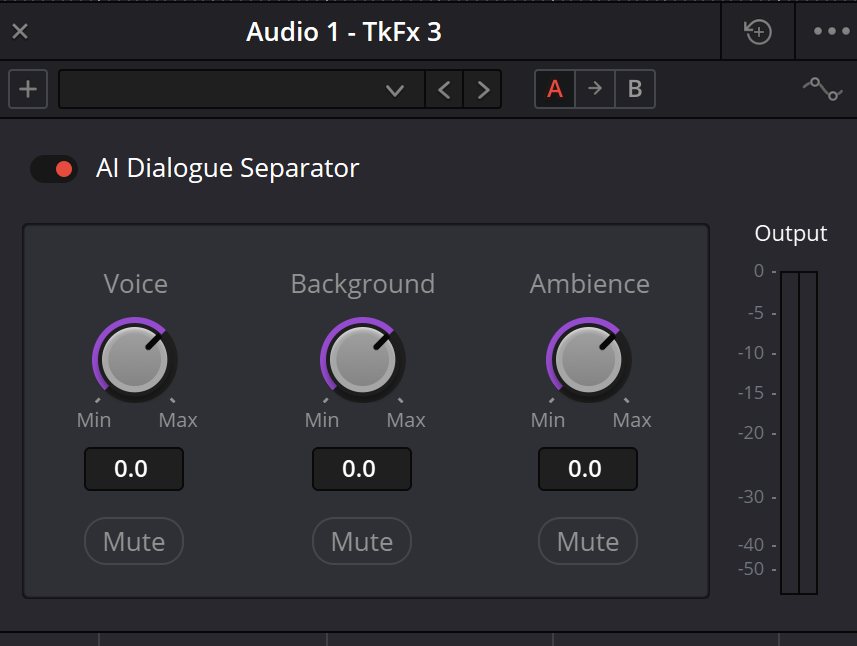
Dialogue Separator — original interface example
Voice, Background, Ambience, individual Mutes and overall Output. The existing site illustration is retained. Control descriptions below were checked separately against the official Resolve 21 manual.
Reference: Blackmagic Design — DaVinci Resolve 21 Reference Manual · Fairlight Track FX
05 / UNDERSTAND & APPLY
A practical pass: retain the room
Choose a revealing passage
Keep a copy. Include background, a word decay, a pause and an adjacent edit. Identify the microphone and channel.
Define three objectives
For example: Voice stays natural, Background competes less and Ambience retains the large hall. Spell out what should remain.
Reduce competing background
First change Background while preserving Voice and Ambience. Listen to interference during words, not just in pauses.
Refine the space
Compare Ambience at a phrase tail and edit. Restore some room if the voice becomes detached from picture.
Check voice and overall output
Adjust Voice only when useful. After any boost, recheck the mix and peaks instead of relying on the previous level.
Restore the full mix
Restore temporary Mutes and include music and ambience. Record the balance and remaining issues, then recheck the saved project and export.
06 / UNDERSTAND & APPLY
A teaching mix with three components
The panel starts with three predetermined teaching components. Level and Mute demonstrate attenuation versus exclusion from a mix. It does not separate your source or generate real stems.
Keep Voice, change Background and compare two Ambience settings. Explain which component should connect words to the room. The values and output shape belong only to the authored signals; they do not predict separation, peaks or artifacts in Resolve.
Voice, background and the room around it.
Adjust the three components independently. Background and Ambience are separate: the latter represents reflections and room sound. Muting the background does not automatically mute the room.
A gain change affects only its own component; Mute sets its weight to zero. Equal gain settings do not imply equally loud components.
−18…+18 dB is the chosen range for this teaching diagram, not a claim about every installed version’s limits.
07 / UNDERSTAND & APPLY
Perspective, automation and edits
The manual gives the example of someone walking toward the camera: ambience can become gradually drier while background remains independently controlled. This is a reason to consider the whole scene rather than copy one dry setting to every shot.
Before recording automation, preserve a version and choose the intended parameter. Listen to the approach, transition and recovery. With normal edits, also inspect neighbouring clips: good treatment of one line can still expose a jump in room sound.
Restore any temporary diagnostic Mutes and repeat playback after saving. Room tone on another track can help continuity, but should not hide a cut-off word or replace evaluation of Separator itself.
Automation
Move parameters through the scene.
↗Audio clip editing
Transitions, phrase boundaries and fades.
Reference: Blackmagic Design — DaVinci Resolve 21 Reference Manual · Fairlight Track FX
08 / UNDERSTAND & APPLY
Separator and the rest of the group
| Tool | When to compare | What changes |
|---|---|---|
| Voice Isolation | The main goal is bringing speech forward from its environment. | Amount blends the original recording with isolated voice. |
| Dialogue Leveler | The issue is quiet and loud lines. | Dialogue leveling and a separate gentle Background Reduction option. |
| Dialogue Separator | Room sound needs to be retained or changed independently of background. | Three component levels and Mute within recorded material. |
| Music Remixer | The task concerns a finished music recording. | Musical components rather than Voice/Background/Ambience. |
| Ducker | Voice and music are already on separate tracks. | Lowers the bed from a control source instead of separating it from speech. |
| Noise Reduction / De-Hummer / EQ | The defect is specific and a smaller correction may suffice. | Compare a noise profile, tonal hum treatment or frequency adjustment first. |
Voice Isolation
Quickly compare original and isolated contributions.
↗Noise Reduction
Address a characteristic steady noise.
Reference: Blackmagic Design — DaVinci Resolve 21 Reference Manual · Fairlight Track FX · Blackmagic Design — DaVinci Resolve Studio / AI audio tools
09 / UNDERSTAND & APPLY
What separation does not establish
Three adjustable components do not guarantee three independent original tracks. Overlapping sources can leak between components. At strong balance changes, inspect moving tone, pumping and unstable room tails.
Voice does not promise a separate track for every speaker. When two people overlap, inspect each required word carefully. Reduced background speech is not evidence of reliable speaker identification.
If local editing, De-Hummer or a small EQ change solves the issue, compare that option. When meaning is lost, seek another microphone, take or ADR; quieter background alone cannot establish restored content.
Lost naturalness
Compare smaller level changes and more of the original room impression.
A new location
Revisit the objective for every component. One balance need not suit the next room.
Delivery
Inspect output routing, channels, loudness and the actual file separately from a useful solo comparison.
10 / UNDERSTAND & APPLY
Diagnose the audible change
| Observation | Next test |
|---|---|
| The voice became abruptly detached from its room | Restore some Ambience and listen with picture and the adjacent shot. |
| Background is quiet only between words | Inspect Background where it overlaps speech and compare a smaller change. |
| Room tails pump | Compare Ambience, the complete mix and bypass over a full phrase. |
| One stereo side changed more | Inspect dual-mono mapping, independent settings, pan and mono compatibility. |
| Part of the environment disappeared after a test | Check all three Mutes and recorded automation before changing routing. |
| Zero fields sound different from bypass | Distinguish neutral component levels from bypass of the module. Use the same passage. |
Reference: Blackmagic Design — DaVinci Resolve 21 Reference Manual · Fairlight Track FX
PRACTICE / NO AUTOPILOT
A small task. A checkable result.
Work in a test copy, listen before and after, and write down what you actually observed. The checklist contains no pre-approved results.
Write three objectives
What to preserve in Voice, reduce in Background and retain as space through Ambience.
Check the mono scope
Record the track and source channel. For dual-mono, describe both sides and pan.
Compare one component
Record before/after level, Mute state and observations during words and pauses. Repeat for other useful components.
Audition transitions
Check a quiet ending, room decay, adjacent edit and character movement with picture.
Restore the mix and save
Check Mutes, automation, overall output and export. Retain unresolved observations.
FAQ / BEFORE THE NEXT MOVE
Questions that matter in practice
How is Ambience different from Background?
The manual defines Ambience as the reverberant field or ambient room sound. Background includes surrounding sounds such as music or crowds. Test the actual separation on the recording.
Reference: Blackmagic Design — DaVinci Resolve 21 Reference Manual · Fairlight Track FX
Does Resolve 21 Separator support a stereo track?
The 21 manual still specifies mono-only and suggests dual-mono with separate processing on two mono tracks. Check source mapping and spatial reconstruction first.
Reference: Blackmagic Design — DaVinci Resolve 21 Reference Manual · Fairlight Track FX
Is Studio required?
Yes. Dialogue Separator is marked Studio-only. Do not automatically apply that marker to Dialogue Leveler.
Reference: Blackmagic Design — DaVinci Resolve 21 Reference Manual · Fairlight Track FX
Do the three controls create three original stems?
No. They control analyzed components within the module, not the original separate microphones, and do not guarantee zero leakage.
Are three 0.0 levels the same as bypass?
Zeros mean neutral additional component levels. Disable the module itself for a bypass comparison; the numeric fields and bypass are different states.
Why are numerical knob limits not listed?
The current manual illustration labels Min/Max. Numeric endpoints are not established by that figure, and the teaching panel’s range is not presented as the complete native range.
Reference: Blackmagic Design — DaVinci Resolve 21 Reference Manual · Fairlight Track FX
REFERENCES / 2026-10-08
What this guide is based on
Reviewed on 8 October 2026 against the official DaVinci Resolve 21 Reference Manual: Track FX, clip controls and the relevant module descriptions. The manual illustrations were inspected. The workflow and browser exercise are authored teaching material; native processing, audio quality and project recall were not tested in an installed Resolve session. Existing site image paths are preserved; their filenames do not establish a particular build.
Blackmagic Design — DaVinci Resolve 21 Reference Manual · Fairlight Track FX ↗
Official PDF: chapter 181, pages 4091–4096 cover Voice Isolation, Dialogue Leveler, Ducker, Music Remixer and Dialogue Separator; page 3982 covers clip controls; 3837 covers Effects In bypass; 690–692 cover the separate Cut-page Voiceover workflow; 952–953 cover Track Mode; 4090 covers Track FX automation; 1148–1149 distinguish AI Music Editor. Text and panel illustrations reviewed on 8 October 2026. This is documentation review, not an audition of processing in an installed application.
Blackmagic Design — DaVinci Resolve Studio / AI audio tools ↗
The current manufacturer page lists Voice Isolation, Music Remixer and Dialogue Separator in DaVinci Resolve Studio. Their purpose, controls and limits are reviewed using the full Resolve 21 manual. These three Studio tools do not imply that the entire editorial chapter requires Studio.