FAIRLIGHT / AI / VOICE · 08
Voice Isolation
Bring the voice forward. Keep the performance.
When fans, traffic or recorded music compete with words, Voice Isolation can help reveal the human voice. Adjust the isolated contribution, inspect quiet endings and decide how much of the environment belongs in the scene.
- 01Choose clip or track scope
- 02Understand Amount as a balance
- 03Check voice and environment
Change the amount and illustrative background. This shows the isolation task, not a prediction of recording quality.
One microphone. An identifiable problem.↗
Audition the source channel and choose a passage containing noise during speech, a pause and a quiet line.
Check: the intended recording is being processed.Change the controls to explore the diagram. No audio playback, native DSP or connection to Resolve.
Sources and scope · 8 October 2026
Reviewed on 8 October 2026 against the official DaVinci Resolve 21 Reference Manual: Track FX, clip controls and the relevant module descriptions. The manual illustrations were inspected. The workflow and browser exercise are authored teaching material; native processing, audio quality and project recall were not tested in an installed Resolve session. Existing site image paths are preserved; their filenames do not establish a particular build.
Read the source notes ↓On this page
01 / UNDERSTAND & APPLY
When Voice Isolation is useful
This DaVinci Resolve Studio feature targets recorded human voice. Consider it when ventilation, traffic, machinery, crowds or music in the same microphone obscure a line. The interference may be present during words as well as in pauses.
Distinguish unwanted interference from the environment the scene needs. A roadside interview may need quieter traffic while retaining its location. In a quiet voice-over recording, the real issue may instead be hum, a sibilant or an uneven level.
A noisy location
Test speech during the strongest distraction, rather than judging one convenient pause.
A reflective room
Compare word decays and vocal colour. Reducing room sound should not damage the scene’s perspective.
Clean but uneven dialogue
Compare Clip Volume or Dialogue Leveler first: isolation and leveling address different problems.
Reference: Blackmagic Design — DaVinci Resolve 21 Reference Manual · Fairlight Track FX
02 / UNDERSTAND & APPLY
Clip controls, Track FX and availability
For a local change, select an audio clip and open its Audio Inspector. For a consistent track, use Mixer Track FX or the track view of the Inspector. Read the selected object’s name: similar controls do not mean identical scope.
If the section is hidden, open the Mixer’s three-dot menu and enable Track FX. These modules occupy their own fixed positions in the path. Effects In bypasses ordinary inserts and does not bypass Track FX; use Voice Isolation’s own switch for comparison.
Chapter 181 of the Resolve 21 manual supports mono, stereo and dual-mono material with no more than two channels, excluding live audio input for the ordinary Track FX path. Do not extend that restriction to every recording workflow: the dedicated Cut Voiceover tool describes enabling Voice Isolation while recording. Inspect monitoring and the resulting file within that specific workflow.
| Check | Reason |
|---|---|
| Studio edition | Voice Isolation is marked Studio-only. Seeing other Track FX does not establish access to this feature. |
| Clip or track | A track setting affects material passing through that track. One local problem may need a smaller scope. |
| Channel format | Two independent lavaliers in a stereo file need correct interpretation before they are treated as one arbitrary mix. |
| Other stages | Check whether isolation is already active on both the clip and track. |
Reference: Blackmagic Design — DaVinci Resolve 21 Reference Manual · Fairlight Track FX
03 / UNDERSTAND & APPLY
Amount, bypass and Output
The compact window has an enable switch, Amount and an Output meter. It offers no manual Threshold, Learn or independent ambience control. Compare Dialogue Separator when background and room sound need separate decisions.
Amount mixes the original source with the isolated voice. The Resolve 21 manual describes 50 as approximately equal contributions. Restoring some original signal also restores both natural detail and original interference. Judge that trade-off on the actual recording.
| Control | Meaning and check |
|---|---|
| Amount · 0–100 | A mix position. 100 does not guarantee complete removal of other sounds; 50 does not mean 50% better audio. |
| Voice Isolation enable | Compare the same line processed and bypassed while keeping other stages unchanged. |
| Output | Shows output level. A lower meter is not a measure of cleanliness or preserved speech. |
| A/B and window preset | Keep useful variants, then recheck source and scope when transferring settings. |
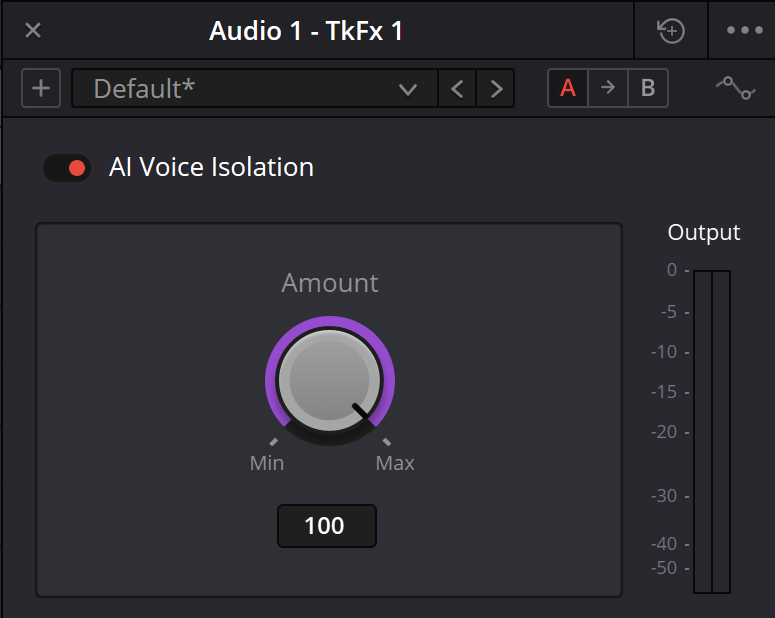
Voice Isolation — original interface example
Amount and Output in the Voice Isolation window. The existing site illustration is retained. Control descriptions below were checked separately against the official Resolve 21 manual.
Reference: Blackmagic Design — DaVinci Resolve 21 Reference Manual · Fairlight Track FX · Blackmagic Design — Resolve Studio 18.1 release / Voice Isolation controls
04 / UNDERSTAND & APPLY
A practical interview pass
Prepare a short scene
Save a timeline copy. Include an ordinary line, a quiet ending, prominent interference and an adjacent edit. Identify the microphone and source channel.
Check source and scope
Audition the source without the new treatment. If another microphone is better, compare it before adjusting Amount.
Make two useful variants
Find a moderate isolation setting and compare a stronger one. Change Amount alone so that the reason for the difference remains clear.
Inspect useful speech
Return to consonants, breaths and a quiet ending. A useful version preserves the words, not merely quiet pauses.
Restore context
Listen with picture, music and ambience. Check for empty gaps between neighbouring lines.
Keep an understandable decision
Record Amount, scope, test passage and the remaining defect. Reopen the project and listen to a short export.
05 / UNDERSTAND & APPLY
A teaching mix: what Amount changes
The interactive display uses authored signals: an original mixture and a hypothetical isolated voice. Amount demonstrates the direction of blending. The result is not derived from your recording and does not perform neural separation.
Compare the start, middle and end of the range. Explain which original contribution returns together with the environment. Then test the idea on real material in Resolve: the browser curve cannot predict artifacts, intelligibility or the exported file’s level.
Change the blend. Keep the task clear.
The two inputs are authored examples: the original and an isolated version with some background left. Amount changes their blend. Highlight the voice to see how this task differs from leveling dialogue.
More of the isolated branch enters the blend as Amount rises. The actual quality of that branch must be judged from your recording.
06 / UNDERSTAND & APPLY
Match the tool to the job
| Task | Tool | Reason |
|---|---|---|
| Bring speech forward from a complex environment | Voice Isolation | Simple original/isolated balance. |
| Balance quiet and loud lines | Dialogue Leveler | Dialogue-focused level handling, with a separate Background Reduction option. |
| Change voice, background and reflections separately | Dialogue Separator | Three component levels help retain the required room sound. |
| Change the makeup of a finished music track | Music Remixer | Balances musical components, including vocals. |
| Make room for speech in separate music | Ducker | Reduces another track in response to a control source. |
| Identifiable steady noise, hum or sibilance | Noise Reduction / De-Hummer / De-Esser | First compare targeted treatment of the specific defect. |
Dialogue Separator
Retain room sound while reducing background separately.
↗Dialogue Leveler
Judge the remaining dialogue variation after cleanup.
Reference: Blackmagic Design — DaVinci Resolve 21 Reference Manual · Fairlight Track FX · Blackmagic Design — DaVinci Resolve Studio / AI audio tools
07 / UNDERSTAND & APPLY
What remains after isolation
A cleaner voice can still be dull, harsh, uneven or too quiet in the mix. After choosing Amount, assess tone, sibilance and dynamics separately. Every added processor should address an audible issue.
Downstream gain can make residual background more apparent again. Before increasing isolation, compare the whole chain on the same passage. A different balance or suitable room tone on a separate track may serve continuity better.
08 / UNDERSTAND & APPLY
Limits to check in the result
A quiet pause does not establish successful cleanup. Check quiet syllables, breathing, attacks and consistent tone as the background changes. With a difficult recording, stronger isolation may draw attention to the processing.
The module does not provide the original separate microphones or guarantee separation of two simultaneous speakers. When clipping, masking or an unusable take has already obscured a word, compare another source, an alternate line or ADR.
Speech overlaps interference
Test the hardest word. A good result in the adjacent pause does not establish that it survived.
The recording changes
A different microphone, room or head position needs another check even at the same Amount.
Delivery
Isolation does not set loudness, peak, channel or sync requirements. Inspect the actual export separately.
09 / UNDERSTAND & APPLY
When the result sounds less natural
| Observation | Next action |
|---|---|
| Metallic or watery endings | Reduce Amount and compare a complete quiet line, then another microphone or repair method. |
| Speech disappears with the background | Check the source channel, useful speech and scope; bypass and reduce intervention. |
| Empty pauses and obvious edits | Compare less Amount and more consistent ambience across clips. |
| Effects In is off but processing remains | Bypass Track FX itself and inspect clip Voice Isolation. Ordinary insert bypass is a different control. |
| Good solo voice gets lost against music | Return to balance and masking. Compare Ducker on a separate music track. |
| A new setting seems inaudible | Inspect the active object, bypass and any processed or cached version being played. |
Reference: Blackmagic Design — DaVinci Resolve 21 Reference Manual · Fairlight Track FX
PRACTICE / NO AUTOPILOT
A small task. A checkable result.
Work in a test copy, listen before and after, and write down what you actually observed. The checklist contains no pre-approved results.
Identify the source
Use one scene, microphone, channel and passage with a quiet ending. Retain an unprocessed version.
Choose the scope
Record clip or track scope and which passages it changes.
Compare Amount
Make two variants and a bypass reference. Match comparison loudness and describe what changes.
Check the scene
Review consonants, breaths, pauses, an edit, music and picture. Record regressions as well as improvements.
Recheck the saved result
Reopen the project, audition an export and record the remaining issue.
FAQ / BEFORE THE NEXT MOVE
Questions that matter in practice
Does it require Studio?
Yes. The Resolve 21 manual marks Voice Isolation as Studio-only. This is a restriction of the specific feature, not every dialogue tool.
Reference: Blackmagic Design — DaVinci Resolve 21 Reference Manual · Fairlight Track FX
Does Amount 80 remove 80% of noise?
No. Amount mixes the original source and isolated voice. It is a setting, not a measurement of effectiveness.
Reference: Blackmagic Design — DaVinci Resolve 21 Reference Manual · Fairlight Track FX
Why can a lower Amount sound better?
It restores some original recording, including natural details and environment. Choose the balance by the words and scene, not the largest number.
Reference: Blackmagic Design — DaVinci Resolve 21 Reference Manual · Fairlight Track FX
Can it clean a live microphone input?
Chapter 181 excludes live audio input for the ordinary Track FX path. The same manual’s dedicated Cut Voiceover workflow describes Voice Isolation during recording. This does not establish processing of any arbitrary Mixer input.
Reference: Blackmagic Design — DaVinci Resolve 21 Reference Manual · Fairlight Track FX
Why might I still need Leveler or EQ?
Isolation does not establish the finished level or tone. Identify what remains and add only useful processing.
Does the interactive display really isolate speech?
No. It is an authored blending model with predetermined signals. It does not hear your recording or reproduce Neural Engine.
REFERENCES / 2026-10-08
What this guide is based on
Reviewed on 8 October 2026 against the official DaVinci Resolve 21 Reference Manual: Track FX, clip controls and the relevant module descriptions. The manual illustrations were inspected. The workflow and browser exercise are authored teaching material; native processing, audio quality and project recall were not tested in an installed Resolve session. Existing site image paths are preserved; their filenames do not establish a particular build.
Blackmagic Design — DaVinci Resolve 21 Reference Manual · Fairlight Track FX ↗
Official PDF: chapter 181, pages 4091–4096 cover Voice Isolation, Dialogue Leveler, Ducker, Music Remixer and Dialogue Separator; page 3982 covers clip controls; 3837 covers Effects In bypass; 690–692 cover the separate Cut-page Voiceover workflow; 952–953 cover Track Mode; 4090 covers Track FX automation; 1148–1149 distinguish AI Music Editor. Text and panel illustrations reviewed on 8 October 2026. This is documentation review, not an audition of processing in an installed application.
Blackmagic Design — DaVinci Resolve Studio / AI audio tools ↗
The current manufacturer page lists Voice Isolation, Music Remixer and Dialogue Separator in DaVinci Resolve Studio. Their purpose, controls and limits are reviewed using the full Resolve 21 manual. These three Studio tools do not imply that the entire editorial chapter requires Studio.
Blackmagic Design — Resolve Studio 18.1 release / Voice Isolation controls ↗
The official release announcement documents the Amount 0–100 scale. Mix behavior and current Dialogue Leveler modes are checked separately against the full Resolve 21 manual; the historical description does not replace current documentation.