FAIRLIGHT / SPATIAL AUDIO / PANNING · 12
Panner
Place the source. Preserve the scene. Verify the channels.
Start with the source and bus formats, then choose the position and width of the sound. Read the real 2D Panner controls, distinguish Spread from Divergence and audition movement in the mix. The teaching model shows how two laws distribute one mono signal to L and R, and why a mono sum needs a separate check.
- 01Connect source format, panning and the output bus
- 02Distinguish position, Spread, Divergence and Boom
- 03Verify pan automation, stereo and the chosen mono fold
Distribute a mono signal between L and R using an explicit teaching law. Compare its coefficients and defined mono sum with the centre position.
One source between L and R.↗
Move an abstract position from −100% to +100%. The marker, branches and output peaks are recalculated from one mono signal. Center reference retains your saved pan.
Check: this percentage defines a teaching axis, not a room angle.Change the controls to explore the diagram. No audio playback, native DSP or connection to Resolve.
Sources and scope · 9 October 2026
Checked 9 October 2026 against the official Resolve 21 Reference Manual: busses and routing, pp. 4001–4002, 4026, 4035; Pan and 2D controls, pp. 4027–4030; automation, pp. 4048–4050. The p. 4028 panel and p. 4029 controls were visually inspected. Immersive Studio scope was checked against the current Blackmagic page. The open cosine/sine equation was verified against the W3C StereoPannerNode mono branch; it is not a native Resolve pan-law claim. The Lab is an authored calculation without playback, measurement, room acoustics or surround rendering.
Read the source notes ↓On this page
01 / UNDERSTAND & APPLY
Establish the route before choosing the position
Pan distributes a signal within an existing channel system. Its position does not select the bus for you.
The Mixer has separate channel strips for tracks and busses. Before panning, establish what is on the source track, the destination bus format and where that bus goes next. A stereo bus remains stereo even if you open a spatial Panner view.
Check parallel paths as well. A Bus Send has its own On, Pre, Send Level and Pan controls; the direct-output and send results can differ. A reverb return or another bus can broaden the final scene after the source pan has already been chosen.
1. Read the source
Match clip mapping, track format and actual channel content. Two file channels are not necessarily a finished stereo pair.
2. Confirm the bus
Check Bus Outputs and the receiving format. For stereo practice, use a clear route into one stereo bus.
3. Place the sound
Set the Panner position and check the meters on the intended output path.
4. Audition the entire path
Restore sends and mix context. Compare the expected movement with actual monitoring.
Reference: Blackmagic Design — Resolve 21 Reference Manual / routing and pan automation · Blackmagic Design — Resolve 21 Reference Manual / 2D Panner
02 / UNDERSTAND & APPLY
Open the 2D Panner and read its state
In the channel strip Pan section, the indicator lets you drag the position. Double-clicking opens the larger Panner window; the manual also describes a single click on the indicator for panning bypass. In the open window, Pan Enable controls whether panning is active. Bypass and resetting saved coordinates are different actions.
The control set depends on the source-audio mapping. The documented 2D view includes Left/Right, Front/Back, Rotate, Spread, Divergence and Boom. Read these in the context of the selected source; a label or a view switch alone does not prove that every channel of the desired format has already been routed.
Read the active context
Check the track name in the window, the Pan state and the output format. A neighboring track’s parameter does not describe the current source.
Reset deliberately
The manual specifies a double-click on a rotary control to restore its default value. Resetting a control and disabling Pan do different things.
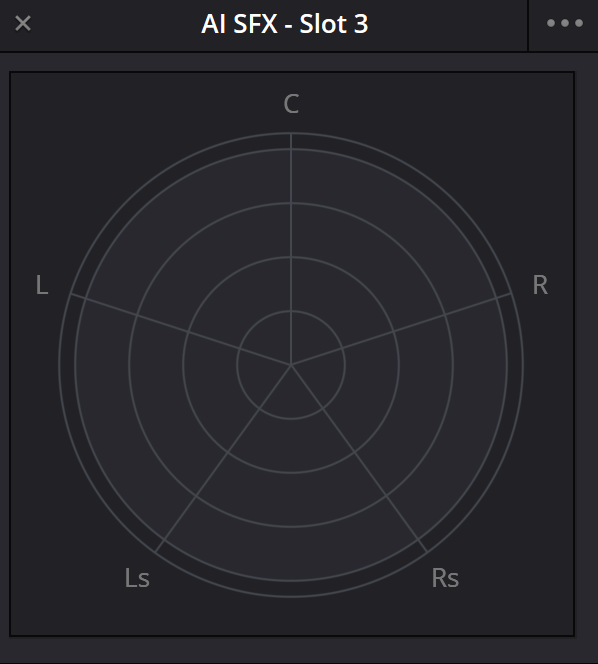
Panner · Resolve 21 interface
Compare the Panner field with your project’s track and bus formats. Available controls depend on source mapping. To check LFE, open Boom and trace its actual path; placement in the field does not establish that send’s level.
Reference: Blackmagic Design — Resolve 21 Reference Manual / 2D Panner
03 / UNDERSTAND & APPLY
A mono source and a stereo pair raise different questions
A mono signal has one original waveform. Distributing it to L/R means choosing how much of that waveform reaches each output. A stereo pair already contains two components and a relationship between them; its position and width need to be judged together with the content of both channels.
The term balance often describes changing the ratio of existing L/R channels. That differs from distributing one mono feed to two sides. A native Panner’s exact algorithm cannot be determined from the word Pan or a centered knob alone; the numeric law in this lesson is defined only for the authored mono example.
| Source material | Check before panning | Listen after the change |
|---|---|---|
| Mono | One intended channel on the track and a clear output pair | Position, level changes and balance with the rest of the mix |
| Stereo | A genuine stereo pair or two separate microphones; correct mapping | Scene preservation, its center and behavior under the selected mono fold |
| Multichannel | Channel membership and order, track and bus formats | Distribution across target channels and their actual monitoring |
Reference: Blackmagic Design — Resolve 21 Reference Manual / 2D Panner · Blackmagic Design — Resolve 21 Reference Manual / routing and pan automation · W3C — Web Audio / StereoPannerNode mono-input algorithm
04 / UNDERSTAND & APPLY
Left/Right and Front/Back: positions within the format
Left/Right changes distribution between the left and right sides according to the speaker configuration. Front/Back addresses the front and rear of a surround format. If the final path is stereo, moving a control does not create separate rear channels in the file.
Establish a static position first, then audition it across a longer passage. For speech, evaluate clarity in context; for a specific sound effect, evaluate its relationship to the action. Choose hard pan when the scene calls for it, rather than simply because a pictured source reaches the edge of the frame.
Position in the field
Move the source in the viewer or use the corresponding controls. Read both the coordinates and the final-bus meters.
Position in the story
Match effect direction to the edit and listening perspective. Camera movement does not always require moving the entire sound scene.
Reference: Blackmagic Design — Resolve 21 Reference Manual / 2D Panner · W3C — Web Audio / StereoPannerNode mono-input algorithm
05 / UNDERSTAND & APPLY
Spread and Divergence change different relationships
Spread describes the distance between sources in multichannel material. The Resolve 21 manual gives a scale from 1, labeled PNT, to 99, labeled FULL. Reducing Spread brings the component placement closer to a point; it does not promise a particular level, correlation or ready-made mono downmix.
Divergence spreads an individual feed into adjacent loudspeakers, making its placement less concentrated. The 2D interface represents the amount with growing green lines; its 2D button changes these indicators into circles. Change one parameter at a time to understand why the scene changes.
| Parameter | Documented change | Separate listening check |
|---|---|---|
| Spread | Distance between multichannel source components | Preserved detail and balance when their placement narrows |
| Divergence | Distribution of a feed into adjacent speakers | Which additional channels receive signal and whether placement stays precise enough |
| Left/Right | Placement across the left and right sides | Scene center after changing width |
Reference: Blackmagic Design — Resolve 21 Reference Manual / 2D Panner
06 / UNDERSTAND & APPLY
Rotate and Boom: rotating the scene and feeding LFE
Rotate moves the source or multiple sources around the listener position in the field. With a wide recording, this is a decision about the placement of the component group. After rotation, recheck the front, rear and picture relationship, especially if Spread was changed first.
Boom controls the send level to the LFE part of the mix. In the documented 2D block, On enables this output and Pre makes it pre-fader. Avoid treating an LFE send as a universal “more bass” control: first establish the required LFE path in the brief, bus and monitoring.
Rotation does not change bus assignment
Rotate changes source placement within the field. Checking Bus Outputs remains a separate action.
A picture does not establish the LFE signal
A dot in a five-channel field cannot reveal the Boom level. Open the relevant controls and check the actual path.
Reference: Blackmagic Design — Resolve 21 Reference Manual / 2D Panner · Blackmagic Design — Resolve 21 Reference Manual / routing and pan automation
07 / UNDERSTAND & APPLY
Lab: one signal, two coefficients
Make the algorithm explicit and inspect simple mono-to-stereo rules.
The example specifies a mono-source peak, a position and one of two mathematical laws. It calculates amplitude coefficients, L/R peaks, the squared coefficient sum and a local mono average. The equal-power equation comes from the open W3C mono algorithm; a linear alternative is provided as a simple comparison.
Center reference temporarily applies 0% while retaining entered settings. This is an authored reference, not a copy of native Pan Enable. Diagram focus does not change the calculation. Switch laws at the same input and position to compare the distribution itself.
Move the source. Inspect what the gains do.
One mono source feeds two output channels through a chosen mathematical law. The source peak is an illustrative input, not a live measurement. Compare cosine/sine equal-power panning with a linear law, then inspect a deliberately defined mono average. No audio is played and no Fairlight pan algorithm is assumed.
At +35%, L receives 0.489 times the mono signal and R receives 0.872 times it. The squared coefficient sum is 1.000; the explicit mono average differs from hard pan by +2.68 dB.
Equal power keeps gL² + gR² = 1. Linear keeps gL + gR = 1. These are different arithmetic invariants. Neither formula establishes constant perceived loudness in a room or specifies the native Fairlight pan law.
At the center, equal-power gives each channel a coefficient of 1/√2, approximately −3.01 dB; linear gives 0.5, approximately −6.02 dB. At either edge, one channel receives the full source and the other receives zero. Our mono average has a 3.01 dB center rise with equal-power and stays constant with linear. This demonstrates the chosen summing rule, not the behavior of your delivery downmix.
Equations, reference and limits
p = appliedPosition / 100
x = (p + 1) / 2
equal-power: gL = cos(xπ/2), gR = sin(xπ/2)
linear: gL = 1 − x, gR = x
A = 10^(inputDb / 20)
L = A × gL; R = A × gR
local mono = (L + R) / 2
dBFS = 20 × log10(amplitude)
center reference: appliedPosition = 0
The two outputs are scaled copies of the same mono input, with identical timing and positive gains. Their sum is coherent by construction. No stereo recording, independent channel, polarity change, delay or correlation estimate is modeled. True zero remains zero and is displayed as −∞ dBFS; it is not replaced by the graph floor.
The input peak defines a normalized digital amplitude. There is no waveform or sample-rate reconstruction, true-peak analysis, LUFS, HRTF, room model, 5.1/7.1 distribution, Spread, Divergence or Boom algorithm. The coefficient energy sum describes the two digital branches; it is not a measured acoustic power or listener-loudness result. The local mono average is not a universal downmix specification.
Center reference changes only the applied position and keeps all input settings. It is not Fairlight Pan Enable bypass. Position buttons set a new saved position and turn the reference off, preserving the level and law. Focus affects the outline only. Reset restores +35%, −12 dBFS, equal-power, applied-position view, All focus and a closed equations panel.
Reference: W3C — Web Audio / StereoPannerNode mono-input algorithm · Blackmagic Design — Resolve 21 Reference Manual / 2D Panner
08 / UNDERSTAND & APPLY
Two laws: preserving squares or preserving the sum
For normalized position p from −1 to +1, define x = (p + 1)/2. Equal-power uses gL = cos(xπ/2), gR = sin(xπ/2), so gL² + gR² = 1 at every pan position. The linear alternative uses gL = 1 − x and gR = x, preserving a different quantity: gL + gR = 1.
A coefficient applies to amplitude. Its level is calculated as 20 log10(g). At center, each equal-power output is approximately 3.01 dB below the source; each linear output is approximately 6.02 dB below it. At an edge, the coefficients are 1 and 0; a zero output is shown as −∞, rather than being replaced by a nominal −60 dBFS.
| Position | Equal-power: gL / gR | Linear: gL / gR |
|---|---|---|
| Hard left | 1 / 0 | 1 / 0 |
| Center | 0.7071 / 0.7071 | 0.5 / 0.5 |
| Hard right | 0 / 1 | 0 / 1 |
Reference: W3C — Web Audio / StereoPannerNode mono-input algorithm · Blackmagic Design — Resolve 21 Reference Manual / 2D Panner
09 / UNDERSTAND & APPLY
Check mono with a known summing rule
In the Lab, both outputs are synchronized copies of one signal with positive coefficients. For this lesson, mono = (L + R)/2. At either edge this retains half the source amplitude; at equal-power center it retains 1/√2 of the source amplitude. The center of this mono average is therefore 3.01 dB above either edge. With the linear law, the average remains half the source amplitude at every position.
A real stereo recording can contain different signals, delays and polarities. Even a simple pair L = −R becomes zero under the chosen average. Our mono source does not model that behavior. Check the actual material and agreed downmix method; investigate level changes or disappearing elements before delivery.
Keep an original stereo reference
Listen on a verified L/R path and note the main elements and their balance.
Establish how mono is produced
Check coefficients, routing and monitoring level. Do not assume that every Mono label means identical summing.
Compare the elements
Assess speech, central effects and details of a wide recording. Account for level differences in the comparison.
Reference: W3C — Web Audio / StereoPannerNode mono-input algorithm · Blackmagic Design — Resolve 21 Reference Manual / routing and pan automation
10 / UNDERSTAND & APPLY
Create movement and verify its return
Fairlight can draw track automation and record control movement during playback. Panning is among the automatable parameters. Toggle Automation enables track automation recording and playback and is required for drawing or recording it; inspect static setup and time-varying movement separately.
For an effect crossing the frame, first choose the start and end positions and audition them through the actual output. Then draw or record the transition. IntelliTrack Audio Panning to Video can create pan automation from people or objects moving in the viewer; its resulting trajectory still needs listening review and checks around edit boundaries.
Prepare the track and range
Select the intended track and passage. Confirm the route and static pan before recording.
Create the pan change
Draw the parameter in its lane, or record control movement with appropriate automation settings.
Play back without recording again
Check before, during and after the passage. Make sure existing data does not restore an unexpected position.
Reference: Blackmagic Design — Resolve 21 Reference Manual / routing and pan automation
11 / UNDERSTAND & APPLY
When the result does not match the dot
The Panner marker is only part of the signal path. Locate the stage at which the result differs from your expectation: source channels, track processing, bus assignment, send, summing or monitoring. Use a short, understandable source for diagnosis and inspect one route at a time.
Restore the working context after the local check. An isolated track can have the intended pan while the overall scene is wider because of returns, duplicates or other sources. Avoid compensating for an unknown route with increasingly extreme pan settings.
| Observation | First check | Next step |
|---|---|---|
| Movement is barely audible | Pan Enable, source mapping and the actual output | Check intended-bus L/R meters and the monitoring path |
| Both sides still sound at hard pan | Parallel sends, returns and other tracks | Compare the direct path with the final bus |
| Pan jumps back when playback starts | Existing pan automation | Inspect its lane and the passage boundaries |
| Stereo narrows unexpectedly | Spread, channel content and mapping | Compare one parameter at a time and check real mono |
| The file has a different scene | Chosen output bus and Deliver channels | Compare the export with the same monitored route |
Reference: Blackmagic Design — Resolve 21 Reference Manual / 2D Panner · Blackmagic Design — Resolve 21 Reference Manual / routing and pan automation
12 / UNDERSTAND & APPLY
Lock the scene before final output
After panning, inspect the full final bus: balance, movement, edit transitions and the required channel-format versions. Include the chosen sends and returns in that review. Delivery depends on reproducing the same scene through the exported route, not just seeing the expected dot in the Mixer.
If you need rear, height or object placement, continue to Surround / Immersive. Blackmagic separately describes immersive 3D audio, spatial automation, Space View and B-Chain as a Resolve Studio workflow. Align project format, renderer and monitoring before judging movement in 3D.
Surround / Immersive
Format, channels, objects, spatial placement and monitoring.
↗Mastering
The final bus, requirements, level and the rendered-file check.
↗Channel Mapping
Source channels and their mapping onto the track.
Reference: Blackmagic Design — Resolve 21 Reference Manual / routing and pan automation · Blackmagic Design — Fairlight / Interactive 3D Spatial Panning
PRACTICE / NO AUTOPILOT
A small task. A checkable result.
Work in a test copy, listen before and after, and write down what you actually observed. The checklist contains no pre-approved results.
1. Record the real path
Choose a short mono passage. Note its track format, destination bus and monitor output; audition center and both edges of the Panner.
2. Check the equal-power example
In the Lab choose −12 dBFS, equal-power and center. Expect approximately −15.01 dBFS in L/R, gL² + gR² = 1 and −15.01 dBFS for the chosen mono average.
3. Compare an edge and the other law
At an edge, expect −12 dBFS and −∞, with mono at −18.02 dBFS. Return to center and choose Linear: both outputs and mono become −18.02 dBFS. This verifies the Lab equations.
4. Inspect width and movement
On a separate stereo track, inspect Spread and then panning, changing one parameter at a time. Create a short pan automation move and audition its entry, motion and return.
5. Verify the final scene
Restore sends and the full mix. Compare L/R with the agreed mono fold, then check the intended bus in the rendered file. Lab results do not replace this review.
FAQ / BEFORE THE NEXT MOVE
Questions that matter in practice
Why can centered mono play in both channels?
One source signal can feed L and R with separate coefficients. A centered position in our model uses equal coefficients. That distributes one mono feed; it does not create two independent sources or a discrete Center channel.
Reference: W3C — Web Audio / StereoPannerNode mono-input algorithm · Blackmagic Design — Resolve 21 Reference Manual / 2D Panner
Are panning and stereo balance the same thing?
For analysis, separate distributing one mono feed from changing an existing stereo pair. Stereo involves two channel contents and width. The manual states that controls depend on source mapping; the exact native matrix cannot be inferred from a Pan label alone.
Reference: Blackmagic Design — Resolve 21 Reference Manual / 2D Panner · W3C — Web Audio / StereoPannerNode mono-input algorithm
Why is PNT labeled 1 rather than 0?
That is the documented Resolve 21 Spread scale: numeric values 1–99, with PNT and FULL at the ends. It is a native-control scale, not a percentage, an amplitude coefficient or the authored example’s pan law.
Reference: Blackmagic Design — Resolve 21 Reference Manual / 2D Panner
Is Divergence just another width control?
Spread changes the distance between sources in multichannel material. Divergence distributes an individual feed into adjacent speakers. Both can affect the impression of the scene, but they describe different operations and need separate checks.
Reference: Blackmagic Design — Resolve 21 Reference Manual / 2D Panner
Does Fairlight necessarily use a −3 dB center pan law?
This lesson makes no such claim. The −3.01 dB figure belongs to the Lab’s explicit cosine/sine law. The inspected manual section describes the controls without specifying the native gain matrix for every mapping and format.
Reference: Blackmagic Design — Resolve 21 Reference Manual / 2D Panner · W3C — Web Audio / StereoPannerNode mono-input algorithm
Why does equal-power change mono level in the example?
Equal-power preserves the squared coefficient sum. Our mono = (L + R)/2 adds two synchronized copies of one signal, so it depends on the sum of the coefficients themselves. Center and edge differ by 3.01 dB. This is a local equation, not a universal downmix rule.
Reference: W3C — Web Audio / StereoPannerNode mono-input algorithm
Does Center reference reproduce Pan Enable?
No. It temporarily applies 0% while retaining your saved pan, input level and mathematical law. Native Pan Enable turns the Panner on or off. Lab Reset separately restores its original inputs, All focus and the closed equations panel.
Reference: Blackmagic Design — Resolve 21 Reference Manual / 2D Panner · W3C — Web Audio / StereoPannerNode mono-input algorithm
When should I move from 2D Panner to Surround / Immersive?
When the task requires a defined multichannel, height or object format and the routing and monitoring are ready for it. A simple on-screen move can be evaluated in stereo; Blackmagic separately describes the immersive 3D workflow for Resolve Studio.
Reference: Blackmagic Design — Resolve 21 Reference Manual / 2D Panner · Blackmagic Design — Fairlight / Interactive 3D Spatial Panning
REFERENCES / 2026-10-09
What this guide is based on
Checked 9 October 2026 against the official Resolve 21 Reference Manual: busses and routing, pp. 4001–4002, 4026, 4035; Pan and 2D controls, pp. 4027–4030; automation, pp. 4048–4050. The p. 4028 panel and p. 4029 controls were visually inspected. Immersive Studio scope was checked against the current Blackmagic page. The open cosine/sine equation was verified against the W3C StereoPannerNode mono branch; it is not a native Resolve pan-law claim. The Lab is an authored calculation without playback, measurement, room acoustics or surround rendering.
Blackmagic Design — Resolve 21 Reference Manual / 2D Panner ↗
Checked 9 October 2026 against the official PDF: pp. 4027–4030, with visual inspection of the p. 4028 panel and p. 4029 controls. Verified Mixer access, Pan Enable, Left/Right, Front/Back, Rotate, Spread (1 PNT to 99 FULL), Divergence and Boom On/Pre. Available controls depend on source mapping. No native pan-law equation is established here; Lab coefficients are not attributed to Resolve.
Blackmagic Design — Resolve 21 Reference Manual / routing and pan automation ↗
Pp. 4001–4002, 4026, 4035 and 4048–4050: tracks and busses, separate Bus Sends / Pan, Bus Outputs assignment, drawing and recording track automation, Toggle Automation and IntelliTrack Audio Panning to Video. Bus format is configured separately from the source position in the panner.
W3C — Web Audio / StereoPannerNode mono-input algorithm ↗
Verified mono branch: x = (pan + 1)/2, gL = cos(xπ/2), gR = sin(xπ/2). Used as an open basis for the authored equal-power example, not Fairlight's internal algorithm. The alternative linear law and mono fold (L+R)/2 are explicitly local definitions. The Lab has no audio engine, spatial renderer or perceived-loudness calculation.
Blackmagic Design — Fairlight / Interactive 3D Spatial Panning ↗
Current page checked 9 October 2026. Immersive 3D audio, placement and automation, Space View and B-Chain are described as a DaVinci Resolve Studio workflow. Used only to scope the next topic; the 2D interface is separately verified against the PDF.