FAIRLIGHT / SPATIAL AUDIO / IMMERSIVE · 12
Surround / Immersive
Place the source. Check the route. Preserve the space.
Build a clear spatial path from the channel format and source position to rendering, monitoring and a master file. Understand what an Atmos object carries, how a bed differs from a 7.1.4 output, and why a room view on screen does not confirm physical playback.
- 01Separate channels, beds, objects and the monitoring system
- 02Check spatial position and recorded automation
- 03Choose a master file and verify the rendered result
Move the source across the width and height of an authored room. Comparison projects it onto the base plane; this is geometry without audio rendering.
Position has three coordinates.↗
In this authored example, X goes right, Y rearward and Z up from the base plane. The gold point carries position; squares mark illustrative channel points. Their distance does not set an audio level.
Check: coordinates describe position, not an active loudspeaker.Change the controls to explore the diagram. No audio playback, native DSP or connection to Resolve.
Sources and boundaries · 9 October 2026
Checked on 9 October 2026 against the official DaVinci Resolve 21 Reference Manual: 3D Panner, 4031–4034; formats, beds/objects and internal/external Dolby workflows, 4146–4159; re-renders, 4160–4161; B-Chain, 4164–4167; Space View, 4168–4169. Text and selected interface pages were inspected; Studio context was also checked on current Blackmagic pages. Platform statements describe the documented workflows rather than an exhaustive device matrix. The lab is authored geometry: it does not calculate audio, speaker levels, Speaker Snap, Atmos rendering or a downmix.
Read the source notes ↓On this page
01 / UNDERSTAND & APPLY
First decide what your format represents
In channel-based surround, each channel has a role in the chosen layout, such as front center or left surround. In an object representation, audio carries spatial position data and a renderer produces the required output. Ambisonics represents a sound field; its channels also cannot be read as independent loudspeakers.
Ordinary multichannel editing should not all be labeled Studio-only. Blackmagic does, however, place advanced immersive workflows, the 3D Panner, Space View and B-Chain in DaVinci Resolve Studio. The version 21 manual also marks particular larger bus formats and object-based formats as Studio features. Check the specific format and operation, rather than the word surround alone.
| Representation | What must be preserved |
|---|---|
| Channel-based 5.1 / 7.1 | Channel roles, order, track format and final bus format. |
| Atmos bed | The bed channel structure and its assignment to the Atmos master. A bed can contain height channels. |
| Atmos object | Source audio, object assignment and position/movement metadata. |
| Ambisonics | The sound-field order and format, with its own encoding and decoding path. |
Reference: Blackmagic Design — Resolve 21 Reference Manual · immersive formats, beds, objects and renderers · Blackmagic Design — DaVinci Resolve Studio · Immersive 3D Audio
02 / UNDERSTAND & APPLY
Separate project channels from room loudspeakers
The notation 7.1.4 describes seven base channels, one LFE channel and four height channels in a chosen output. It does not promise exactly twelve physical drivers in every room. Establish the signal structure first, then check the audio-interface output assignments and the actual playback system.
LFE is a separate programme channel. It is not an ordinary position to which a spatial object should be moved, nor is it synonymous with all bass in the mix. Playback bass management and LFE content serve different purposes. The lab includes LFE only in its channel count and excludes it from the nearest-point search.
Track
Check the source type and its actual channels. A file or track name does not replace Channel Mapping.
Bus / renderer
Establish which sum or object structure is passed onward, and the output format into which it is rendered.
Monitoring
Match output channels to hardware ports and real loudspeakers or the selected binaural monitoring path.
Reference: Blackmagic Design — Resolve 21 Reference Manual · immersive formats, beds, objects and renderers · Blackmagic Design — Resolve 21 Reference Manual · B-Chain and Space View
03 / UNDERSTAND & APPLY
Beds, objects and the Atmos Master have different roles
A bed combines audio into a fixed channel structure that can include height channels. An object retains a source with spatial metadata for rendering. Assigning dialogue, music and effects to these structures is a mixing choice, not a rule requiring all music to be a bed or every effect to be an object.
The version 21 manual describes the Dolby Atmos Master bus as a control for the renderer. In the route with no Dolby Atmos Sends patches, buses feeding this master become beds and tracks become objects. If patching is in use, inspect it explicitly. Naming an ordinary bus Atmos does not replace the correct type and assignments. LFE intended for an Atmos master is routed through a bed.
Reference: Blackmagic Design — Resolve 21 Reference Manual · immersive formats, beds, objects and renderers
04 / UNDERSTAND & APPLY
Use the panner representation that fits the movement
The 3D Panner has Cartesian and Spherical representations. Cartesian separates Left/Right, Front/Back and Down/Up; additional front, side and top views help assess pairs of axes. Spherical uses Azimuth, Elevation and Distance. Choose a representation for the movement you need, and do not copy numeric coordinates between coordinate systems without conversion.
Start with a clear path: mark the beginning, end and required height changes, then check the movement against picture. Cartesian Freeform lets depth and height vary independently; Height Mode Presets link them along defined shapes. The manual documents the Atmos Elevation and Zone options for objects, explicitly excluding Dolby Atmos buses.
Panner
Start with channel-based positioning and its routing relationship.
↗Automation
Prepare movement recording and check pass boundaries.
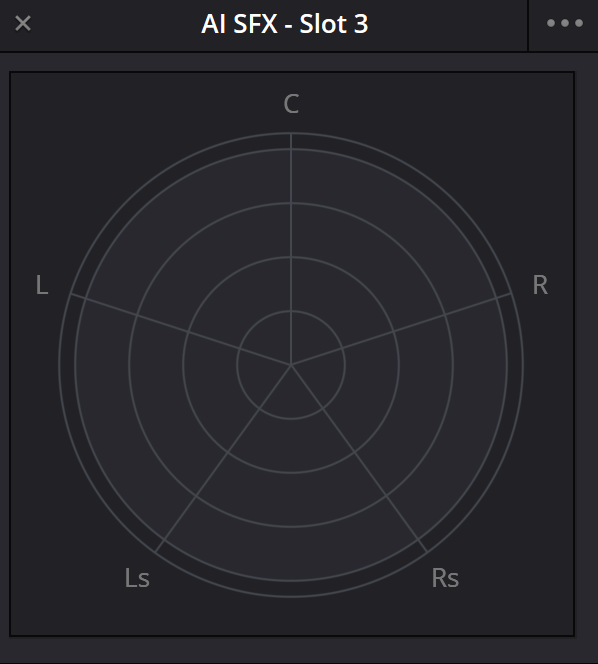
Fairlight channel Panner
A channel-panning example. The complete 3D controls, Atmos assignment and physical output route require separate checks; this illustration alone cannot establish them.
Reference: Blackmagic Design — Resolve 21 Reference Manual · 3D Cartesian and Spherical Panner
05 / UNDERSTAND & APPLY
Inspect position, layout and projection separately
The lab below shows one point in an authored room measuring 2 × 2 × 1 model units. Change X, Y and Z, then switch from 7.1.4 to 5.1. The position remains saved even though the new drawing has no height points. This makes the distinction between position data and the drawing’s available channels easier to inspect.
Its distance readout is ordinary Euclidean distance from the displayed point to the nearest labeled drawing point. It does not determine gain, energy distribution, room acoustics or Dolby Speaker Snap rules. Plane comparison sets displayed Z to zero; it does not convert an object into a bed or downmix audio.
Position is not a loudspeaker channel
Move one point through a normalized room, then change the channel layout without changing the point. The model compares coordinates with labeled drawing points. It does not reproduce Dolby panning, Speaker Snap, Space View, a downmix or an acoustic room.
The 7.1.4 drawing has 4 height channels. The nearest labeled point is a geometric comparison only: no speaker is activated, and no audio level is calculated.
A renderer needs audio, position metadata and its own rendering rules. A monitoring system also needs correct output patching and calibration. The nearest drawing point here supplies none of those decisions; it only makes a coordinate comparison visible.
Equations, points and assumptions
x = X% / 100; y = Y% / 100; z = Z% / 100
projection(x, y, z) = (x, y, 0)
d = sqrt((x − sx)² + (y − sy)² + (z − sz)²)
Distances use the displayed point: the saved 3D position normally, or its Z = 0 projection during comparison. One unit has the same size on all axes, so the authored box is 2 × 2 × 1 model units. No conversion to meters, angle, delay, attenuation, energy or loudness is made.
Base points are L(−1,−1,0), C(0,−1,0), R(1,−1,0). For 5.1, Ls/Rs use X = −1/+1 and Y = 0.65; for 7.1 and 7.1.4 they use Y = 0, with Lb/Rb at Y = 1. The four height points use X = ±0.7, Y = ±0.65, Z = 1. These coordinates are chosen for teaching; they are not Dolby speaker placement or metadata values.
All points within 0.000000001 model units of the minimum distance are reported as ties. LFE contributes one channel to the count but is excluded from the point set. Its signal, low-frequency filtering and bass management are not modeled. The Side view merges identical 2D projections without merging channels.
06 / UNDERSTAND & APPLY
Use Space View to inspect several moving sources
Space View shows source positions and automated movement in a spatial workspace. The manual specifies visibility for unmuted sources with fader levels above −70 dB. If a source disappears, check Mute, the fader, track visibility and the display filter before looking for a routing fault.
Room and Spherical choose the spatial representation. Show Beds, Show Only Selected, Show Visible and Show All help select what to inspect; Compact Meters and Show Active Level Only change its presentation. Camera rotation and display filtering are useful checks, but neither confirms that audio reaches the intended physical output.
Position
Compare the start, direction change and destination with the action in picture.
Automation
Check the Pan/Touch state and replay the pass after recording. A position seen during editing does not establish the saved result.
Visibility
Confirm that a filter has not hidden the required track or bed. Restore the overall view after an isolated check.
Reference: Blackmagic Design — Resolve 21 Reference Manual · B-Chain and Space View
07 / UNDERSTAND & APPLY
Treat the monitoring format and B-Chain as a separate path
First choose the signal to monitor and its playback format. Then map the output channels to the audio interface. A spatial master may be monitored in an appropriate channel format or in binaural; that selects a monitoring representation. It should not silently replace the agreed master-file format.
Studio’s B-Chain configures the output for a particular room. Its preset defines input and output structures, the assignment matrix and individual output settings including trim and delay. While B-Chain is enabled, Speaker Setup in Video and Audio I/O is disabled. Check the active preset and physical assignments before changing a mix in response to a single loudspeaker problem.
Signal
Select the intended master or bus and a recognizable passage with a known spatial placement.
Outputs
Check format channels and hardware-port assignments. Label them for the actual system.
Check
Verify individual directions, then return to the complete scene. Document room adjustments separately from mix changes.
Reference: Blackmagic Design — Resolve 21 Reference Manual · B-Chain and Space View · Blackmagic Design — Resolve 21 Reference Manual · immersive formats, beds, objects and renderers
08 / UNDERSTAND & APPLY
Distinguish internal and external Dolby workflows
The Resolve 21 manual explicitly describes an internal Dolby Atmos workflow covering input, content creation, the internal renderer and master-file export. That description names Mac M1, Windows and Linux. It establishes the documented workflow, rather than claiming all other Macs are excluded or that every device and driver behaves identically.
The external Dolby Atmos Renderer integration is described separately for Mac and Windows: server discovery, internal/external switching and metadata exchange. Do not transfer that feature list to an external Linux workflow simply because Linux supports the internal renderer. Decide which exact path your system will use before committing to a project.
| Decision | What to check |
|---|---|
| Immersive Audio | Enable the required format in Preferences → Video and Audio I/O; verify the Studio edition. |
| Internal renderer | Correct Dolby Atmos Master, bed/object assignments and monitoring format. |
| External renderer | A workflow supported on your system, selected server, connection and audio outputs. |
| Delivery | The required master-file type and an agreed method of checking it after export. |
Reference: Blackmagic Design — Resolve 21 Reference Manual · immersive formats, beds, objects and renderers · Blackmagic Design — DaVinci Resolve Studio · Immersive 3D Audio
09 / UNDERSTAND & APPLY
Choose between playing a master and unpacking it
An existing Atmos master can be rendered and monitored using its embedded metadata. The manual distinguishes placing such a Media Pool file on a track from Fairlight → Immersive Audio → Import Master File. The latter extracts audio and metadata structure for further work on beds, objects and movement.
For a remix, preserve the original master and check the reconstructed structure on a short known passage before changing it. Compare names, range, positions and automation. If all you have is a set of rendered PCM channels, do not assume that their original object trajectories can automatically be recovered.
Reference: Blackmagic Design — Resolve 21 Reference Manual · immersive formats, beds, objects and renderers · Blackmagic Design — Resolve 21 Reference Manual · ADM BWF, IMF IAB and Atmos re-renders
10 / UNDERSTAND & APPLY
Deliver the master and channel versions to an explicit brief
For an Atmos master, the manual describes Export Master File and Dolby Atmos ADM BWF; it also lists Dolby Atmos IMF IAB. These are spatial delivery paths with the corresponding structure. An ordinary WAV containing rendered channels is a separate channel version, even when it has twelve channels.
Before exporting, check the range, name, Format, Source and Atmos Send Patching assignments. The documented ADM BWF export offers 48,000 and 96,000 Hz; choose the value required by the delivery specification. For additional PCM versions, use the required re-render: Resolve can store presets for the format and selected beds, objects or groups, including for Bounce Mix to Track.
| Deliverable | Check |
|---|---|
| ADM BWF | Master structure, full range, metadata and re-import. |
| IMF IAB | The agreed IAB delivery and its packaging, not a renamed PCM file. |
| PCM re-render | Selected sources, channel format, order and full range. |
| Binaural / stereo | A separately agreed version and listening check, not proof of all spatial outputs. |
Bounce / Cache
Separate playback acceleration from printing new audio clips.
↗Mastering
Check the range, format and finished file.
Reference: Blackmagic Design — Resolve 21 Reference Manual · ADM BWF, IMF IAB and Atmos re-renders · Blackmagic Design — Resolve 21 Reference Manual · immersive formats, beds, objects and renderers
11 / UNDERSTAND & APPLY
Check more than the picture of the sound field
Assess dialogue intelligibility, directional transitions, overhead events and the overall balance during normal scene playback. Then check the agreed additional representations, such as surround and binaural versions. Each can expose a problem that a single object position on screen cannot reveal.
Tie loudness measurements to the required signal representation. Resolve offers a parallel downmix for measurement while monitoring in another format; this does not make every reading interchangeable between renders. After delivery, reopen the finished file, check its range and structure, and listen to the critical passages again.
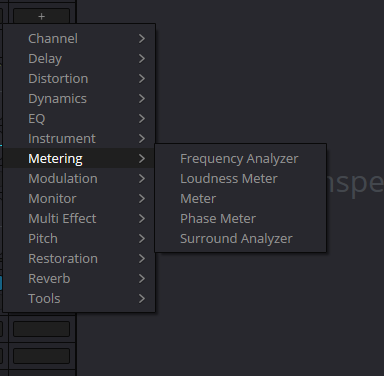
Fairlight Metering menu
An example of the metering tools menu. For multichannel diagnostics, choose an appropriate meter on the intended signal; a menu illustration does not establish its readings or settings.
Reference: Blackmagic Design — Resolve 21 Reference Manual · ADM BWF, IMF IAB and Atmos re-renders
12 / UNDERSTAND & APPLY
Complete one short spatial scene
Choose a scene with stable dialogue and one moving effect. Establish a clear channel balance first. Assign the required bed/object structure, record the effect movement, and inspect it from several Panner or Space View perspectives. Fewer sources make assignment and automation errors easier to identify.
Finish the exercise with a short master file and one agreed monitoring version. Record the bus types, assignments, monitoring format and output names. Reopen the project to confirm that movement is saved, temporary Solo states are cleared and the same output route is selected. The exercise succeeds when the checks are repeatable, rather than when the height-channel count is large.
Structure
Each source has a clear role and a checked route into the master.
Movement
The start, height and destination match the scene’s intention on replay.
Result
The master and monitoring version open correctly, span the required range and retain the expected content.
Reference: Blackmagic Design — Resolve 21 Reference Manual · immersive formats, beds, objects and renderers · Blackmagic Design — Resolve 21 Reference Manual · ADM BWF, IMF IAB and Atmos re-renders
PRACTICE / NO AUTOPILOT
A small task. A checkable result.
Work in a test copy, listen before and after, and write down what you actually observed. The checklist contains no pre-approved results.
Separate three structures
Record the source track format, the Atmos-master or channel-bus structure, and the actual monitoring format. Keep these as distinct decisions.
Check the model coordinates
Set X = 35%, Y = −20%, Z = 60% with the 7.1.4 layout. Compare all three views: the coordinates and 3D distance should remain unchanged.
Remove height channels from the drawing
Choose 5.1 without changing Z. Observe that the point remains and no physical output has been calculated. Toggle plane projection; the saved height must return.
Check movement in Resolve
In an appropriate Studio workflow, record one short Pan pass. Verify bed/object assignments, replay and the physical monitoring system.
Open the result
Export the agreed short master and monitoring version, then check the structure, range, key movement and sound. Save the observations with the settings.
FAQ / BEFORE THE NEXT MOVE
Questions that matter in practice
Does every surround workflow require Studio?
No. Ordinary multichannel work should not all be labeled Studio-only. Blackmagic places advanced immersive workflows, the 3D Panner, Space View, B-Chain and the listed object-based formats in Studio. Check the specific format and operation.
Reference: Blackmagic Design — DaVinci Resolve Studio · Immersive 3D Audio · Blackmagic Design — Resolve 21 Reference Manual · immersive formats, beds, objects and renderers
Is 7.1.4 an Atmos bed?
No. It can be a channel-render or monitoring configuration. The manual explicitly states that 7.1.4 is not an Atmos bed type and that twelve linked PCM channels do not by themselves create an Atmos master.
Reference: Blackmagic Design — Resolve 21 Reference Manual · immersive formats, beds, objects and renderers
Is a bed always confined to ear height?
No. An Atmos bed can include height channels, for example in a 7.1.2 structure. The lab’s Z = 0 comparison is geometric projection, not a bed simulation.
Reference: Blackmagic Design — Resolve 21 Reference Manual · immersive formats, beds, objects and renderers
Does the lab’s nearest point mean the loudest speaker?
No. It is the minimum Euclidean distance to authored drawing points, retaining ties. The model does not calculate gain, implement Speaker Snap or know the renderer, signal or room acoustics.
Does Linux support the internal Dolby Atmos workflow?
The Resolve 21 manual lists Linux alongside Mac M1 and Windows for the internal workflow, including rendering and master-file export. The closer external Renderer integration is documented separately for Mac and Windows under different conditions.
Reference: Blackmagic Design — Resolve 21 Reference Manual · immersive formats, beds, objects and renderers
Why is a source missing from Space View?
Check Mute, the fader and display filters. The manual specifies visibility for unmuted sources with faders above −70 dB. Then check selected tracks and the Show Beds/Visible/All options.
Reference: Blackmagic Design — Resolve 21 Reference Manual · B-Chain and Space View
Does B-Chain define the master-file content?
B-Chain maps and adjusts the output for the monitoring system in a particular room. Treat it as part of monitoring; verify the exported master structure and content through separate assignments and the finished file.
Reference: Blackmagic Design — Resolve 21 Reference Manual · B-Chain and Space View · Blackmagic Design — Resolve 21 Reference Manual · ADM BWF, IMF IAB and Atmos re-renders
Is exporting a multichannel WAV sufficient?
Only when that PCM file is what the brief requests. An Atmos master requires its corresponding structure and format, such as ADM BWF or an agreed IMF IAB delivery. Reopen the result; a WAV extension alone does not prove ADM metadata.
Reference: Blackmagic Design — Resolve 21 Reference Manual · ADM BWF, IMF IAB and Atmos re-renders · Blackmagic Design — Resolve 21 Reference Manual · immersive formats, beds, objects and renderers
REFERENCES / 2026-10-09
What this guide is based on
Checked on 9 October 2026 against the official DaVinci Resolve 21 Reference Manual: 3D Panner, 4031–4034; formats, beds/objects and internal/external Dolby workflows, 4146–4159; re-renders, 4160–4161; B-Chain, 4164–4167; Space View, 4168–4169. Text and selected interface pages were inspected; Studio context was also checked on current Blackmagic pages. Platform statements describe the documented workflows rather than an exhaustive device matrix. The lab is authored geometry: it does not calculate audio, speaker levels, Speaker Snap, Atmos rendering or a downmix.
Blackmagic Design — Resolve 21 Reference Manual · immersive formats, beds, objects and renderers ↗
Full official PDF: 4146–4149, channel configurations, 7.1.4, beds/objects, LFE, Import Master File and PCM versus Atmos; 4149, internal workflow listing Mac M1, Windows and Linux; 4150, separate external Renderer integration for Mac and Windows; 4152–4156, Ambisonics; 4157 and 4159, enabling formats and Studio labels. Checked 9 October 2026. Workflow context, not an exhaustive device matrix or exclusion of other Macs. Native rendering was not run.
Blackmagic Design — Resolve 21 Reference Manual · 3D Cartesian and Spherical Panner ↗
Text on 4031–4034 and the panel on 4031 inspected on 9 October 2026: Cartesian 3D, Front/Side/Top, three axes, Freeform/Height Mode Presets and Spherical Azimuth/Elevation/Distance. Atmos Elevation/Zone on 4033 are excluded for Dolby Atmos buses. The authored model uses its own coordinates and does not implement Speaker Snap or gain panning.
Blackmagic Design — Resolve 21 Reference Manual · B-Chain and Space View ↗
Text on 4164–4169 and pages 4165/4168 inspected on 9 October 2026. B-Chain is Studio monitoring: input/output, matrix, trim/delay and hardware assignments; Speaker Setup is disabled while B-Chain is enabled. Space View covers unmuted sources with faders above −70 dB, views and filters. Ambiguous numerical matrix examples on 4165 are not carried into the guide.
Blackmagic Design — Resolve 21 Reference Manual · ADM BWF, IMF IAB and Atmos re-renders ↗
Text on 4157–4161 and panels on 4157–4158 inspected on 9 October 2026: Export Master File, range, ADM BWF/IMF IAB, Atmos Send Patching source, 48/96 kHz, parallel loudness downmix and re-render presets. On 4158 the prose calls both sample rates delivery, while the menu shows 48000 (Delivery) and 96000 (Archive). The guide avoids the conflicting 96 kHz label and defers to the delivery specification. Native export was not tested.
Blackmagic Design — DaVinci Resolve Studio · Immersive 3D Audio ↗
Current official Studio and Fairlight pages checked on 9 October 2026: advanced immersive workflows, 3D Panner, Space View, B-Chain, ADM/IAB and Ambisonics belong to Studio. The broad Fairlight format list is not treated as proof that every format is available in Free. Detailed operations and platform conditions are checked against the version 21 manual.