FAIRLIGHT / FINAL MIX / DELIVERY · 11
Mastering
Balance the mix. Set the level. Verify the finished file.
Take a clear balance of dialogue, music and effects through to a verified file. Define the delivery requirements, measure the right bus, estimate the available gain and carry that same mix into Deliver with the correct channels, range and format.
- 01Connect requirements, measurements and the output bus
- 02Assess the LUFS target alongside the true-peak ceiling
- 03Verify the structure and sound of the finished export
Compare target loudness and peak headroom in an authored linear-gain budget. Check how much of the target a level change alone can reach.
Start with the measured programme.↗
Compare full-programme integrated loudness with the agreed target. In the authored example, the −22 LUFS input and −16 LUFS target require +6 dB of constant gain.
Check: the target comes from the brief, not a universal number.Change the controls to explore the diagram. No audio playback, native DSP or connection to Resolve.
Sources and scope · 9 October 2026
Reviewed 9 October 2026 against the official DaVinci Resolve 21 Reference Manual: project Audio Sample Rate on page 166; monitoring and loudness on 4130–4140; signal-flow diagram on 4143; Quick Export and Deliver on 4177 and 4179; Audio Only and render modes on 4193 and 4196; Audio Panel on 4205–4206; render range and queue on 4210–4212. Text and relevant interface pages were inspected. General dither ordering was also checked against manufacturer documentation from iZotope; it does not establish a native Resolve switch. The three original article captures are retained as interface examples. The lab is an authored calculation of one linear gain from entered measurements: it does not measure audio, model normalization, a limiter or a codec, or certify an export.
Read the source notes ↓On this page
01 / UNDERSTAND & APPLY
First define the master you need to deliver
Mastering starts with a description of the result. For a video project this might be the final stereo mix, a separate audio file, several language versions or a set of stems. Record what belongs in each version, where the programme starts and finishes, and which channels and files the recipient expects.
Choose the loudness target from the actual delivery specification. A platform name, a Resolve preset and the client brief are related pieces of information; none is a substitute for checking the others. Establish the measurement standard, Integrated target, tolerance and maximum true peak, then the format and file structure. Lab values are exercise settings and are not recommendations for every project.
| Part of the brief | Record before mixing |
|---|---|
| Programme | Edit version, language, full range, permitted opening silence and final tails. |
| Loudness | Measurement algorithm or mode, Integrated target and tolerance, plus any delivery-specific conditions. |
| Peak | Maximum true peak in dBTP and requirements for the final file, including any encoded version. |
| Channels | Mono, stereo or an agreed multichannel format, channel order and labels, and the required stems. |
| File | Container, codec, Sample Rate, PCM bit depth or compression settings, filename and version. |
Reference: Blackmagic Design — DaVinci Resolve 21 Reference Manual · Deliver audio and render range · Blackmagic Design — DaVinci Resolve 21 Reference Manual · Loudness and monitoring
02 / UNDERSTAND & APPLY
Make the mix clear before adding overall gain
First listen as a viewer: are the important words clear, does music pull attention away, and do the significant sound events read? Constant gain applied to the whole mix preserves the relationships between its components. It raises quiet dialogue and over-loud music together.
Address the cause at the appropriate level. Inspect a single intrusive syllable on its clip; use automation for a musical rise beneath a line; review a group bus for a repeated problem across that group. Master-bus processing affects all of its contributors, so compare every change in the full mix at a comparable listening level.
Dialogue
Check quiet word endings, the start of a line after a pause and changes between takes. Intelligibility cannot be inferred from one Integrated number.
Music
Listen under dialogue: attacks, low frequencies and a strong melody can compete in different ways. Find a local change that preserves the musical shape.
Effects and ambience
Review coincident attacks, abrupt transitions and tails. Keep the intended scene contrast before making the whole programme denser.
03 / UNDERSTAND & APPLY
Select the bus you intend to deliver
A bus meter shows the sum of the sources routed to that bus. Make a short map: dialogue, music and effects → required groups → final bus. Check sends, returns, Mute/Solo and alternative paths. If a source reaches the final sum twice, an overall fader move may hide excess level without correcting the routing.
The upper monitoring menu selects the signal for listening and the compound meters, including Loudness. Deliver selects the file source separately through Output Track. Match these assignments explicitly. Control Room serves the listening path; changing speaker level should not be used as a way to change the delivered programme.
Name the final bus
Record its name and channel format. Confirm that all required groups and returns reach it and that no temporary Solo remains.
Measure that signal
Select the bus for monitoring, establish the measurement point and play a recognizable passage.
Repeat the choice in Deliver
Check Output Track, channel count and any unwanted additional outputs. Selecting a monitoring bus does not complete this step.
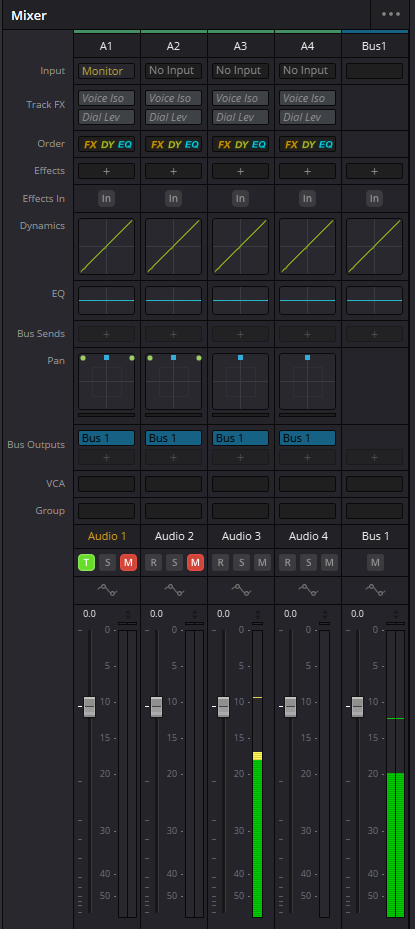
Mixer and the active Bus 1 strip
Tracks and the final bus appear in the same context. The name Bus 1 alone does not confirm that this bus is selected in Deliver: check the Output Track assignment separately.
Reference: Blackmagic Design — DaVinci Resolve 21 Reference Manual · Loudness and monitoring · Blackmagic Design — DaVinci Resolve 21 Reference Manual · Deliver audio and render range
04 / UNDERSTAND & APPLY
Check gain before and after processing
Map the actual path through EQ, Dynamics, inserts, faders and busses. The level entering a compressor affects its behavior: adding gain before the detector and adding the same gain after processing are different operations. Test changes of order or level on the same passage with context.
For final checks, measure after all stages that will form part of the delivered mix. If additional gain follows a meter, or normalization is enabled on export, the earlier reading does not describe the finished file. Equalization, summing and subsequent processing can also alter peaks.
Before processing
Check the original level and the cause of the problem. Turning down an already clipped source does not restore the missing waveform.
After processing
Compare changes in attack, tone and dynamics alongside level. A louder version should not receive an automatic advantage in the comparison.
At the output
Reset the relevant stored maxima and repeat the pass. A change to output gain, routing or render settings calls for a new check.
Chain FX
Follow processing order and compare the input with the output.
↗Limiter
Study peak control separately from a constant-gain calculation.
Reference: Blackmagic Design — DaVinci Resolve 21 Reference Manual · Deliver audio and render range · Blackmagic Design — DaVinci Resolve 21 Reference Manual · Loudness and monitoring
05 / UNDERSTAND & APPLY
Measure the full programme, not a favorable excerpt
Before a formal pass, select the appropriate standard and bus, clear the accumulated analysis with Reset and start measurement over the agreed full range. Integrated describes the material included in that pass. A looped chorus, a short excerpt or a different bus does not replace the final measurement.
Loudness History helps locate problem moments on Main 1; the Resolve 21 reference limits history support to that bus. Analyze Audio Level is available from a timeline file’s context menu and can check imported or bounced material. An analysis of a source clip does not by itself establish the loudness of the complete sum with bus processing.
Loudness and true peak answer different questions. For Integrated color coding, the manual describes blue as below tolerance, yellow as within tolerance and red as above tolerance. Color depends on the selected mode and does not replace checking numbers, units and the duration of the pass.
Loudness Meter
Study M/S/I, Reset, transport controls, gating and measurement scope.
↗Level Meter
Distinguish sample peak, a moving meter and a stored maximum.
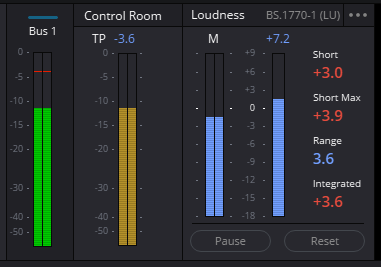
Bus 1, Control Room and Loudness
Retained example of active monitoring. Its numbers belong to this capture and are not delivery targets. Establish the selected bus, scale and measurement range in your own project.
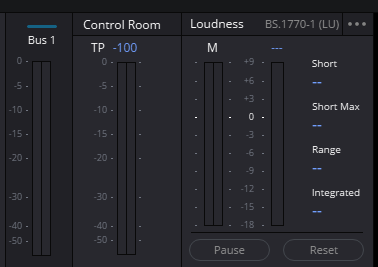
The same block without populated readings
This original capture shows dashes. It records one interface state and does not prove that every transport stop resets accumulated Integrated loudness. Check Reset and the measurement controls.
Reference: Blackmagic Design — DaVinci Resolve 21 Reference Manual · Loudness and monitoring
06 / UNDERSTAND & APPLY
Calculate how much linear gain the peaks allow
For a planning estimate, take Integrated loudness and maximum true peak from the same programme version. Target LUFS minus measured LUFS gives the required gain. Ceiling dBTP minus measured dBTP gives the maximum constant gain permitted by the peak ceiling. A negative value means attenuation is needed.
In the authored example, raising −22 LUFS to −16 LUFS requires +6 dB. But a measured true peak of −4 dBTP and a −1 dBTP ceiling allow only +3 dB. Choosing +3 dB predicts −19 LUFS and −1 dBTP. A shortfall of 3 LU remains: constant gain cannot satisfy both requirements at once.
Shifting Integrated by the gain is an estimate that assumes the final set of blocks included after both gates remains unchanged. The relative threshold shifts by the gain only while the set passing the absolute gate remains unchanged; if that set changes, the relative threshold is recalculated from the new set and may shift by a different amount. The absolute threshold itself stays fixed. Measure Integrated again after an actual level change.
| Quantity | Equation | Example |
|---|---|---|
| Required gain | target LUFS − measured LUFS | −16 − (−22) = +6 dB |
| Peak-permitted gain | ceiling dBTP − measured dBTP | −1 − (−4) = +3 dB |
| Constrained choice | min(required, permitted) | +3 dB for the whole programme |
| Estimated result | original measurement + chosen gain | −19 LUFS; −1 dBTP |
Reference: ITU-R BS.1770-5 — Programme loudness and true-peak algorithms
07 / UNDERSTAND & APPLY
Lab: a target, a ceiling and an explicit shortfall
Change the measured Integrated, maximum true peak, target and ceiling independently. With the constraint enabled, the example selects the smaller of the two gains. Disable it: loudness reaches the authored target while predicted true peak reveals any ceiling excess. The model does not clip the peaks.
Compare three scenarios: a conflict, sufficient headroom and a level reduction. Original measurements temporarily applies zero gain while keeping the settings. LUFS, dBTP and Gain buttons highlight parts of the diagram without changing the calculation. Values beyond a drawing scale remain in the numeric readouts.
Can one gain change meet both requirements?
Enter two measurements from the same complete programme: integrated loudness and maximum true peak. Set an illustrative target and ceiling. The calculation applies one constant gain, with an optional peak constraint. It does not listen, analyze a file or reproduce Resolve normalization.
Peak budget limits the gain to +3.0 dB. The loudness estimate remains 3.0 LU below the target. Revisit the mix or the agreed target before delivery.
Positive loudness difference means the estimate is below target; negative means above. Positive peak headroom means room remains; negative means the ceiling is exceeded. A zero is an exact arithmetic boundary, not proof of a compliant exported file.
When the peak constraint prevents the loudness target, the calculation leaves a shortfall. It does not invent compression to remove it. Make a listening decision in the real mix, then measure again. Changing a target label alone does not establish a delivery requirement.
Drawing ranges: −40 to 0 LUFS and −12 to +3 dBTP. Readings outside these ranges: 0. Numeric results are preserved without clipping.
Equations and assumptions
gainNeeded = targetLUFS − measuredLUFS
maxLinearGain = ceilingDBTP − measuredDBTP
gain = constrainPeaks ? min(gainNeeded, maxLinearGain) : gainNeeded
original comparison: gain = 0
estimatedLUFS = measuredLUFS + gain
estimatedDBTP = measuredDBTP + gain
One decibel of constant gain shifts every measured block by one LU. The LUFS estimate assumes the final set of blocks included after both gates remains unchanged. The relative threshold shifts by the gain only while the set passing the absolute gate remains unchanged; if that set changes, the relative threshold is recalculated from the new set and may shift by a different amount. If the final included set changes, integrated loudness need not shift by exactly the gain.
True-peak prediction assumes only linear gain. No waveform is reconstructed; no limiter, clipping, dynamics, codec, dither or sample-rate conversion is calculated. Peak headroom is signed, so a source already above the ceiling can require attenuation. The example checks arithmetic, not whether an entered measurement pair represents a real file.
Source comparison sets the displayed gain to zero and retains all settings. Focus changes the drawing emphasis only. Reset restores the initial measurements, both requirements, the enabled peak constraint, result view and All focus. Measure the actual full export after every processing or export change.
Reference: ITU-R BS.1770-5 — Programme loudness and true-peak algorithms
08 / UNDERSTAND & APPLY
Carry the intended mix from Fairlight into Deliver
Quick Export is useful with a prepared preset. Deliver provides separate Video, Audio and File settings, making the exact delivery structure easier to inspect. For an audio file, use a suitable audio-only setup or disable Export Video while retaining Export Audio. A preset supplies an initial configuration; compare its values with the brief.
In the Audio Panel, choose the required Format and Codec, then Output Track. This selector determines the bus to render; additional outputs can be added as separate rows. Inspect the name and channel count of every row. All Timeline Tracks creates output tracks from the timeline tracks and does not mean the finished master-bus sum.
Render mode
Check Single Clip for a continuous finished film or programme. Individual Clips produces separate clip files and uses a different interpretation of the selected range.
File contents
Verify Export Audio, any required video and the bus in every Output Track row. Match each one to the intended measured mix.
Queued job
Set the filename and folder, inspect the range, then add the job to the Render Queue. After changing settings, confirm that the current job is the one being rendered.
Reference: Blackmagic Design — DaVinci Resolve 21 Reference Manual · Deliver audio and render range
09 / UNDERSTAND & APPLY
Verify the range and channel order
Choose Entire Timeline or explicitly set In/Out and inspect the duration. The check should include the start of the programme, the final sound and its decay. If a short In/Out selection remains from editing, even a correctly configured bus can produce an incomplete file.
Channel count and order belong to the delivery brief. A stereo file, two separate mono channels and a multichannel container can represent different structures despite similar playback. In the Audio Panel, Render one track per channel and Render as discrete audio tracks control channel packaging; the manual specifically notes the lack of positioning information for discrete tracks. Do not choose solely by a familiar option name.
| Check | Action |
|---|---|
| Boundaries | Match In, Out and Duration to the edit version; listen to the start and end of the file. |
| Single Clip / Individual Clips | Confirm continuous output for the finished mix. Individual Clips snaps boundaries to clip boundaries. |
| L/R and mono | Check channel mapping and the imported result using known left, right and center events. |
| Multichannel output | Match bus format, channel count, order and expected labels to the recipient’s requirements. |
| Versions | Check language, music, effects and requested omissions separately for every delivery version. |
Channel Mapping
Establish the meaning of source and output channels before adjusting gain.
↗Surround / Immersive
Continue to multichannel programme formats and monitoring.
Reference: Blackmagic Design — DaVinci Resolve 21 Reference Manual · Deliver audio and render range
10 / UNDERSTAND & APPLY
Specify the format and choose normalization explicitly
The project processing rate and the output file’s Sample Rate are separate settings. Under Project Settings, the reference describes Audio Sample Rate as a choice made before creating the first timeline; the Deliver Audio Panel chooses the output rate. Increasing the output number alone cannot recover detail absent from the source. PCM bit depth, compressed-audio bitrate and sample rate are different parameters.
Deliver Audio Normalization applies to selected outputs. The manual describes Normalize to Standard as scaling with regard to whichever loudness or peak threshold is reached first; Optimize to Standard is intended to bring both loudness and peaks into the chosen standard. That description does not disclose the complete processing algorithm. Do not describe both modes as a single constant gain or apply the lab equations to their behavior.
If you have already prepared the required level, check whether additional export normalization is needed for this job. When using it, record the mode, standard, target values and enabled outputs, then measure the result. Different export settings can produce different final measurements from the same mix.
Container and codec
Choose a combination accepted by the recipient and available in your installation. Check a PCM master and a compressed file separately; available choices depend on format and environment.
Dither for word-length reduction
If the final process reduces word length to integer PCM, coordinate dither with that last conversion. Check the selected tool’s documented order: subsequent gain or additional dither can disrupt the intended process. No native Resolve switch is assumed here.
A fresh measurement
Limiting, normalization, resampling and encoding lie outside the simple linear calculation. Measure the actual resulting file and listen to quiet tails, attacks and transitions.
Reference: Blackmagic Design — DaVinci Resolve 21 Reference Manual · Deliver audio and render range · iZotope — Ozone 8 Help · Dithering Tips
11 / UNDERSTAND & APPLY
Separate a working bounce from the delivery package
Bouncing helps create intermediate processed material, consolidate work and prepare a file for another analysis. A working bounce and a final deliverable serve different purposes: delivery still requires checks of range, format, channels and the intended mix version. The linked topic explains Cache and the individual Bounce commands in detail.
For stems, agree the contents in advance, such as Dialogue, Music and Effects, and use matching time boundaries. State which processing is included in each file and which bus produced it. Do not normalize stems independently unless required: doing so can change their relative balance when they are recombined.
A sum of separate stems need not match a finished master that passed through a shared compressor, limiter or other nonlinear processing. That process responds to the combined signal. For a verifiable reconstruction, agree the capture point, common processing and summing procedure; prevent that processing from being applied a second time after import.
Common boundaries
Matching start, duration and sample rate make alignment easier. Check the tails of group effects too.
Processing notes
Record what was processed at source, group and final-bus level, and what is expected during the next assembly.
Sum check
Rebuild the stems through the agreed path and compare them with the reference mix. Exclude double processing and routing errors before diagnosing a loudness difference.
Bounce & Cache
Study intermediate audio, committed effects and playback caching.
↗FlexBus
Prepare groups and separate outputs for multiple versions.
Reference: Blackmagic Design — DaVinci Resolve 21 Reference Manual · Deliver audio and render range · Blackmagic Design — DaVinci Resolve 21 Reference Manual · Loudness and monitoring
12 / UNDERSTAND & APPLY
Verify the finished file and retain the result
First render a short representative passage if you are still checking channel assignments, format or the processing chain. This can expose a problem before the full render. After correcting it, export the complete programme: that full file becomes the object of the final Integrated, maximum true-peak, duration and content checks.
Import the file to a clean verification track or open it in a separate environment. Confirm that this checking path does not reapply the previous processing, automation or normalization. Then listen through the whole programme in the agreed monitoring format and measure the complete delivery range. A successful Render Queue job confirms file creation, not the creative or technical suitability of its contents.
Inspect the structure
Check the version name, duration, channel count and order, Sample Rate, codec and required bit depth.
Measure again
Reset accumulations and make a complete pass under the same specification. Record the actual Integrated and maximum true peak together with the measurement mode.
Listen to the content
Check dialogue, transitions, loud attacks, tails, missing material and sync. Compare the required monitoring versions without changing the delivered file.
Keep a reviewable record
Record the date, edit version, route, range, export settings, measured values and any problems found and corrected.
Reference: Blackmagic Design — DaVinci Resolve 21 Reference Manual · Deliver audio and render range · Blackmagic Design — DaVinci Resolve 21 Reference Manual · Loudness and monitoring
PRACTICE / NO AUTOPILOT
A small task. A checkable result.
Work in a test copy, listen before and after, and write down what you actually observed. The checklist contains no pre-approved results.
1 · Describe the delivery
Choose a complete short programme. Record its version, full range, channels, format, loudness standard, target and tolerance, and maximum true peak. If a requirement is missing, label any exercise assumption explicitly.
2 · Check the path and balance
Name the final bus and find its dialogue, music, effects and returns. Compare monitoring with the planned Output Track; check Mute/Solo, automation and any source reaching the sum twice.
3 · Measure and calculate
Run a fresh full measurement pass and record Integrated and maximum true peak. Enter them in the lab, set the agreed requirements and compare required gain with peak-permitted gain. Describe any conflict.
4 · Prepare and render
Correct a specific mix issue, measure again and inspect Deliver: mode, range, Output Track, channels, Sample Rate, format and normalization state. After a short verification render, export the full programme.
5 · Verify the result
Import the finished file without reapplying processing. Inspect structure, sync, dialogue, attacks and tails; measure the full file. Keep the settings and actual results separate from the lab estimates.
FAQ / BEFORE THE NEXT MOVE
Questions that matter in practice
Should I always master to −14 LUFS?
No. The target comes from the specific brief and selected measurement mode. Check tolerance, true peak, channel format and final-file requirements together. None of the lab values is presented as a universal platform target.
Reference: Blackmagic Design — DaVinci Resolve 21 Reference Manual · Loudness and monitoring · Blackmagic Design — DaVinci Resolve 21 Reference Manual · Deliver audio and render range
If LUFS is below target, can I simply raise the master fader?
Check the true-peak headroom first. Constant gain raises both quantities, so peaks may reach their ceiling before Integrated reaches its target. The LUFS estimate also assumes unchanged gated-block membership. Measure again after an actual level change.
Reference: ITU-R BS.1770-5 — Programme loudness and true-peak algorithms
Does Control Room level change the export?
The monitor path serves listening. Its menu selects the compound-meter source, while Deliver Output Track selects the file source. To change the delivered mix, work in its signal path and verify the resulting file; the speaker-level control does not replace that adjustment.
Reference: Blackmagic Design — DaVinci Resolve 21 Reference Manual · Loudness and monitoring · Blackmagic Design — DaVinci Resolve 21 Reference Manual · Deliver audio and render range
Is Analyze Audio Level on the source clip enough?
It is useful analysis of the selected file. It does not certify the complete sum with other tracks, automation and bus processing. Measure the intended full mix for delivery, then check the exported result on a clean verification path.
Reference: Blackmagic Design — DaVinci Resolve 21 Reference Manual · Loudness and monitoring
Are Normalize to Standard and Optimize to Standard the same?
No. The reference describes Normalize as scaling with regard to the first reached loudness or peak constraint, and Optimize as bringing both quantities into the standard. The full algorithm is not disclosed in that description. Check the selected outputs and measure the finished file; the lab does not reproduce these modes.
Reference: Blackmagic Design — DaVinci Resolve 21 Reference Manual · Deliver audio and render range
When should I plan dither?
When the final process reduces word length to integer PCM, check the documented conversion method. Coordinate dither with that last stage; subsequent gain or processing and additional dither require separate attention. This guide assumes no specific Resolve switch and does not recommend enabling dither on every export.
Reference: iZotope — Ozone 8 Help · Dithering Tips
Must stems sum exactly to the processed master?
That depends on the agreed capture point and chain. Shared nonlinear master processing responds to the complete sum, so independent processing or normalization of stems can give a different result. Agree the contents, boundaries, processing and reconstruction procedure.
Does the model guarantee a compliant finished file?
No. It calculates one constant gain from two entered measurements. LUFS is estimated with unchanged gating and true peak with an unchanged signal shape. A limiter, codec, dither and resampling are not modeled. Measure and listen to the actual finished file separately.
Reference: ITU-R BS.1770-5 — Programme loudness and true-peak algorithms
REFERENCES / 2026-10-09
What this guide is based on
Reviewed 9 October 2026 against the official DaVinci Resolve 21 Reference Manual: project Audio Sample Rate on page 166; monitoring and loudness on 4130–4140; signal-flow diagram on 4143; Quick Export and Deliver on 4177 and 4179; Audio Only and render modes on 4193 and 4196; Audio Panel on 4205–4206; render range and queue on 4210–4212. Text and relevant interface pages were inspected. General dither ordering was also checked against manufacturer documentation from iZotope; it does not establish a native Resolve switch. The three original article captures are retained as interface examples. The lab is an authored calculation of one linear gain from entered measurements: it does not measure audio, model normalization, a limiter or a codec, or certify an export.
Blackmagic Design — DaVinci Resolve 21 Reference Manual · Loudness and monitoring ↗
Full official PDF: Project Settings Audio Metering on 167; loudness and monitoring on 4134–4140; panel and menu on 4137. Text and panels reviewed on 9 October 2026. The Short descriptions on 4136 state 30 seconds, while 4138 and EBU Tech 3341 specify 3-second Short-Term measurement. This discrepancy is recorded; native engine timing was not measured. Standard, Absolute Scale and Lock Metering to Transport are distinguished from the authored model.
ITU-R BS.1770-5 — Programme loudness and true-peak algorithms ↗
BS.1770-5, November 2023: Annex 1, printed pages 2 and 6–7 (PDF pages 4 and 8–9), K weighting, channel weights, 400 ms blocks with 75% overlap, strict absolute gate > −70 LKFS and relative gate 10 LU below the absolute-gated mean; Annex 2 covers true peak. Reviewed on 9 October 2026. The teaching model starts from supplied measured block loudness values and performs no audio filtering or true-peak reconstruction.
Blackmagic Design — DaVinci Resolve 21 Reference Manual · Deliver audio and render range ↗
Full official PDF: project Audio Sample Rate on 166; the programme path and separate Control Room on 4143 (a legacy diagram, not a FlexBus layout); Quick Export and Deliver on 4177 and 4179; Audio Only and Single Clip/Individual Clips on 4193 and 4196; Audio Panel, Output Track, channels, Sample Rate/Bit Depth and Normalize/Optimize on 4205–4206; range and queue on 4210–4212. Text read and panels/pages 4133, 4143, 4179, 4193 and 4206 viewed on 9 October 2026. Native export was not exercised. OS-specific codec availability and named platform targets are not generalized.
iZotope — Ozone 8 Help · Dithering Tips ↗
Manufacturer primary documentation (Dithering Tips and the linked Dither overview) used only for general final word-length reduction ordering: later gain/processing after dithering and additional host dither need separate consideration. This is not a Resolve Dither UI reference. Reviewed on 9 October 2026.