FAIRLIGHT / AUTOMATION / METERING · 10
Level Meter
Find the level. Check the route.
Read the separate Fairlight FX Meter alongside track and bus meters. Distinguish the moving bar, peak hold and stored numerical maximum, check L/R and the measurement point, then compare sample peak and RMS using a transparent teaching signal.
- 01Distinguish Meter from Mixer meters
- 02Compare L/R, sample peak and RMS
- 03Check the measurement point and output
Change the gain of the defined test signal and its right channel. Compare sample peak with RMS of the calculated samples.
See each channel.↗
A known source lets you change overall level and the right channel separately. These controls belong to the teaching generator; the native Meter does not have these knobs.
Check: identify which channel changed.Change the controls to explore the diagram. No audio playback, native DSP or connection to Resolve.
Sources and scope · 9 October 2026
Reviewed 9 October 2026 against the official DaVinci Resolve 21 Reference Manual: Audio Metering settings on page 167; Frequency Analyzer, Meter and Phase Meter on pages 4115, 4118 and 4122; metering and monitoring on pages 4130–4140. PDF and printed page numbers match. The text and Meter panel were inspected. Original article illustrations are retained; an unlabelled screenshot does not establish the measurement point. Workflows and the lab are authored teaching material. The lab calculates statistics of specified samples, does not reproduce native detectors and does not process your recording.
Read the source notes ↓On this page
01 / UNDERSTAND & APPLY
First decide which signal you are measuring
Level Meter is the title of this encyclopedia topic. The separate Fairlight FX is called Meter in the Resolve 21 reference. It is a sample-peak meter that can provide a large display for a selected track or FlexBus. It helps you observe the signal and does not replace level processing.
A similar vertical bar might belong to a Mixer channel, the upper monitoring panel or Control Room. Name the object and its route before comparing readings. The question “why is this level different?” becomes easier when you know the channels, sum and settings behind each display.
One source
Measure the relevant track when investigating an overloaded clip, an unexpectedly quiet line or incorrect channels.
A shared bus
Watch the sum when several tracks reinforce an attack or background. That event may be absent from any individual track.
Programme output
Check the intended output mix, then its loudness and true peak against the requirements of the specific job.
Reference: Blackmagic Design — DaVinci Resolve 21 Reference Manual · Meter and Audio Metering
02 / UNDERSTAND & APPLY
Read the Meter window and its actual commands
Open Meter on the selected track or bus and check the window title. The number of bars follows the channels: the manual illustration shows mono M, while the original article capture shows L/R. Two bars are not a requirement for every instance.
The bar, red line and number at the top have different meanings. Meter’s documented red peak marker holds for two seconds, while its numeric value can remain for much longer. A disappearing line does not mean that the stored numerical maximum has been reset.
| Element | How to read it |
|---|---|
| Level bar | Watch level changes during playback. The native Meter description identifies it as a sample-peak meter. |
| Red peak marker | Shows a maximum with a two-second hold. This is a measurement marker, not an instruction to limit the signal. |
| Number at the top | Retains the highest measured level until reset or exceeded by a higher peak. Do not mistake it for the current level after pausing. |
| Reset Peak on Play | When enabled, the numerical peak resets when playback stops and starts again. When disabled, it remains between passes. |
| Reset | Manually clears the numerical maximum. Useful before repeating the same passage after a setting change. |
| Resize | Drag the bottom-right corner for a larger view. The size of the window does not change signal level. |
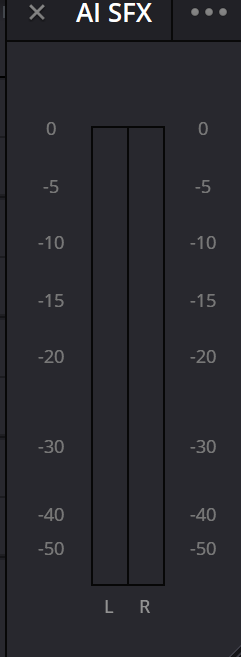
Meter · separate L/R window
Original article illustration with separate L and R channels. The native effect is called Meter in the reference manual. This view does not establish an unlabelled position before or after a fader.
Reference: Blackmagic Design — DaVinci Resolve 21 Reference Manual · Meter and Audio Metering
03 / UNDERSTAND & APPLY
Read the scale, sample peak and RMS accurately
The manual’s Meter panel shows ticks at 0, −5, −10, −15, −20, −30, −40 and −50 dB. Values closer to zero indicate a higher level. The lowest labelled tick is the edge of the displayed scale, not evidence that weaker signals cannot exist.
Digital dBFS measurements are referenced to full scale. For normalized samples, amplitude 1 corresponds to 0 dBFS and 0.5 to approximately −6.02 dBFS. Zero on a fader means unity gain and answers a different question: it does not promise 0 dBFS on the output meter.
Sample peak is the largest absolute value of individual samples. RMS takes the square root of their mean square and therefore depends on the complete selected window. Different time patterns can produce the same peak and different RMS. Neither measurement is LUFS by itself.
A short impulse
One large sample determines sample peak even if the other samples in the block are nearly or entirely zero.
A sustained signal
If high amplitude lasts longer, RMS rises for a block of the same length. Its largest sample can remain unchanged.
Silence
A completely zero digital block has zero peak and RMS amplitude: −∞ in dBFS. An apparently empty on-screen bar alone does not prove that the block is exactly zero.
Reference: Blackmagic Design — DaVinci Resolve 21 Reference Manual · Meter and Audio Metering
04 / UNDERSTAND & APPLY
Separate project settings from the plugin menu
Choose Meter Type in Project Settings → Fairlight → Audio Metering. The manual describes these settings for channel meters and Fairlight FX. They govern the project’s metering response and presentation; they are a separate interface area from the Meter window.
Avoid calling every solid bar “RMS by default”. For Digital VU, the manual explicitly separates an RMS bar from a fast peak segment; IEC has a PPM-style response. Check the type and scale before comparing two displays.
| Meter Type | Documented meaning | Practical check |
|---|---|---|
| IEC 60268-18 | Default type: a digital PPM meter with fast peak response and slower release. The manual specifies a −18 dBFS reference. | Observe brief attacks and decay. This meter reference is not a target loudness for your project. |
| Digital VU | A separate fast segment shows peak level; the bar shows RMS. | Compare attacks and more sustained level without confusing either with accumulated LUFS. |
| Custom | Allows selection of detector, scale, decay and peak indication. | Record the configuration with the reading: the same signal can look different under other settings. |
Reference: Blackmagic Design — DaVinci Resolve 21 Reference Manual · Meter and Audio Metering
05 / UNDERSTAND & APPLY
Check the position before or after the fader
Pre fader metering on tracks is a track-metering setting. The manual states that it is off by default: channel-strip meters then read after the fader and Mute. When enabled, the measurement point is before the fader, so moving that fader no longer changes the reading.
Clip gain and clip-volume keyframes occur earlier and still affect a pre-fader reading. Here, “pre” describes the position relative to the fader; it does not mean an untouched original file under every condition.
For an inserted Meter, locate its position in the chain. One L/R photograph does not establish that point, and the track setting should not be transferred automatically to every plugin. Compare the same passage while changing one part of the route at a time.
Record the conditions
In a test copy, note the track, bus, Meter Type and Pre fader metering on tracks state. Choose a repeatable line or attack.
Move the fader
For example, lower the track fader by 6 dB and replay the passage. This is a diagnostic change, not a recommended mixing level.
Compare observations
Expect the corresponding meter change with post-fader measurement; a pre-fader reading should not follow the fader. Listen to the output and separately establish how the inserted Meter responds.
Reference: Blackmagic Design — DaVinci Resolve 21 Reference Manual · Meter and Audio Metering
06 / UNDERSTAND & APPLY
Compare a track, the bus sum and the selected output
In Fairlight’s upper panel, meter count follows the channel format: one for mono, two for stereo and six for 5.1. A bus meter shows the sum of tracks assigned to that bus. It need not repeat an individual track, even when their faders are at the same position.
When several sources play together, compare their shared bus over the same passage. Listening to contributions separately helps find the cause, but make the final decision after restoring the full mix. Do not add track dB readings as ordinary numbers.
The Bus Monitoring Menu selects the signal you hear and the signal analysed by the compound meters. Check this choice separately from the export route. The bus you hear in headphones and the bus assigned to the rendered file should serve your intended task.
FlexBus
Check which signals feed the intended bus.
↗Monitoring
Connect measurement with the listening route.
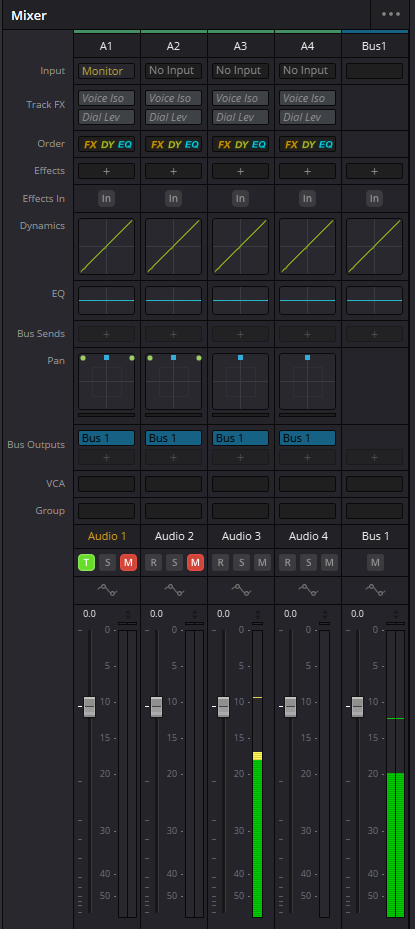
Mixer · tracks and Bus 1
Tracks and Bus 1 appear in the same context. Compare individual channels with the contents of the bus; one track reading does not describe the sum of the complete mix.

Bus 1 · isolated channel strip
Original illustration of the Bus 1 strip. Check its assignments and the project output: the name Bus 1 alone does not establish that this bus is selected for export.
Reference: Blackmagic Design — DaVinci Resolve 21 Reference Manual · Meter and Audio Metering · Blackmagic Design — Fairlight · Mixing, automation and metering
07 / UNDERSTAND & APPLY
Distinguish intentional width from an L/R error
An L/R difference is not automatically a fault. Music, ambience or a moving object may be intentionally asymmetric. Investigate when the source position contradicts the scene, one channel disappears unexpectedly or a difference persists in material that should be centred.
Start with the source and channel mapping, then inspect panning and channel-specific processing. Overall output gain raises both sides and does not fix an incorrect channel assignment. Apply the correction where the problem begins.
Listen to the source
Decide where it belongs in the scene. Compare its channels with the expected mono or stereo format.
Check the path
Inspect mapping, panning, Mute/Solo, assignments and effects with independent channel settings. Compare the same passage.
Restore context
After a correction, hear the full mix in stereo and through the intended mono monitoring path. Check that the important centre and attack remain intact.
08 / UNDERSTAND & APPLY
Assess headroom and investigate actual overload
A sample peak approaching 0 dBFS shows diminishing headroom to digital full scale. However, Meter’s held peak line is a normal part of its display, and Bus Meter High Level and Low Level configure bus colour zones. A red interface element without its context is not a universal clipping verdict.
Clipping already present in a recorded source is not repaired by lowering its fader. Attenuation makes that source quieter; the damaged waveform remains. Locate the stage where distortion occurs, listen to it separately and compare it with the source material.
Sample peak checks the samples. True peak also considers potential inter-sample maxima in the reconstructed signal. Use a dedicated true-peak measurement and a separate loudness pass for final checks. Choose targets from the delivery specification and output format rather than applying one universal number.
Before another processor
Check what level reaches the processing and whether it changes its behaviour. Label the Meter position when comparing results.
At the sum
Listen to coincident attacks and transitions. One quiet source does not establish adequate headroom for the whole bus.
After export
Open the resulting file separately and check channels, audible distortion, loudness and true peak against the chosen requirements.
Reference: Blackmagic Design — DaVinci Resolve 21 Reference Manual · Meter and Audio Metering
09 / UNDERSTAND & APPLY
Choose a meter for the question you have
To trace a route, it may be enough to see where a signal appears or disappears. Assessing the programme requires additional measurements. Choose the tool for the question, then compare the same signal and playback range.
| Tool | Question it addresses | What one reading cannot establish |
|---|---|---|
| Fairlight FX Meter | What is the sample peak of the chosen track or bus; which numerical maximum is stored? | Programme LUFS, true peak or phase compatibility. |
| Track / bus meters | What happens to track channels or a bus sum under the selected Audio Metering configuration? | The scope of an inserted plugin based on visual resemblance. |
| Loudness Meter | How does loudness change, and what is the accumulated result under the selected standard? | The cause of incorrect L/R assignments or a particular spectral defect. |
| Phase Meter | How do channels relate, and is there a problem to investigate in mono? | The quality or loudness of the entire mix from one indicator. |
| Frequency Analyzer | How is the signal distributed by frequency in Spectrum or Waterfall? | LUFS and overall delivery compliance. |
| Surround Analyzer | How do directions and channels relate in multichannel audio? | A replacement for listening and other measurements. |
Loudness Meter
Measure the loudness of the selected programme.
↗Frequency Analyzer
Locate the frequency region of a problem.
↗Surround & Immersive
Check multichannel relationships and monitoring.
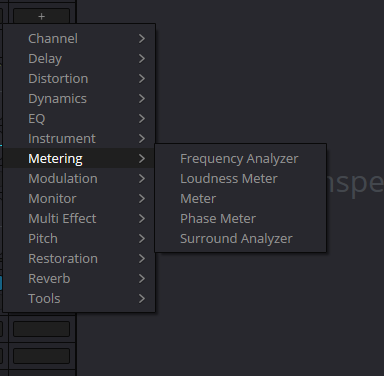
Metering · neighbouring tools
Original Metering menu illustration. This category groups several measurement tasks; sharing a menu does not give the tools the same detector, scale or scope.
Reference: Blackmagic Design — DaVinci Resolve 21 Reference Manual · Meter and Audio Metering
10 / UNDERSTAND & APPLY
Teaching signal: calculate the peak and RMS of a block
The lab generates 256 normalized samples per channel. Sine contains four complete cycles; Burst activates one of those four cycles; Impulse keeps one nonzero sample; Silence contains only zeros. The initial maximum of the nonzero sources is 0.5. These are specified arrays, not a voice or music recording.
Overall gain multiplies L by 10^(gain/20) and R by 10^((gain + R offset)/20). For each channel, sample peak is 20 log10(max |x|) and block RMS is 20 log10(√mean(x²)). A completely zero block produces −∞. Samples above 1 are not clipped by the model: a number above 0 dBFS reports its calculation rather than an auditioned clipping event in Resolve.
Compare Sine, Burst and Impulse at the same gain and R offset. Their peak can match while RMS differs. Then change overall gain and R offset separately. Comparing with the original teaching block checks amplitude changes; it does not operate a native plugin bypass.
Capture this block adds the current peaks to a manual history; Reset captured maxima clears that history. Changing controls alone does not store a new maximum. There is no transport, native two-second hold or decay model. RMS uses all 256 samples without frequency weighting; an audio-window duration in seconds, LUFS and true peak are not modelled.
| Control | Authored condition |
|---|---|
| Source · Sine / Burst / Impulse / Silence | Four specified shapes for comparing peak and RMS. These are not native Meter modes. |
| Gain · −24…+12 dB | Gain applied to both channels of the teaching signal. Not a Meter plugin knob. |
| Additional right gain (R offset) · −12…+12 dB | Additional gain on the right channel only. This does not model Resolve’s panning law. |
| Block RMS | A mathematical result for the current 256-sample array; not Digital VU emulation. |
| Capture this block / Reset captured maxima | A manual history of selected blocks; not Reset Peak on Play or playback metering. |
One peak. Different amounts of signal.
Compare a sine, a burst, a single impulse and silence in the same 256-sample block. Sample peak sees the largest absolute sample. Block RMS also responds to how much of the block contains signal. Gain and right-channel offset are controls for this authored test signal.
The displayed samples and statistics include the authored gain controls. No manual peak captures yet. No audio is generated.
LMeasured block
- Sample peak
- −9.02 dBFS
- Block RMS
- −12.03 dBFS
- Peak − RMS
- +3.01 dB
RMeasured block
- Sample peak
- −13.02 dBFS
- Block RMS
- −16.03 dBFS
- Peak − RMS
- +3.01 dB
Capture keeps the larger peak for each channel across the blocks you explicitly capture. Changing controls alone does not update this memory. Reset clears only these maxima; the source and gains remain. This is not a simulation of the native two-second peak line, running numeric maximum or Reset Peak on Play.
At equal gain, sine, burst and impulse have the same sample peak. Shorter activity lowers block RMS: a one-sample impulse can have a large peak while contributing little to the block average.
The meter drawing spans -60 to +12 dBFS: 0 channel(s) above, 0 below its finite range. Real readouts are retained. Samples above 0 dBFS: L 0, R 0; this is not a verdict that an internal floating-point path has clipped.
Samples, equations and drawing scale
N = 256 and full-scale amplitude = 1. Sine uses 0.5 × sin(2πn/64); R advances its phase by one quarter-cycle. Burst keeps n = 64…127 and zeros the other samples. Impulse is 0.5 at n = 96 for L and n = 160 for R; all other samples are zero. Silence zeros both channels. No sample rate or playback time is implied.
L = sourceL × 10^(Gain/20)
R = sourceR × 10^((Gain + R offset)/20)
peak = max |x[n]| · RMS = √(Σ x[n]² / N)
dBFS = 20 log10(amplitude)
The resulting samples are not limited or normalized back to one. Only the drawn meter rail is bounded; its numeric value and above-range marker remain. The waveform uses a shared L/R scale of max(1, peakL, peakR). RMS is the unweighted statistic of this whole block: no meter ballistics, time weighting, loudness gating, LUFS or true-peak reconstruction are calculated.
11 / UNDERSTAND & APPLY
Investigate the cause of the visible symptom
| Observation | What to check | Next comparison |
|---|---|---|
| The bar moves but nothing is heard | The monitoring bus, device output, Mute/Solo and pre-fader setting. | Meter activity separately from audible output over the same passage. |
| One channel is consistently absent | Source format, channel mapping, panning and routing. | Original channels before gain or balance compensation. |
| The fader moved but the reading did not | Pre fader metering on tracks and the inserted Meter position. | One gain change at an established measurement point. |
| The number at the top does not fall | The stored maximum and Reset Peak on Play state. | Reset before replaying the same passage. |
| Tracks have headroom but bus peaks are higher | Coincident attacks and the sum of assigned sources. | Individual track contributions, then the complete mix without unintended Solo. |
| Peaks match but loudness seems different | Duration, signal shape, spectrum and passage loudness. | RMS and loudness followed by listening, beyond a peak-to-peak comparison. |
12 / UNDERSTAND & APPLY
Finish the measurement with listening and a record
Choose a representative passage: a line with a pause, a musical attack or a transition between scenes. A stored peak is useful only when you know which pass it represents. After changing processing, reset the maximum and replay the same passage with context before and after it.
When level changes across the scene, check automation and actual output readings. A smooth-looking curve does not establish correct routing, adequate headroom or intelligible words. Measurement should support a specific listening decision.
Label the measurement
Record the source, track or bus, meter type, pre/post settings and playback range. Establish an unknown measurement point before drawing conclusions.
Compare one change
Reset the maximum, replay the passage and record L/R. Change one cause: mapping, gain, panning or processing.
Listen together
Restore the full mix. Check source position, key words, attacks and transitions in stereo and the required monitoring format.
Check the file
Export a short passage through the intended route and listen separately. Measure final loudness and true peak against the specification; retain your observations.
Reference: Blackmagic Design — DaVinci Resolve 21 Reference Manual · Meter and Audio Metering · Blackmagic Design — Fairlight · Mixing, automation and metering
PRACTICE / NO AUTOPILOT
A small task. A checkable result.
Work in a test copy, listen before and after, and write down what you actually observed. The checklist contains no pre-approved results.
1 · Name the signal and route
In a test copy, choose 10–15 seconds of material. Record its channel format, track, bus, monitoring output and expected L/R position.
2 · Repeat the Meter measurement
Open native Meter on the intended track or bus. Reset before the pass, record the numerical channel maxima and check Reset Peak on Play behaviour between two passes.
3 · Check the fader’s influence
Record Meter Type and Pre fader metering on tracks. Temporarily lower the track fader by 6 dB, replay the passage and compare the measurement with listening. Restore the initial value afterwards.
4 · Compare shapes in the lab
At matching gain and R offset, compare Sine, Burst and Impulse: record sample peak and block RMS. Check Silence, then change R offset alone. Keep this calculation separate from measuring the recording in Resolve.
5 · Correct and check the output
Choose one observed problem, correct its cause and compare the complete mix. Listen to a short export; separately check loudness and true peak against project requirements. Record the actual result.
FAQ / BEFORE THE NEXT MOVE
Questions that matter in practice
Why is this topic Level Meter when the menu says Meter?
Level Meter is the topic title for level measurement. The separate native Fairlight FX is called Meter in the Resolve 21 reference. Track, bus and Control Room meters also measure level but belong to different interface areas.
Reference: Blackmagic Design — DaVinci Resolve 21 Reference Manual · Meter and Audio Metering
Does every solid bar display RMS?
No. The Meter section describes a sample-peak meter. Project settings separately select IEC 60268-18, Digital VU or Custom; the manual explicitly describes an RMS bar and a separate peak segment for Digital VU. Identify the tool and Meter Type first.
Reference: Blackmagic Design — DaVinci Resolve 21 Reference Manual · Meter and Audio Metering
Why did the red line disappear while the number remained?
Meter’s red peak marker has a two-second hold. The numerical maximum persists independently until a manual reset, a playback restart with Reset Peak on Play enabled, or a higher measured peak.
Reference: Blackmagic Design — DaVinci Resolve 21 Reference Manual · Meter and Audio Metering
When should I use Reset or Reset Peak on Play?
Reset gives an explicit start to a new measurement. Reset Peak on Play automates clearing the numerical peak when playback stops and starts again. Choose the behaviour for a single pass or several passages, and record what the stored maximum includes.
Reference: Blackmagic Design — DaVinci Resolve 21 Reference Manual · Meter and Audio Metering
Why did lowering the fader leave the meter unchanged?
A track meter may have Pre fader metering on tracks enabled. For a separate inserted Meter, also establish its chain position. Clip gain and clip-volume automation can affect the signal earlier than the fader, so test one change at a time.
Reference: Blackmagic Design — DaVinci Resolve 21 Reference Manual · Meter and Audio Metering
Do equal peaks mean equal loudness?
No. A short impulse and a sustained sound can share a sample peak while having different RMS. Perception also depends on spectrum and time. Use the appropriate loudness analysis and listening for programme loudness decisions.
If L and R match, is stereo already checked?
Matching peaks or RMS does not describe the phase relationship between channels. Listen in stereo and mono, and add Phase Meter if needed. Read it in the context of the signal: for example, an absent signal does not demonstrate a healthy stereo relationship.
Reference: Blackmagic Design — DaVinci Resolve 21 Reference Manual · Meter and Audio Metering
Does the lab reproduce Resolve Meter?
It calculates sample peak and RMS exactly for its specified blocks. Gain and R offset change the teaching generator. Native detectors, hold/decay, recording processing, LUFS and true peak are not modelled; stored maxima cover only manually selected blocks.
REFERENCES / 2026-10-09
What this guide is based on
Reviewed 9 October 2026 against the official DaVinci Resolve 21 Reference Manual: Audio Metering settings on page 167; Frequency Analyzer, Meter and Phase Meter on pages 4115, 4118 and 4122; metering and monitoring on pages 4130–4140. PDF and printed page numbers match. The text and Meter panel were inspected. Original article illustrations are retained; an unlabelled screenshot does not establish the measurement point. Workflows and the lab are authored teaching material. The lab calculates statistics of specified samples, does not reproduce native detectors and does not process your recording.
Blackmagic Design — DaVinci Resolve 21 Reference Manual · Meter and Audio Metering ↗
Official full PDF: Fairlight FX Meter on pages 4118 and 4132; metering overview and settings on 4130–4140; Project Settings Audio Metering on 167; Frequency Analyzer on 4115; Phase Meter on 4122. Meter is documented as a sample-peak tool with a separate short hold line and numerical maximum. Project meter types and custom behavior are distinguished from the plug-in menu. Text and panels reviewed on 9 October 2026. The page block RMS is an authored calculation, not a relabeling of native Meter.
Blackmagic Design — Fairlight · Mixing, automation and metering ↗
The manufacturer product page provides general context for Fairlight mixing, automation and audio monitoring. Exact commands, menus and metering types in this package are checked against the full Resolve 21 manual and the cited supplementary primary sources.