FAIRLIGHT / CHARACTER / FX · 09
Pitch
New pitch. The event stays in time.
Move a sound into another register while keeping its place in time. Separate the main interval, fine tuning and original-signal blend, then check attacks, intelligibility and the layer’s role in the scene.
- 01Calculate semitone and cent intervals
- 02Build a controlled parallel layer
- 03Keep timing and assess processing quality
Shift pitch in semitones and compare frequencies in one time window. Blend the original and shifted teaching waves.
Choose the new register first.↗
Semitones sets the broad shift. Compare an octave down and up on one sound while keeping its event boundaries.
Check: pitch changes while the edit point stays in place.Change the controls to explore the diagram. No audio playback, native DSP or connection to Resolve.
Sources and practice · 9 October 2026
Reviewed on 9 October 2026 against the official DaVinci Resolve 21 Reference Manual: chapter 181, Pitch on physical and printed page 4123; common FX controls on p. 4090; scope, order and automation in chapter 180, pp. 4083–4087. The Cents range is verified from the panel’s −100…+100 scale. Elastic Wave and clip-adjustment comparisons were checked on the official Fairlight page. The interval equation and graphical lab are separate teaching explanations, not native DSP reproduction.
Read the source notes ↓On this page
01 / UNDERSTAND & APPLY
Change pitch while the event keeps its timing
Pitch shifts audio without changing clip speed. A hit stays at its edit position and a phrase keeps its duration. Use it to change the register of an effect, transpose a musical layer or deliberately alter a voice character.
Decide whether the result will replace the source or support it as another layer. Choose a reference passage with an attack and decay; for dialogue, include consonants, vowels and a quiet phrase ending. These details reveal the cost of a large shift.
This guide concerns the separate Fairlight FX named Pitch. Clip pitch adjustment in the Inspector is another control location. Check it before adding an FX interval so an existing clip adjustment does not create an unintended combined shift.
Reference: Blackmagic Design — DaVinci Resolve 21 Reference Manual · Chorus, Flanger, Pitch and Distortion · Blackmagic Design — Fairlight / FX, plug-ins and FlexBus
02 / UNDERSTAND & APPLY
Two pitch controls, one blend and an output meter
The Pitch section contains Semitones and Cents. The Output section contains Dry/Wet, with an output meter at the right. This window has no separate Output Level knob. Match comparison level with an appropriate later stage rather than changing the interval at the same time.
The upper row provides presets and A/B comparison; the common Reset restores plug-in parameters. A/B compares two settings, while Bypass lets you hear the original path. Keep a note of the chosen interval and compare the same passage.
The documented Pitch window does not expose separate key, scale, quality or Formant menus. Setting a fixed interval does not select the right notes or correct a performer’s intonation automatically.
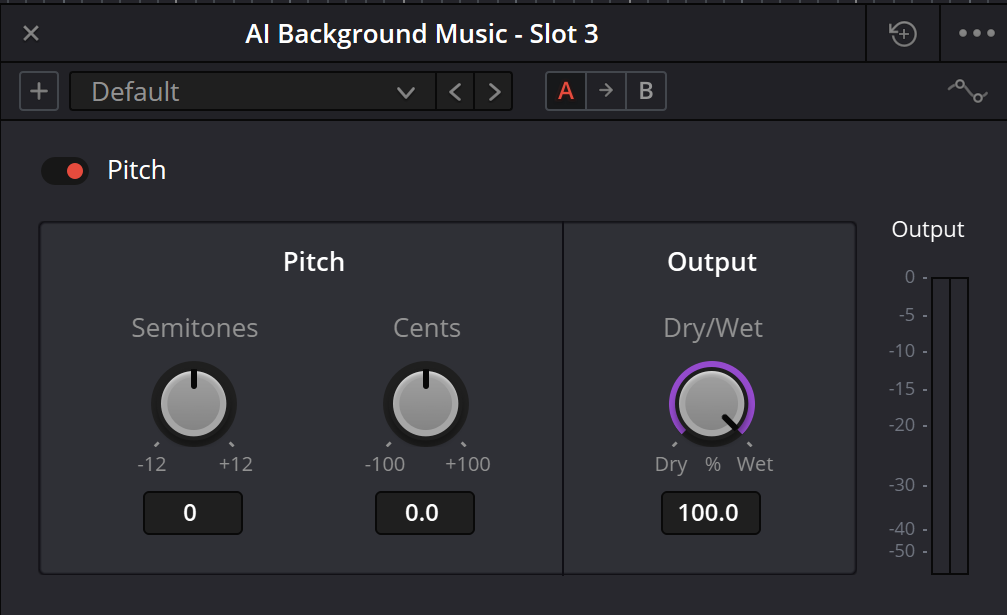
Pitch: interface capture
The capture shows one plug-in state. Compare its labels with the control reference; choose settings for the source and musical or dramatic task.
Reference: Blackmagic Design — DaVinci Resolve 21 Reference Manual · Chorus, Flanger, Pitch and Distortion
03 / UNDERSTAND & APPLY
Three controls and verified ranges
The following ranges were checked against the Pitch panel and description on page 4123 of the Resolve 21 manual. A displayed value is one plug-in state; a scale endpoint describes adjustment scope, not a recommended setting.
| Control | Scale | Function |
|---|---|---|
| Semitones | −12…+12 semitones | Coarse transposition. With Cents=0, −12 and +12 are one octave down and up. |
| Cents | −100…+100 cents | Fine addition to Semitones. 100 cents equal one semitone, not a percentage of playback speed. |
| Dry/Wet | 0…100% | 0% retains the source; 100% retains the processed signal. Intermediate blends include both pitches. |
| Bypass | Effect bypass | Checks the original sound while retaining the settings for return. |
| Output meter | Measurement | Displays output level; it does not reduce that level or guarantee equal perceived loudness. |
Reference: Blackmagic Design — DaVinci Resolve 21 Reference Manual · Chorus, Flanger, Pitch and Distortion
04 / UNDERSTAND & APPLY
Turn semitones and cents into a frequency ratio
In equal temperament the total shift is s+c/100 semitones, where s is Semitones and c is Cents. The frequency ratio is r=2^((s+c/100)/12). A tone at frequency f moves to f×r. This explains the interval mathematically; it does not specify Resolve’s internal algorithm.
+100 cents and +1 semitone produce the same ratio when the other control is zero. The controls add: +1 semitone and −100 cents cancel the net pitch interval. Read both controls when checking a result.
An octave up doubles the frequency of oscillation within the same event time. It does not imply faster playback here: clip boundaries remain unchanged, and the quality of the real processing must be assessed on the actual source.
| Semitones / Cents | Frequency ratio | For a 220 Hz reference |
|---|---|---|
| −12 / 0 | ×0.500 | 110 Hz |
| −7 / 0 | ≈×0.667 | ≈146.832 Hz |
| 0 / +10 | ≈×1.00579 | ≈221.274 Hz |
| +7 / 0 | ≈×1.498 | ≈329.628 Hz |
| +12 / 0 | ×2.000 | 440 Hz |
05 / UNDERSTAND & APPLY
Compare the source, shifted signal and blend
The teaching diagram constructs a periodic signal with a 220 Hz reference and its harmonics. Semitones and Cents change the frequencies through the exact interval ratio, while Dry/Wet combines two calculated versions. The time-window width stays unchanged.
Start with Cents=0 and a fully processed signal; compare −12, 0 and +12 semitones. Then return Semitones to zero, add a small cent offset and blend in the source. The visible interference helps explain why a mixture differs from one shifted voice.
The diagram does not process a recording, play audio or model duration-preservation algorithms, formants, latency or Pitch artifacts. It explains frequency relationships. Assess speech, music and transient quality in Resolve with actual material.
Add the interval. Compare the frequency ratio.
Semitones and Cents contribute to one total pitch shift. The harmonic source and shifted reference share a 25 ms window. Dry/Wet overlays their different frequencies; it does not move the pitch halfway back.
The drawing follows the controls. It does not generate audio.
A twelve-semitone increase doubles every frequency; a twelve-semitone decrease halves it. Fine cents multiply the ratio as well. A partial Dry/Wet blend contains both references and can produce interference instead of one intermediate pitch.
How this teaching model is defined
The analytic source is 0.72 sin(2πft) + 0.18 sin(4πft) + 0.08 sin(6πft), f = 220 Hz. The shifted reference substitutes f × r at the same time coordinates; the output is a linear Dry/Wet mixture. This confirms interval arithmetic and superposition, not the processing quality of a real voice or the native latency.
The three native controls are represented. No Formant, Auto Tune or output-gain control is added. The diagram makes no claim about formant preservation, resampling, transient handling or guaranteed stereo width.
06 / UNDERSTAND & APPLY
Dry/Wet: replace the source or support it
At full processing, Dry/Wet does not blend the original pitch back in. This makes an interval and its artifacts easier to evaluate first. If the treatment should add weight or a second register, gradually restore the source and assess both contributions in context.
A small detune makes nearby frequencies interfere over time. For two pure tones, beating follows their frequency difference: 220 Hz and a +10-cent version differ by about 1.274 Hz. Speech and music contain many frequencies and transients, so this number cannot describe their entire sound.
One mono blend does not automatically create stereo width. When building separate layers and panning them, check the centre, mono sum and combined level. Avoid adding another dry copy on a return if the main route already carries the original.
| Task | Initial comparison | Listen for |
|---|---|---|
| Replace the original register | Dry/Wet 100% | Consonants, attacks and decays without the source hiding them. |
| Add an octave layer | Choose the interval, then reduce Wet | Whether the lower layer masks the main hit or voice. |
| Small detune | Semitones=0; a small Cents value | Beating, pitch stability and intelligibility. |
| Parallel bus | A dry route and a fully processed return | Return balance, duplicated dry signal and mono behaviour. |
07 / UNDERSTAND & APPLY
Chain position changes the task
For one sound, drag Pitch from Audio FX onto the clip. For a whole track, use its Mixer channel; for a group, use the intended bus. Check every source feeding that bus, since one interval will process their combined signal.
Plug-in order determines processing order. Pitch before Reverb sends an already shifted source into the space. Pitch after Reverb also receives reflections and the tail. Compare the orders on the same passage while preserving the other settings.
Compare the order with Distortion separately as well. Shifting an already saturated sound and saturating a shifted sound can produce different character. Choose by texture, attack and the mix role rather than assuming one order always wins.
Reverb
Place the shifted source in a space.
↗Distortion
Compare pitch shifting with harmonic treatment.
↗Mixer and routing
Separate the original route and processed return.
Reference: Blackmagic Design — DaVinci Resolve 21 Reference Manual · Chorus, Flanger, Pitch and Distortion · Blackmagic Design — Fairlight / FX, plug-ins and FlexBus
08 / UNDERSTAND & APPLY
Music, effects and voices need different checks
Impact or transition
Create a lower version for weight or a higher one for an accent. Check the start of the hit; extra gain alone does not restore a lost attack.
Layered sound effect
Keep the source and add another register. Give layers separate roles through frequency, level and timing; more copies do not automatically make a larger sound.
Tonal material
Check the new interval against the scene’s harmony. Moving a whole chord transposes all its notes; it does not choose individual notes that need correction.
Designed voice
Choose the shift for character and intelligibility. Large changes may alter the perceived timbre; the reviewed Pitch provides no separate Formant control.
Dialogue timing
When the task is fitting duration to picture, compare Elastic Wave. It handles a different timing task; Pitch controls do not move syllables around the timeline.
Modulation
Add cyclic movement instead of a fixed interval.
↗Audio clip editing
Work with position, duration and transitions.
↗Dialogue
Prepare an intelligible source before styling.
Reference: Blackmagic Design — DaVinci Resolve 21 Reference Manual · Chorus, Flanger, Pitch and Distortion · Blackmagic Design — Fairlight / FX, plug-ins and FlexBus
09 / UNDERSTAND & APPLY
Give pitch movement a start and an end
For a rise before a cut or a fall after a hit, define where the movement begins and finishes. Establish useful end states manually, then write only the required parameters. The track’s plug-in parameter list shows available automation controls.
A continuous pitch transition and a jump to a fixed interval have different effects. Listen through the transition, adjacent words and return to the normal state; abrupt changes can become an audible part of the design.
After writing, return automation to playback and repeat the passage. Keep the source version and a short reference render. The movement should repeat at the intended point, with the planned interval on neighbouring clips.
Reference: Blackmagic Design — DaVinci Resolve 21 Reference Manual · Chorus, Flanger, Pitch and Distortion · Blackmagic Design — Fairlight / FX, plug-ins and FlexBus
10 / UNDERSTAND & APPLY
Identify the specific detail that has changed
| Observation | Next check |
|---|---|
| The voice sounds metallic or smeared | Reduce the net shift, audition Wet alone and inspect the source recording. |
| The hit loses its beginning | Compare the original transient, a smaller interval and the dry contribution. |
| The blend pulses or sounds doubled | Check Cents, Dry/Wet, additional copies and the mono sum. |
| The pitch is not where expected | Read Semitones and Cents together; also inspect clip pitch and other active instances. |
| Pitch rises but the phrase is not shorter | That is the intended Pitch task; use retiming tools for duration. |
| The louder version sounds more convincing | Match output level and compare timbre with the monitor level unchanged. |
| An interval clashes with the music | Check harmony and the layer’s role, not only numeric correctness. |
| Automatic note correction is needed | A fixed Pitch interval does not replace melody detection and scale-based correction. |
11 / UNDERSTAND & APPLY
Save the interval together with its purpose
Record the source, processing scope, Semitones, Cents, Dry/Wet and chain order. For a parallel version add return level and panning; for automation add the movement boundaries.
Save a preset and a short before/after passage. After reopening, check the interval, event placement and neighbouring transitions, then listen to the export. The practice card records a comparison; it is not a Resolve preset file.
Reference: Blackmagic Design — DaVinci Resolve 21 Reference Manual · Chorus, Flanger, Pitch and Distortion · Blackmagic Design — Fairlight / FX, plug-ins and FlexBus
PRACTICE / NO AUTOPILOT
A small task. A checkable result.
Work in a test copy, listen before and after, and write down what you actually observed. The checklist contains no pre-approved results.
Choose a reference sound
Keep the source version. Mark a passage with an attack and decay; decide whether Pitch replaces the source or adds a layer.
Choose the main interval
With Cents=0 and Dry/Wet=100%, compare the source and two Semitones settings. Record the benefit and any lost detail.
Check fine tuning and blend
Refine Cents, then change Dry/Wet. For small detuning, assess beating and source stability separately.
Listen in the scene
Match level to bypass and check consonants or attacks, harmony and mono for a parallel version.
Save and repeat
Record settings and chain order, reopen the project and check a short render, including automation boundaries.
FAQ / BEFORE THE NEXT MOVE
Questions that matter in practice
Does Pitch change clip duration?
The manual describes pitch changes without changing clip speed. Use an appropriate editing or retiming tool to move syllables or stretch a recording.
Reference: Blackmagic Design — DaVinci Resolve 21 Reference Manual · Chorus, Flanger, Pitch and Distortion
Are 100 cents one semitone?
Yes. Cents are hundredths of a semitone. +100 cents with Semitones=0 equals the interval of +1 semitone with Cents=0; it does not double the frequency.
Why are +12 semitones an octave?
In equal temperament, each semitone multiplies frequency by 2^(1/12). Twelve steps multiply it by two; −12 divides it by two.
Does Dry/Wet 50% halve the interval?
No. It mixes the original with an already shifted signal, retaining both contributions. Change Semitones/Cents to change the interval itself.
Reference: Blackmagic Design — DaVinci Resolve 21 Reference Manual · Chorus, Flanger, Pitch and Distortion
Where are Formant and scale selection?
They are absent from the reviewed Pitch window: the documented controls are Semitones, Cents, Dry/Wet and bypass. A static shift does not automatically choose notes from a scale.
Reference: Blackmagic Design — DaVinci Resolve 21 Reference Manual · Chorus, Flanger, Pitch and Distortion
Does detuning guarantee wide stereo?
No. A small pitch difference changes signal interference. Stereo placement depends on channels and routing; check the centre and mono summing.
How do I compare loudness without Output Level?
Watch the Output meter and match level with an appropriate subsequent stage or separate layer level. Avoid changing both the interval and loudness during evaluation.
Does the lab reproduce the plug-in’s voice quality?
No. It constructs a periodic example to explain frequency ratios and blending. Formants, artifacts, the native algorithm and recorded-audio playback are outside its scope.
REFERENCES / 2026-10-09
What this guide is based on
Reviewed on 9 October 2026 against the official DaVinci Resolve 21 Reference Manual: chapter 181, Pitch on physical and printed page 4123; common FX controls on p. 4090; scope, order and automation in chapter 180, pp. 4083–4087. The Cents range is verified from the panel’s −100…+100 scale. Elastic Wave and clip-adjustment comparisons were checked on the official Fairlight page. The interval equation and graphical lab are separate teaching explanations, not native DSP reproduction.
Blackmagic Design — Fairlight / FX, plug-ins and FlexBus ↗
The manufacturer page confirms clip and track processing, plug-in order, saved chains, automation and FlexBus routing. Exact controls for these four effects are checked against the full Resolve 21 manual rather than inferred from the general product overview.
Blackmagic Design — DaVinci Resolve 21 Reference Manual · Chorus, Flanger, Pitch and Distortion ↗
Official full PDF, chapter 181: Chorus on 4099–4100; Distortion on 4105–4106; Flanger on 4110–4111; Pitch on 4123, with Reverb beginning lower on the same page. Physical and printed page numbers match. Text and panels reviewed on 9 October 2026 for controls, menus and readable scales. The page curves and signals are authored teaching examples, not native Resolve algorithms.