FAIRLIGHT / SPACE / FX · 09
Echo
A repeat. A return. Movement between channels.
Build a repeat pattern around a word, an impact or a transition. Separate channel delay, loop timing and cross-channel returns, then check the tail, output level and behaviour when stereo is summed.
- 01Separate delay from feedback
- 02Control L/R and cross-channel returns
- 03Protect the source and the end of the tail
The first response and feedback spacing are separate intervals. Follow the repeats travelling between L and R.
Find a useful place for the repeat.↗
Choose a short sound and the gap after it. Repeat timing should support a phrase or picture accent.
Check: the original event and the position of its return are clear.Change the controls to explore the diagram. No audio playback, native DSP or connection to Resolve.
Sources and practice · 8 October 2026
Reviewed on 8 October 2026 against the text and illustration of the official Resolve 21 Reference Manual: chapter 181, pp. 4107–4108; shared FX controls on p. 4090; clip, track and bus application in chapter 180, pp. 4083–4087. High Ratio and the visible parameter limits were checked on the manual panel. The source does not disclose the internal damping law or native return algorithm; the teaching model is described separately.
Read the source notes ↓On this page
01 / UNDERSTAND & APPLY
When repeats become part of the sound design
Echo creates delayed reflections of the original sound. Its stereo configuration provides separate left and right parameters, a dedicated Feedback Delay and two cross-feedback directions. This lets you design a pattern in more detail than a single overall time control.
Choose the task before adjusting: a sparse answer to a final word, an impact moving between channels, or a repeating transition texture. A short sound with space afterwards makes a useful first test. In dense continuous music, identifying which control changed a particular return is harder.
Keep the dry source’s role clear: the listener should recognise the main event while reflections support space, rhythm or the scene’s intention. If a simple pair of delays is enough, compare the more compact Delay processor first.
A short event
A click, impact or isolated word exposes the order of returns.
A gap
Provides room for the tail and reveals whether it masks the next line.
Stereo
Lets you examine the left and right sides before connecting them deliberately.
Reference: Blackmagic Design — DaVinci Resolve 21 Reference Manual · Spatial and creative Fairlight FX
02 / UNDERSTAND & APPLY
The Echo window: input, two lines and a shared output
The stereo window places left and right event graphs and an Output meter above the controls. The graphs show repeat timing and relative intensity. The manual illustration displays a two-second interval; that is the pictured graph scale, not a promise that every tail ends after two seconds.
Below are the Filter block, High Ratio in the Feedback section, independent Left Channel and Right Channel blocks, then Dry/Wet and Level. The shared Fairlight FX controls provide presets, A/B comparison and Reset. Compare overall Echo bypass separately from reducing Dry/Wet.
Input Format is shown on a multichannel track. Selecting Mono in that menu sums the incoming L/R, while applying Echo to an actual mono track changes the window to one Echo block. These are different operations.
| Input Format | Input to Echo |
|---|---|
| Stereo | Separate left and right inputs. |
| Mono | The L/R sum feeds both processing channels. |
| Left | Only the left input channel is used. |
| Right | Only the right input channel is used. |
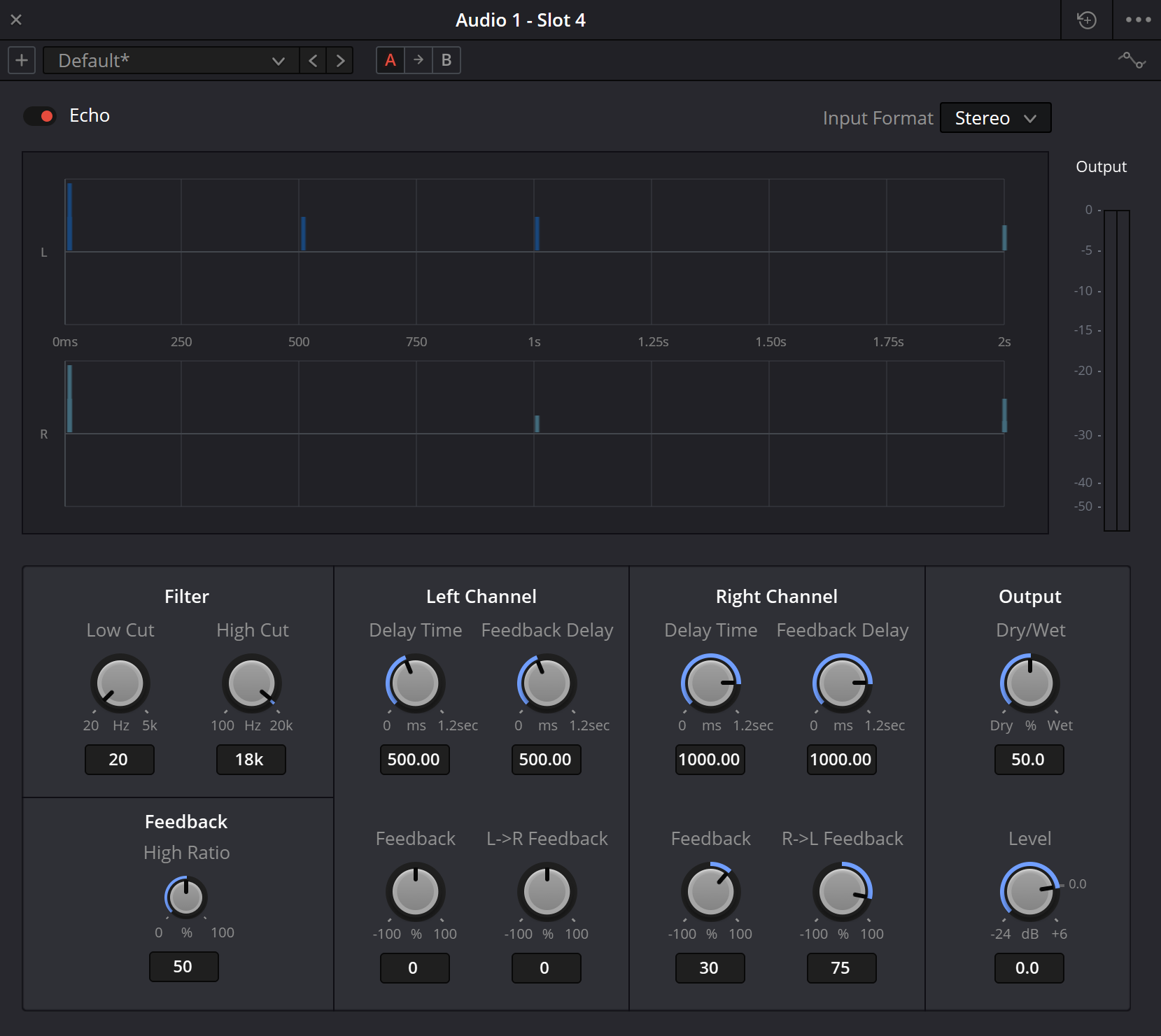
Echo: interface reference
Compare the panel labels with the control reference below. The values shown describe one setup; choose working settings from the source, scene and intended effect.
Reference: Blackmagic Design — DaVinci Resolve 21 Reference Manual · Spatial and creative Fairlight FX
03 / UNDERSTAND & APPLY
Controls and verified scales
This table combines the Resolve 21 manual description with its Echo illustration. Values displayed in the numeric fields belong to one example; scale endpoints are not recommended working settings.
Mono retains Delay Time, Feedback Delay and Feedback in one block. The L→R and R→L controls belong to the stereo configuration and are not expected in a mono-track window.
| Control | Purpose | Illustrated scale |
|---|---|---|
| Low Cut | A global high-pass filter that reduces the effect’s low-frequency content. | 20 Hz–5 kHz |
| High Cut | A global low-pass filter that limits the effect’s high-frequency content. | 100 Hz–20 kHz |
| Feedback · High Ratio | A feedback damping control, separate from the return amount of each channel. | 0–100% |
| Left / Right · Delay Time | Delay of the corresponding channel. | 0 ms–1.2 s |
| Left / Right · Feedback Delay | Delay time in the corresponding channel’s feedback path. | 0 ms–1.2 s |
| Left / Right · Feedback | Percentage of the channel fed back to itself. | −100 to +100% |
| L→R Feedback | Feedback from the left channel into the right. | −100 to +100% |
| R→L Feedback | Feedback from the right channel into the left. | −100 to +100% |
| Dry/Wet | Original-to-processed balance: 0 is dry and 100% is processed. | 0–100% |
| Output · Level | Overall output level of the effect. | −24 to +6 dB |
Reference: Blackmagic Design — DaVinci Resolve 21 Reference Manual · Spatial and creative Fairlight FX
04 / UNDERSTAND & APPLY
Separate self-feedback from cross-channel return
Delay Time and Feedback Delay are separate settings. The first concerns channel delay and the second concerns its feedback timing. Begin without cross-feedback: change one channel’s time, then Feedback Delay, replaying the same short source for each comparison.
Feedback sets the self-return amount. L→R and R→L add paths between channels. Different times and several active paths can make the pattern denser and harder to trace. Add one connection at a time so you understand where each new event comes from.
Self-feedback and cross-feedback have negative and positive scales. Compare signs at the same magnitude and check the channel sum; a negative percentage should not be read as ordinary output attenuation. Overall level is controlled separately, and the interaction of paths is judged by listening.
Time
Where is the return, and is there enough space before the next important event?
Amount
How do audibility and tail length change while timing stays fixed?
Direction
Where does the next return appear when only one cross-channel connection is enabled?
Reference: Blackmagic Design — DaVinci Resolve 21 Reference Manual · Spatial and creative Fairlight FX
05 / UNDERSTAND & APPLY
Choose a clip, a track or a dedicated FX bus
For one word or effect, drag Echo from the Effects Library’s Audio FX onto the clip. For an entire track, use its header or the + button in the Mixer channel’s Effects section. That section also supports an effect on a bus. Verify the clip, track or bus name before adjusting.
On a serial insert, Dry/Wet sets the balance of direct sound and repeats within that path. In a parallel setup, the direct signal already reaches the mix and a separate send feeds an FX bus containing Echo. For an effect-only return, set Dry/Wet to 100% and control its contribution through the send or return level.
Check the two parallel branches separately. Dry signal remaining on the FX return adds to the main path and changes the balance. Confirm that the return reaches the intended mix and is not being sent back into itself.
| Scope | Useful for | Check |
|---|---|---|
| Clip | One source or a local word treatment. | Clip boundaries and the actual tail during playback and delivery. |
| Track | A shared character for several events. | Neighbouring clips, insert order and written automation. |
| FX bus | A shared repeat space fed by separate sends. | The dry path, Dry/Wet, return level and routing. |
Reference: Blackmagic Design — DaVinci Resolve 21 Reference Manual · Spatial and creative Fairlight FX · Blackmagic Design — Fairlight / FX, plug-ins and FlexBus
06 / UNDERSTAND & APPLY
Build a pattern from one short sound
Prepare the source
In a duplicate timeline, choose a short sound and leave several seconds after it. Mark the next line or picture accent that the tail must leave clear.
Establish scope and balance
Check the clip, track or FX bus and Input Format. Begin with a moderate Dry/Wet on an insert; keep a dedicated effect return fully wet.
Examine one line
Disable cross-feedback. Compare two Delay Time settings, then two Feedback Delay settings with everything else unchanged. Record the audible difference.
Add self-repeats
Raise Feedback from a modest value. Judge tail length and density while watching Output. Use filtering to give repeats their place relative to the source.
Connect the channels
In stereo, add L→R first and R→L only if useful. Compare a single connection with both together and check that the intended rhythm survives.
Compare and shape the transition
Match processed and original listening loudness, then check stereo and mono. Automate the contribution around a specific word if needed; replay after writing.
Reference: Blackmagic Design — DaVinci Resolve 21 Reference Manual · Spatial and creative Fairlight FX · Blackmagic Design — Fairlight / FX, plug-ins and FlexBus
07 / UNDERSTAND & APPLY
Trace seven generations of teaching-model returns
The model shows seven generations in total, including the first delayed arrival and subsequent self-feedback and cross-feedback returns. Left, Right and Both choose example source impulses; they are not an extension of native Input Format. Change initial delay, feedback timing and path amounts to trace where each event originates.
The model’s rule assigns the destination channel’s Feedback Delay to the next path. The drawing covers four seconds and marks truncated events. A seven-generation limit does not mean that the real Echo tail must end at the same point.
The teaching controls use their own windows: initial delay 0–800 ms, feedback time 50–1000 ms, and self/cross-feedback −90 to +90%. A large combined return amount does not guarantee decay. The model does not reproduce the filters, native algorithm or your recording’s audio.
Set the first arrival, then route the returns.
Initial Delay moves the first event. Feedback Delay spaces new generations. Follow self-feedback and the two cross-channel paths separately; their weights can combine and need not produce a decaying sequence.
The drawing follows the controls. It does not generate audio.
A path can return to its own channel or cross to the other. A negative coefficient reverses that branch’s sign. Equal-time contributions within a generation are added algebraically.
0 events are outside the 4-second window; 0 exceed the drawing’s ±1.6 height scale and receive an arrow. The fixed seven-generation limit is not a tail-length measurement.
How this teaching model is defined
A first event is placed at its source channel’s Initial Delay. Each following generation branches through self and cross coefficients, with the destination’s Feedback Delay added to the event time. The total absolute outgoing coefficient is a conservative contraction check for this drawing, not a stability test of the native plugin. No filters, clipping, saturation, output gain or native wet/dry law are simulated.
08 / UNDERSTAND & APPLY
Four purposeful repeat patterns
An answer to a word
Choose a phrase ending that has a real gap afterwards. Restrict the effect’s contribution to that event and listen to the start of the next line.
Alternating stereo
Use different times and introduce cross-connections gradually. Check that the source retains its role while the repeats move.
A transition texture
Compare two loops with different timing on a short sound effect. Let the pattern support the edit; more audible events do not automatically create a stronger transition.
A distant filtered tail
Compare Low Cut, High Cut and High Ratio separately. Listen to changes in bass, brightness and repeat development while retaining a connection to the original sound.
09 / UNDERSTAND & APPLY
Check the tail, output and channel sum
Listen from the original event through to the next important sound. One successful repeat does not establish that later returns leave words clear or stay inside the scene. Recheck the complete tail after feedback changes.
If output continues building in a dense network, reduce return amounts first. Lowering Output makes the result quieter but does not explain why the pattern accumulates. Judge settings without relying on later processing to disguise every build-up.
A mono check reveals what remains when channels are summed: balance, density and colour can differ from the stereo version. Compare at similar listening loudness, then return to the full mix.
| Observation | Next check |
|---|---|
| Echo cannot be heard | Bypass, insert scope, selected input channel, Dry/Wet and the FX-return path. |
| The tail fills the entire gap | Self and cross-feedback, loop timing and the effect’s contribution to the scene. |
| Output keeps building | All active return amounts and the external bus routing. |
| Repeats mask the next line | Tail amount and spectrum, timing, and send or balance automation. |
| The character changes in mono | Asymmetric timing, feedback signs and each cross-connection separately. |
| The rendered file cuts off the tail | Render range, final events, clip boundaries and the tail heard in actual playback. |
10 / UNDERSTAND & APPLY
Separate repeats, space and modulation
| Tool | Main decision |
|---|---|
| Delay | Will a simpler time-and-feedback setup provide the repeat you need? |
| Echo | Does the pattern need separate Feedback Delay and L→R / R→L paths? |
| Reverb | Does the source need a denser surrounding space? |
| Modulation | Does the scene need movement of level, frequency, filtering or position instead of more repeats? |
Delay
Compare a simpler repeat structure.
↗Reverb
Build space around a source.
↗Modulation
Understand several domains of movement.
↗Automation
Place the effect at the intended moment.
Reference: Blackmagic Design — DaVinci Resolve 21 Reference Manual · Spatial and creative Fairlight FX · Blackmagic Design — Fairlight / FX, plug-ins and FlexBus
11 / UNDERSTAND & APPLY
Save the controls and the signal path
Save a preset with the shared Fairlight FX controls and record insert scope, Input Format, both channel times and every Feedback value. For a bus, also document sends, Dry/Wet and return level; a preset name alone does not restore those external connections.
After reopening, check the source event, the entire gap and the next scene. Replay any automation without making new control moves. In the rendered file, listen to the full tail and channel sums in the formats required by the project.
Reference: Blackmagic Design — DaVinci Resolve 21 Reference Manual · Spatial and creative Fairlight FX · Blackmagic Design — Fairlight / FX, plug-ins and FlexBus
PRACTICE / NO AUTOPILOT
A small task. A checkable result.
Work in a test copy, listen before and after, and write down what you actually observed. The checklist contains no pre-approved results.
Prepare an event
Choose a short sound, its gap and the next important moment. Record the processing scope and preserve the original.
Separate the two times
With cross-feedback off, compare Delay Time and Feedback Delay individually. Record which events change.
Add returns
Compare self-feedback, one cross-connection and both together. Record tail development and the Output observation.
Check the mix
Shape the spectrum and effect contribution, compare bypass at similar loudness and listen to the mono sum.
Verify repeatability
Reopen the project and render a reference file including the full tail. Record what happened and what remains uncertain.
FAQ / BEFORE THE NEXT MOVE
Questions that matter in practice
How does Echo differ from Delay?
Echo provides a separate Feedback Delay per channel and explicit L→R and R→L cross-feedback paths. These help design a more complex repeat network; compare Delay for a simple delay task.
Reference: Blackmagic Design — DaVinci Resolve 21 Reference Manual · Spatial and creative Fairlight FX
Does Input Format Mono turn the track into mono?
No. It sums L/R at the Echo input and feeds both processing channels. Applying the effect to a mono track is a separate case, with one Echo control block.
Reference: Blackmagic Design — DaVinci Resolve 21 Reference Manual · Spatial and creative Fairlight FX
Are Delay Time and Feedback Delay the same control?
No. The manual distinguishes channel delay from feedback timing. Adjust them separately and listen to the actual sequence of returns.
Reference: Blackmagic Design — DaVinci Resolve 21 Reference Manual · Spatial and creative Fairlight FX
Does negative Feedback simply mean lower output?
Feedback uses a signed scale associated with the signal return. Do not substitute it for Output Level; compare both signs at the same magnitude and check the channel sum.
Reference: Blackmagic Design — DaVinci Resolve 21 Reference Manual · Spatial and creative Fairlight FX
Can High Ratio be converted into an exact frequency?
The reviewed manual supplies no such formula. Its prose associates the control with feedback damping frequency, while the illustration shows High Ratio in percent.
Reference: Blackmagic Design — DaVinci Resolve 21 Reference Manual · Spatial and creative Fairlight FX
Why use 100% Wet on an FX bus?
When direct sound already has its own route, a fully processed return lets you add the effect independently. Another Dry/Wet setting also adds dry signal from the return; account for it in the total balance.
Reference: Blackmagic Design — DaVinci Resolve 21 Reference Manual · Spatial and creative Fairlight FX · Blackmagic Design — Fairlight / FX, plug-ins and FlexBus
Does the two-second graph limit the tail length?
No. It is the interval displayed in the illustration. Listen to the actual tail and set the render range accordingly.
Reference: Blackmagic Design — DaVinci Resolve 21 Reference Manual · Spatial and creative Fairlight FX
Does the teaching network reproduce native Echo exactly?
No. It uses seven generations, a four-second window and its own path-timing rule. It explains return structure without analysing the recording or running Echo.
REFERENCES / 2026-10-08
What this guide is based on
Reviewed on 8 October 2026 against the text and illustration of the official Resolve 21 Reference Manual: chapter 181, pp. 4107–4108; shared FX controls on p. 4090; clip, track and bus application in chapter 180, pp. 4083–4087. High Ratio and the visible parameter limits were checked on the manual panel. The source does not disclose the internal damping law or native return algorithm; the teaching model is described separately.
Blackmagic Design — DaVinci Resolve 21 Reference Manual · Spatial and creative Fairlight FX ↗
Official full PDF, chapter 181 Fairlight FX: Delay on 4103–4104; Echo on 4107–4108; Modulation on 4118–4120; Reverb on 4123–4125. Text and panel illustrations reviewed. Parameter names, menu choices and confirmed scales checked on 8 October 2026. The teaching diagrams do not reproduce native algorithms or measure a particular recording.
Blackmagic Design — Fairlight / FX, plug-ins and FlexBus ↗
The manufacturer page confirms clip and track processing, plug-in order, saved chains, automation and FlexBus routing. Exact controls for these four effects are checked against the full Resolve 21 manual rather than inferred from the general product overview.