← All Fusion workflows
Intermediate workflowText+ParticlespEmitterpTurbulenceGlowTimeStretcher

Sand Particle Titles in Fusion

This workflow builds a sand-like title effect in Fusion. The DaVinci Resolve text first defines the shape used by a Bitmap Mask. Particles are emitted from that shape, pTurbulence gives them an irregular drifting motion, pRender converts the particle system into a 2D image, Glow adds a soft golden bloom, and a second Text+ restores a clean readable title over the particle layer.

Why this graph is built this way

Workflow logic

The graph is split into two branches. One branch converts the letter shape into a particle system; the other preserves a clean Text+ layer for readability. TimeStretcher is used as a timing tool rather than decoration: reversing time makes it easy to switch between assembly and disintegration without rebuilding the animation. Merge combines the particle layer and clean title only after pRender and Glow, so the particles stay lively while the final title remains legible.
Node tree

Connection diagram

The cable colors follow Fusion conventions: blue is an Effect Mask, neutral lines carry images, and colored ports indicate specific node inputs. Node-page links are intentionally disabled on the English diagram until the matching Fusion Encyclopedia pages are translated.

Node order

How to read the chain

1

Text1 → TimeStretcher1

The first Text+ provides the letter shape that will emit particles. TimeStretcher reverses the source with comp.RenderEnd - time so the same animation can read as either formation or disintegration.

2

TimeStretcher1 → Bitmap1

Bitmap converts the luminance of the text into a mask. This restricts particle birth to the letters instead of emitting particles across the whole frame.

3

Bitmap1 → pEmitter1 → pTurbulence1

pEmitter creates particles from the letter mask and pTurbulence breaks up their motion. Together they create sand, dust or golden debris rather than a simple dissolve.

4

pTurbulence1 → pRender1 → Glow1

pRender turns the particle system into a regular 2D image. Glow then adds a soft bloom so the grains feel brighter and more dimensional against black.

5

Text1_1 → Merge1

A second clean Text+ is composited with the sand layer so the effect never collapses into unreadable dust and the final title remains intact.

6

Merge1 → Transform1 → TimeStretcher2 → MediaOut1

Transform positions the assembled title, and the final TimeStretcher controls the direction of the complete effect before it reaches MediaOut.

Result

What the shot looks like

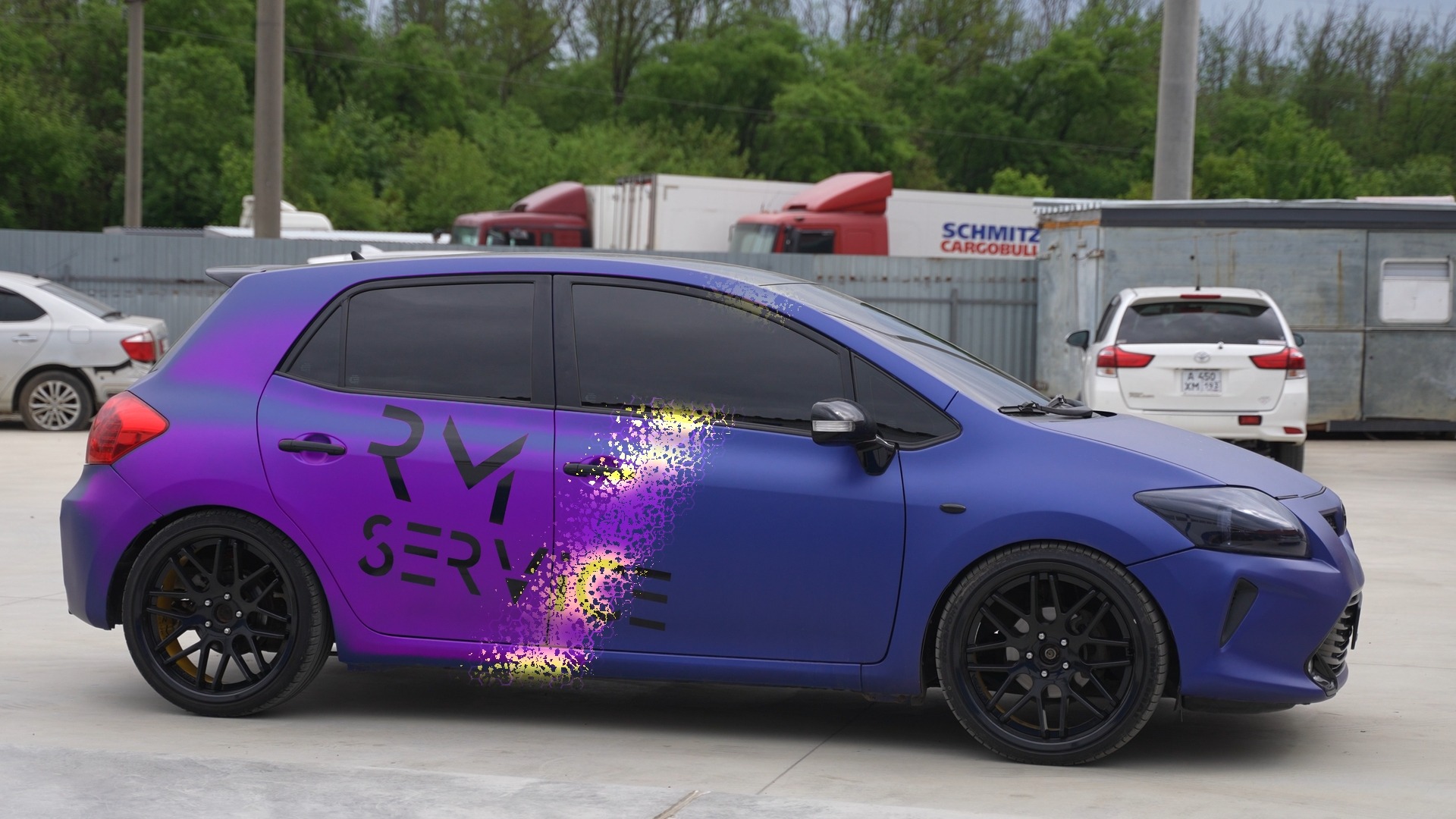
The result is a golden title on black: the lower part of the letters looks like sand or dust, particles rise and dissolve, and the main title remains readable. The same structure works well for intros, logos, promos and cinematic title cards.

When to use it

Where it works

  • Cinematic title cards and intros with dissolving or assembling text.
  • Logo reveals made from sand, dust, sparks or golden fragments.
  • Titles for DaVinci Resolve, motion design or visual-effects content.
  • Promotional text on dark backgrounds where a premium particle effect is useful.
  • Any reveal where text should assemble from a material instead of simply fading in.

Node parameters

What changes from the defaults

Text1 / Text1_1

Both Text+ nodes use the same wording and styling. The first is the particle shape source; the second is the clean readable layer in the final Merge.

  • StyledText: DaVinci Resolve
  • Font: Montserrat Bold
  • CharacterSpacing: 1.5 via Follower
  • Text color: gold; Green 0.6666667 / Blue 0
  • Horizontal / Vertical Justification: Center
  • Text1_1 Opacity: 1 at frame 70 → 0 at frame 90

Follower / Path

Follower offsets characters sequentially while Path adds movement. This lets the title assemble character by character instead of appearing as one static block.

  • Order: 4
  • Delay: 1
  • CharacterOffset: Path Position
  • Path Displacement: 0 at frame 0 → 1 at frame 7
  • Follower Opacity: 0 at frame 0 → 1 at frame 20

pEmitter1

The emitter uses Bitmap Mask as its region. Particle count rises from zero to a peak and returns to zero, creating a controlled burst instead of continuous noise.

  • Region: BitmapRgn
  • BitmapRgn.Bitmap: Bitmap1.Mask
  • Number: 0 at frame 70 → 8000 at frame 90 → 0 at frame 119
  • Lifespan: 80
  • Velocity: 0.047
  • Angle: 83.5 / AngleZ: 44.3
  • RandomSeed: 1500

pTurbulence1

Turbulence breaks the overly regular particle motion. X and Y forces push the grains sideways and upward so the edges of the letters feel organic.

  • XStrength: -0.402
  • YStrength: 0.315
  • StrengthOverLife: 0.5

Glow1 / Transform1 / TimeStretcher

These final nodes control presentation: bloom, placement and reverse playback of the assembled composition.

  • Glow Blend: 0.2
  • XGlowSize: 3.1
  • Glow: 0.52
  • Transform Center: X 0.5 / Y 0.095
  • TimeStretcher SourceTime: comp.RenderEnd - time

Common mistakes

What not to break

  • Do not feed pEmitter directly into Merge; particles must first be rendered with pRender.
  • Do not omit Bitmap Mask or the particles will be emitted as a generic field instead of following the letters.
  • Avoid excessive Velocity or the sand will fly too far from the title and destroy readability.
  • Do not remove the second Text+; the clean title is what keeps the final result readable after the particle breakup.
  • Do not confuse the two TimeStretcher nodes: the first controls the particle source, the second reverses the assembled result.