What you will learn
- Distinguish disabling a video track from deleting a clip.
- Understand why V2 covers V1 and how to check overlays.
- Avoid accidentally separating picture from its recorded sound.
Before you begin
- Create a sequence with the main video and its audio on V1/A1.
- Add a short cutaway to V2.
Why V2 sits above V1
The timeline runs horizontally through time and vertically through tracks. Higher numbered video tracks sit above lower ones. An opaque upper clip covering the entire frame usually hides lower tracks; transparency, alpha and compositing effects can change the result.
In the V1/V2 example, the upper clip is a cutaway while the original speech continues on A1. This is a basic interview, tutorial and review technique: the picture changes without interrupting the sound.
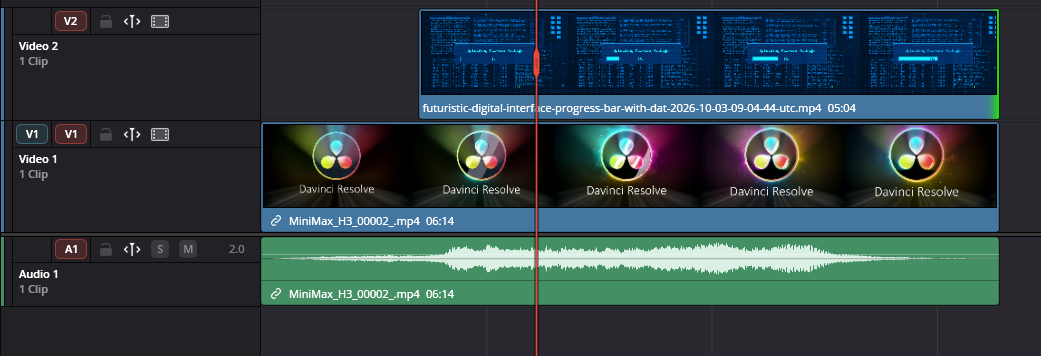
V2 sits above V1. An opaque upper clip usually covers the lower one.
| Track | Typical material | What to check |
|---|---|---|
| V1 | Main picture | Picture continuity |
| V2 | B-roll, inserts and overlays | Duration and overlap with V1 |
| A1 | Original dialogue or synchronized sound | Synchronization with picture |
| A2+ | Music, voice and ambience | Balance and unintended phase problems |
Disabling a track does not delete its clips
The video-track visibility switch compares the result with and without the overlay. When V2 is disabled, its clip remains in the sequence but stops contributing to the image. This reversible operation is useful for diagnosing a composition.
Audio tracks have independent controls: Mute removes a track from monitoring; Solo helps focus on a selected source. When checking synchronization, inspect the sound you actually hear as well as the image.
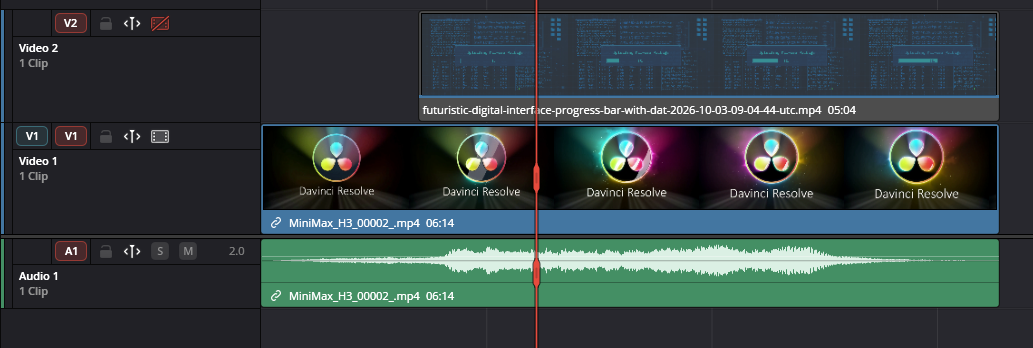
Disabled V2: its clip remains on the timeline but does not contribute to the visible result.
Linked video and audio
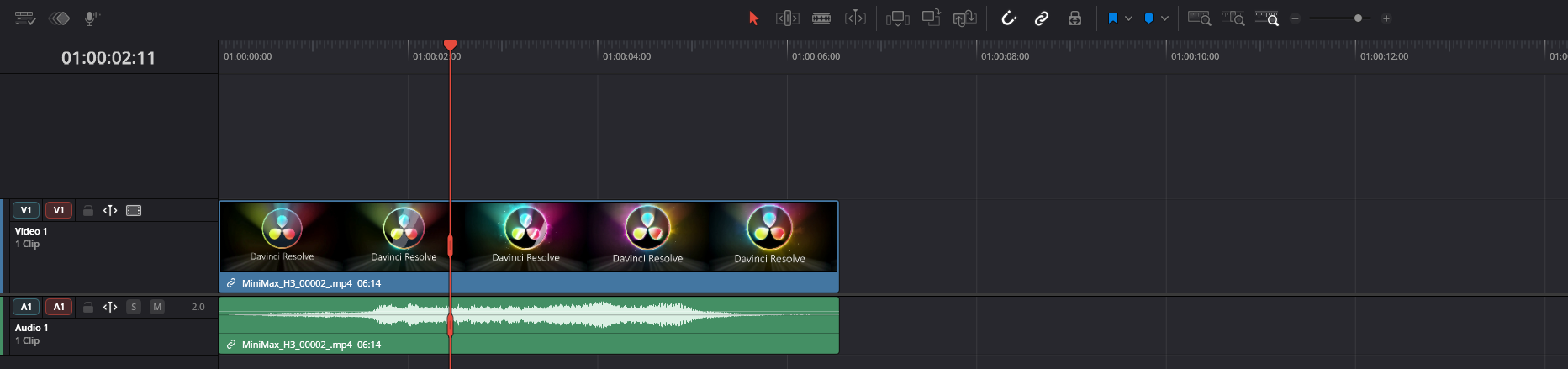
When a source contains both picture and sound, a standard edit often places them on corresponding tracks as a linked pair. Linked Selection selects them together. Disabling it or selectively editing one component makes it easy to shift picture and sound apart.
You may deliberately separate a pair in a complex edit, for example to keep the preceding shot's audio under a new image. Understand where the synchronization point is before doing so.
Linked Selection controls joint selection of already linked components. In Resolve 21, Sync Lock separately controls whether other tracks participate in ripple edits; ordinary Lock prevents editing. The chain icon alone does not guarantee that music, titles or an independent microphone recording move with dialogue.
Select a number on the image or a panel name. Open the enlarged view for small controls.
Linked V1/A1 pair: picture and original sound from one source clip.
Check tracks before editing
Before Insert, Overwrite or Ripple Trim, check which tracks receive media and which participate in the shift. Source patching, auto select and locks can affect the result. A visually active track is not necessarily the only affected track.
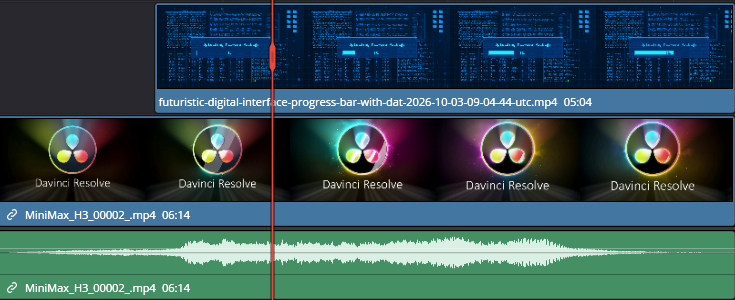
Continuous V2/V1 clips and linked A1 audio. No cuts are present yet; E08 shows the cut result.
- Place the main clip and synchronized sound on V1/A1.
- Place b-roll on V2 without its source audio if that audio is unnecessary.
- Temporarily disable V2 and compare the image.
- Enable V2, play through the transition and check dialogue continuity.
- Lock any track you want to protect from accidental shifts and check again.
Check track visibility
What happens when you hide V2?
Toggle the track and compare real timeline states.
V2 sits above V1. An opaque upper clip usually covers the lower one.
The frame shows the opaque upper clip. V2 covers V1 where they overlap. Disable V2 to compare its state.
STEP-BY-STEP PRACTICE
A cutaway over continuous dialogue
- Place a dialogue excerpt with its original sound on V1/A1.
- Add a suitable cutaway on V2 in the middle of the line.
- Disable V2 to compare the image before and after.
- Restore V2 and listen across both boundaries.
Only the picture changes during the cutaway; the dialogue remains continuous.
Errors and diagnosis
The cutaway completely covers the main shot.
That is normal for an opaque upper clip. Change its duration, opacity or composition if you need another result.
The sound shifted after I moved the video.
Check Linked Selection and whether only one component of the linked clip moved.
Common questions
Why does V2 cover V1?
The image is composed from upper layers down. An opaque V2 clip usually hides V1 where they overlap.
How does Mute differ from disabling a video track?
Mute affects sound; the video-track switch affects picture. They are independent controls.