Who will watch?
Review files, downstream masters and transparent graphics need different content and formats.
DAVINCI RESOLVE / DELIVER
Prepare a file that preserves your picture, sound and editorial intent. Explore Deliver, compare output methods and verify the result through real interface screenshots, diagrams and practice files.
WORKSPACE
Render Settings, Viewer, timeline range and Render Queue work together. Select a screenshot region, then enlarge it to inspect precise labels.
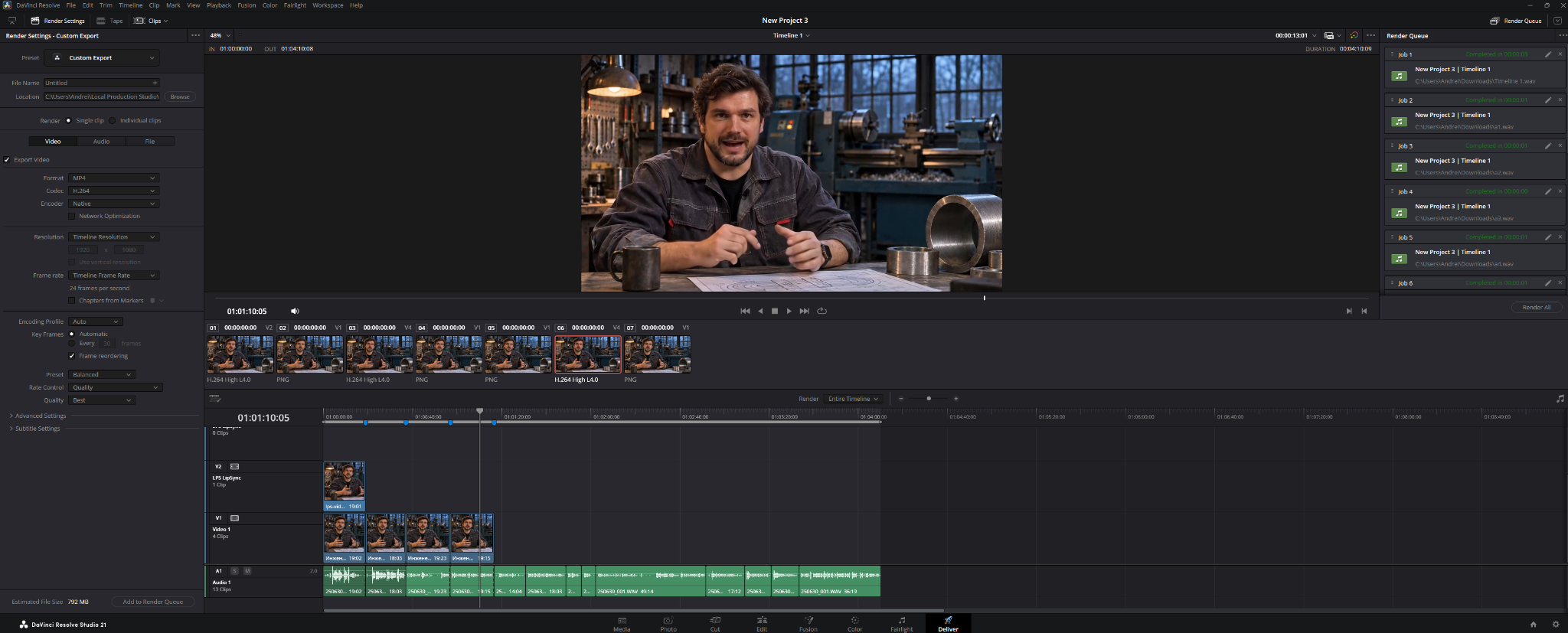
Select a number in the screenshot or a region name. In the enlarged view, you can hide markers and open the original scale.
Deliver overview showing Custom Export MP4 / H.264 / Native; completed jobs on the right are WAVs. This illustrates panel layout, not the practice export settings.
DELIVERY LOGIC
A clear specification prevents arbitrary settings. Define purpose, properties and output checks first.
Review files, downstream masters and transparent graphics need different content and formats.
Check dimensions, timebase, colour, channels, subtitles and source range separately.
Open the output, compare reference frames, listen to channels and inspect captions in the target player.
EXPORT REFERENCE
Each topic links a setting, its effects and an exercise. Encoder limits, HDR, transparency, audio and subtitles have dedicated coverage.
Find the render range and video/audio settings, queue a checked job, and distinguish a completed render from an accepted deliverable.
Create a short SDR file, follow the full Deliver workflow and verify 360 frames, stereo channels and agreement with the timeline.
Choose between a finished film and clips for further work; verify timecode, effects, dimensions and handles.
Export a full edit or exact test interval, retain the correct first/last frames and distinguish file timecode from duration.
Separate file packaging, compression format and encoder implementation; inspect available options and verify stream compatibility.
Choose a delivery codec for the recipient, available encoder and a real test. Separate hardware decoding from encoding; a Master preset does not guarantee archival quality.
Preserve the agreed timebase and dimensions, recognise pulldown and check that output resizing has not changed composition.
Understand bit depth and colour resolution, read HEVC profiles and choose an output the next workflow stage accepts.
Choose what to constrain—quantisation, quality or bitrate—and understand why equal duration does not mean equal file size.
Estimate delivery size, include sound and duration, derive video bitrate from a size limit and measure the output.
Understand encoder resource use and compare one excerpt with resolution, frame rate and target bitrate held constant.
Understand temporal compression dependencies, select access-point intervals for the delivery specification and distinguish codec keyframes from animation keys.
Verify the picture source, use cache deliberately and distinguish processing quality from switches that change output content.
Align colour transforms, code-value range and metadata, then verify output without randomly switching Full/Video to compensate for a player.
Define a verifiable HDR specification and supported encoding, distinguishing actual HDR output from simply attaching HDR tags to SDR.
Export short graphics with real transparency, verify composited edges and preserve sequence frames, fps and separate audio.
Trace Fairlight's mix into file channels, distinguish buses from tracks and verify sound, channel order and sync after export.
Choose text delivery, export a real SRT sidecar and verify each cue's timing and readability against the finished video.
Separate edit versions from encoding variants, keep predictable names and video/subtitle relationships, and prevent accidental replacement.
Prepare independent outputs, understand saved-job boundaries, explicitly update the intended job and run verified versions.
Define each output's purpose, choose a verifiable intermediate master, make a compact review copy and retain materials for future project restoration.
Build repeatable acceptance checks, separate file analysis from content review and isolate problems by exact position and setting.
COMPLETE PRACTICE PROJECT
Continue the minute-long edit or start with a short test clip. Prepare viewing/handoff versions and check audio, sidecar subtitles and package contents.
INTERACTIVE PRACTICE
Calculate size, inspect range and levels, and trace audio channels. Models help test decisions before working in Resolve.
The kit contains a reference clip, two compression variants, stereo identification signal, SRT and QC table.
FROM SETTINGS TO RESULTS
Add real-file data and its playback conditions to the teaching models.
Load ffprobe JSON and SRT. Check the exact frame rate, frames, every audio stream, color tags and subtitle intervals.
Open the checker02 / CODEC AND SYSTEMCompare container, codec and OS. Decode, encode and alpha conditions are shown separately from the official document.
Check capabilities