What you will learn
- Distinguish changes to total duration from movement of a shared boundary.
- See how source frames limit available trims.
- Test an edit in the lab before changing a real project.
Before you begin
- Create an empty 30 fps timeline starting at zero timecode. Use BROLL_GRID.mp4 for A/C and BROLL_MOTION.mp4 for B; insert video only.
- A: source [30,105), 75 frames; B: [15,75), 60; C: [35,120), 85. Place them consecutively without gaps for total interval [0,220).
- In the Viewer, mark Out on the last included frame: A104, B74, C119. The numbers 105/75/120 are the mathematical boundaries after those frames.
Ripple: change duration and shift later material
Ripple Trim changes the selected segment's duration and shifts later material on affected tracks. Shortening a clip by 10 frames shortens the corresponding continuous sequence by 10; extending it increases the sequence length if the source has enough frames.
A=75, B=60 and C=85 form a 220-frame sequence. Ripple trimming B's right edge shorter by 12 gives B=48, moves C earlier and reduces the total to 208. C's source entry frame does not change.
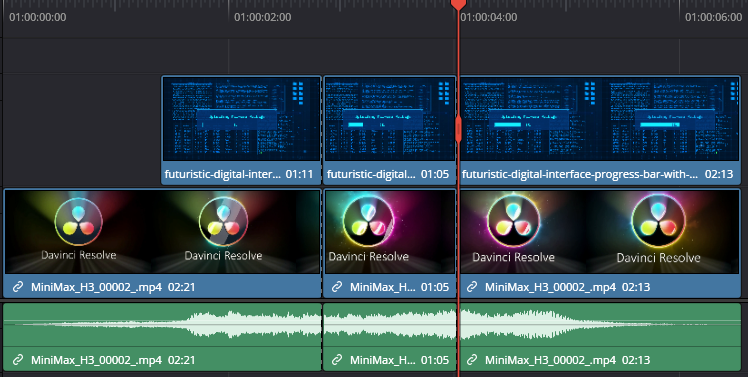
Blade creates separate timeline segments without creating new files on disk.
| Property | Before | After Ripple −12 on B |
|---|---|---|
| B duration | 60 frames | 48 frames |
| C source In | 35 | 35 — unchanged |
| C timeline start | 135 | 123 |
| Total duration | 220 frames | 208 frames |
Roll: move the boundary between two neighboring clips
Roll Trim works on a shared cut. Extending B to the right shortens C from the left by the same amount. Overall duration stays fixed; the time allocated to the neighbors and C's starting source frame change.
In the original example, Roll +12 gives B=72, C=73 and C In=47 instead of 35; A+B+C remains 220 frames. This shifts the picture cut while preserving C's endpoint and later events. If you also trim dialogue audio, check its content and boundary separately.
| Property | Before | After Roll +12 |
|---|---|---|
| B | 60 frames | 72 frames |
| C | 85 frames | 73 frames |
| C In | 35 | 47 |
| Total duration | 220 frames | 220 frames |
Handles: where spare trim frames come from
Every trim is limited by actual source frames. If B already uses the last file frame, extending its right edge cannot create new footage. Roll also requires an available range in both clips at the cut.
Before complex trimming, check which source regions remain outside the current In/Out. This is especially useful for transitions: Cross Dissolve also uses neighboring frames when available.
Choose Ripple or Roll for the task
Ripple can remove a dialogue pause but may desynchronize b-roll, titles and audio if tracks participate inconsistently. Roll can change the picture cut while keeping later events at their existing times.
Check both operations in the Timeline Viewer and by listening. The appropriate frame matters more than the button; sometimes you need Blade before Trim.
- Assemble A [0,75), B [75,135), C [135,220) using the specified sources. Verify endpoint 220.
- Switch to Trim Edit. Target only B's right edge; highlighting both sides of the cut would select Roll.
- Ripple −12 at B's right edge. B should use [15,63); C should start at timeline 123 from source 35; the sequence ends at 208.
- Check B's last frame: timeline 122 → source 62, then C's first: 123 → source 35. Step through the cut.
- Undo to 220 frames. Select both sides of B/C for Roll and move the boundary 12 frames right.
- Check B [75,147), source [15,87); C [147,220), source [47,120). Endpoint 220 and C's final source frame 119 remain fixed.
- Compare timeline 146 → B source 86 and timeline 147 → C source 47, then watch at normal speed.
STEP-BY-STEP PRACTICE
Reproduce the model with real footage
- Build the 220-frame A/B/C sequence from BROLL_GRID and BROLL_MOTION using the preparation ranges.
- Compare Ripple −12 in the lab and Resolve: B=48, C starts at 123, endpoint=208.
- Undo both versions and compare Roll +12: B=72, C=73, C source In=47, endpoint=220.
- Check the two frames around each new cut; explain which source material appeared or disappeared.
Real media frames confirm the model: Ripple changes duration and C's position; Roll redistributes time between B/C while preserving the endpoint.
Errors and diagnosis
After Ripple, the title and music no longer match the picture.
Check which tracks participated, undo the inconsistent edit and configure track participation.
I cannot extend B.
The source may have run out of frames or the neighboring clip may constrain the operation. Check actual In/Out and available handles.
Common questions
Does Roll move the whole timeline?
No. A normal Roll trim moves the shared boundary between two neighbors while preserving their combined duration.
How do I shorten pauses without leaving gaps?
Ripple Trim or ripple deletion removes time and shifts later material when track participation is configured consistently.